APS Bank statement to Excel
Your APS Bank statement as a spreadsheet, every balance checked.
- Checked every row against your balance
- Private read on your device first
- Excel & CSV plus QuickBooks, Xero and Quicken files
- Free no sign-up, no page limits
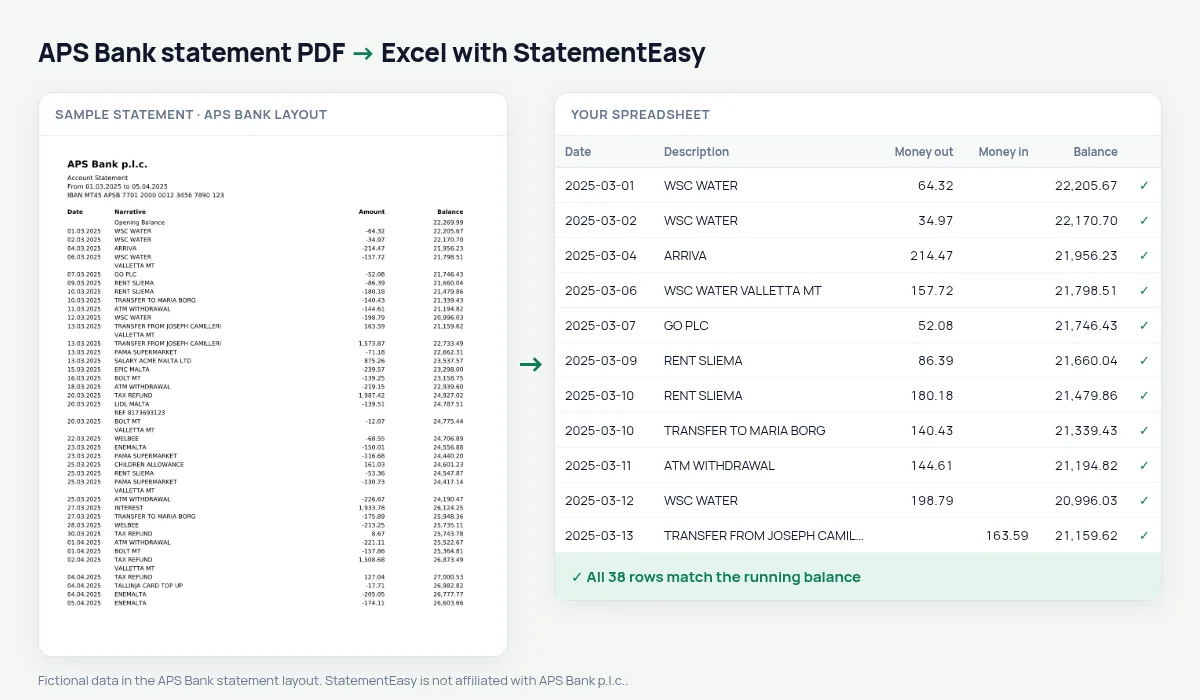
APS Bank was founded in 1910 as a savings bank linked to the Church in Malta and has grown into one of the island’s main retail banks. Its statement prints Date (05.03.2025), Narrative, one signed Amount and Balance.
StatementEasy reads the dotted dates, splits the amount into money out (negative) and money in, and checks every row from the opening balance.
Download your APS Bank statement
- Sign in to APS Internet Banking or the APS Mobile app.
- Open the account, then Statements.
- Pick the period and download the PDF.
- Drop it into the converter above. Excel, CSV, CAMT.053, MT940 or Xero and QuickBooks files in seconds.
APS Bank columns in your sheet
| On the statement | In your sheet |
|---|---|
| 05.03.2025 | 05/03/2025 |
| Narrative | Description |
| Amount -32.10 | Money out 32.10 |
| Amount 1,950.00 | Money in 1,950.00 |
| Opening Balance | Opening balance |
Home loans
APS is a common choice for first-time buyers. Lenders usually ask for several months of statements; the Monthly sheet shows income, spending and the balance at each month end.
One amount, two columns
The download splits the signed amount for budgets and accounting software, or keeps one column if you prefer.
An example line
On the PDF: 09.03.2025 PAMA SUPERMARKET -32.10 1,476.85. In your sheet: money out 32.10, balance 1,476.85.
Last tested October 2026. StatementEasy is not affiliated with APS Bank p.l.c..
Questions
Signed column?
Yes, with “One amount (+/−)”.
Several months?
Yes.
How do I download an APS statement?
In APS Internet Banking or the app, open the account, then Statements.
Is my statement uploaded?
Your browser reads the PDF first, on your device. Only if it cannot read it is the file read on our server, and deleted right after.
Is StatementEasy made by APS Bank?
No. StatementEasy is an independent tool and is not affiliated with APS Bank p.l.c..
Your next statement, in a spreadsheet
Free, no limits. No sign-up.