Bank of Valletta statement to Excel
Your BOV statement as a spreadsheet, every balance checked in euros.
- Checked every row against your balance
- Private read on your device first
- Excel & CSV plus QuickBooks, Xero and Quicken files
- Free no sign-up, no page limits
Bank of Valletta is Malta’s largest bank, with branches from Valletta to Gozo and most of the island’s households among its customers. Its statement of account prints Date, Value Date, Description, Debit, Credit and Balance, starting from a Balance Brought Forward.
StatementEasy keeps both dates, reads Debit as money out and Credit as money in, and checks the balance after every row.
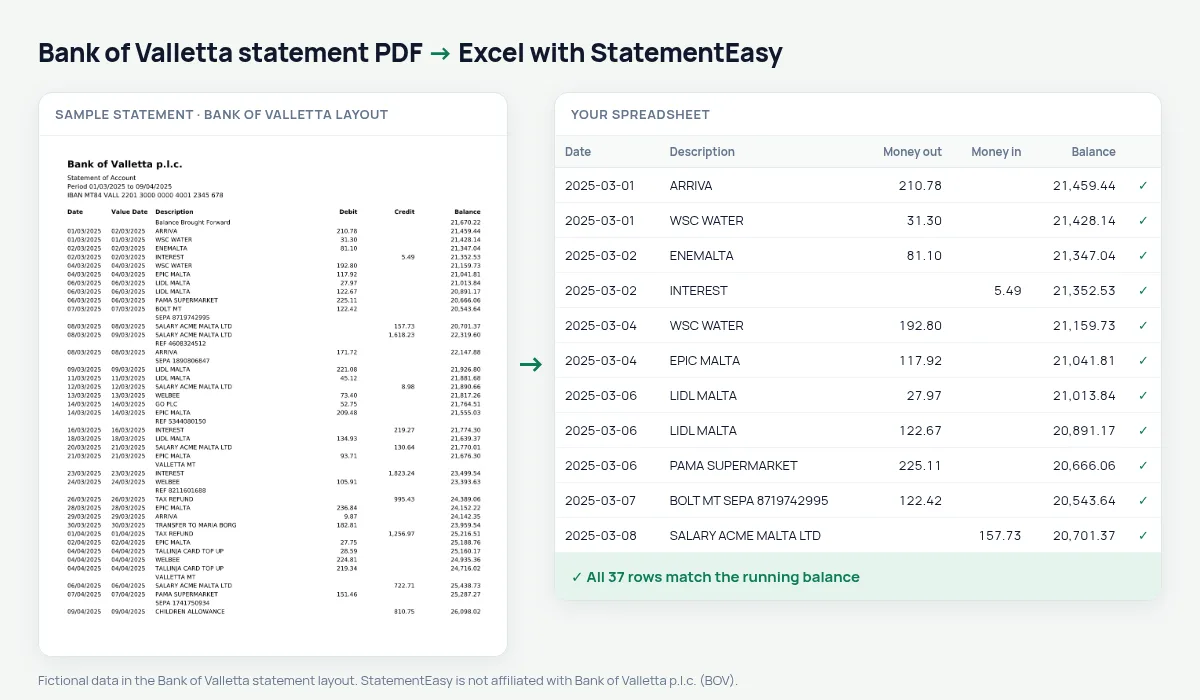
Download your BOV statement
- Sign in to BOV Internet Banking or the BOV Mobile app.
- Open the account, then e-Statements. Choose the month or a custom period.
- Pick the period and download the PDF.
- Drop it into the converter above. Excel, CSV, CAMT.053, MT940 or Xero and QuickBooks files in seconds.
BOV columns in your sheet
| On the statement | In your sheet |
|---|---|
| Date | Date |
| Value Date | Value date, its own column |
| Description | Description |
| Debit | Money out |
| Credit | Money in |
| Balance Brought Forward | Opening balance, not a transaction |
Your tax return
Malta’s tax year is the calendar year. Convert the twelve statements together and you have one table of salary, rent received, donations and other items to check against your return.
The converter does not calculate tax; it gives you clean, checked figures for you or your accountant.
Self-employed and small companies
Sole traders and small companies can import the converted file into their accounting software, or hand their accountant one spreadsheet for the year instead of twelve PDFs.
An example line
On the PDF: 05/03/2025 05/03/2025 ENEMALTA BILL 62.40 2,841.15. In your sheet: date 05/03/2025, money out 62.40, balance 2,841.15.
Last tested October 2026. StatementEasy is not affiliated with Bank of Valletta p.l.c. (BOV).
Questions
Business accounts?
Yes, they use the same layout.
Can I convert a whole year?
Yes, drop all the PDFs and choose “All files together”.
How do I download a BOV statement?
In BOV Internet Banking or BOV Mobile, choose the account, then e-Statements, pick the month and save the PDF.
Is a BOV statement of account the same thing?
Yes, the statement of account is the PDF the converter reads.
Is my statement uploaded?
Your browser reads the PDF first, on your device. Only if it cannot read it is the file read on our server, and deleted right after.
Is StatementEasy made by Bank of Valletta?
No. StatementEasy is an independent tool and is not affiliated with Bank of Valletta p.l.c. (BOV).
Your next statement, in a spreadsheet
Free, no limits. No sign-up.