Arab Bank statement to Excel
Your Arab Bank statement as a spreadsheet in Jordanian dinars and fils, every balance checked.
- Checked every row against your balance
- Private read on your device first
- Excel & CSV plus QuickBooks, Xero and Quicken files
- Free no sign-up, no page limits
The Jordanian dinar has 1,000 fils, so Arab Bank writes amounts with three decimals: 3.750 is three dinars and 750 fils. Its statement carries a Posting Date and a Value Date, then Description, Debit, Credit and Balance.
StatementEasy detects the precision, keeps both dates and checks every balance to the fils.
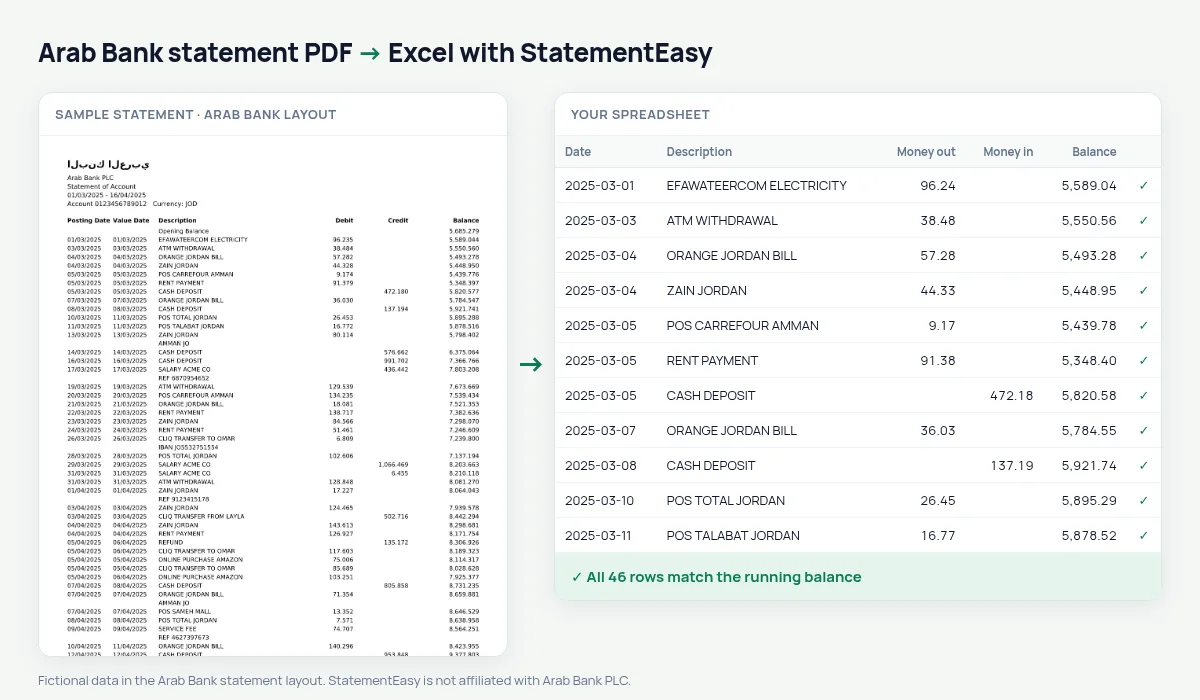
Download your Arab Bank statement
- Sign in to Arabi Mobile or Arabi Online.
- Open the account and choose Account Statement.
- Download the PDF.
- Drop it into the converter above.
Arab Bank columns in your sheet
| On the statement | In your sheet |
|---|---|
| Posting Date | Date |
| Value Date | Value date, its own column |
| Debit / Credit | Money out / money in, to the fils |
| Balance | Checked on every row |
CliQ and eFAWATEERcom
Instant CliQ transfers and bills paid through eFAWATEERcom keep their description, ready to filter and total.
Salaries from abroad
Jordanians working in the Gulf often send salaries home to Arab Bank; the Monthly sheet shows what arrived and what was spent.
An example line
12/03/2025 12/03/2025 EFAWATEERCOM ELECTRICITY 42.350 1,186.725 becomes money out 42.350 and balance 1186.725.Last tested October 2026. StatementEasy is not affiliated with Arab Bank PLC.
Questions
Are the fils kept?
Yes, three decimals in every format.
Is my statement uploaded?
Your browser reads the PDF first, on your device. Only if it cannot read it is the file read on our server, and deleted right after.
Is StatementEasy made by Arab Bank?
No. StatementEasy is an independent tool and is not affiliated with Arab Bank PLC.
Your next statement, in a spreadsheet
Free, no limits. No sign-up.