Bank Audi statement to Excel
Your Bank Audi statement — lira or dollars — as a spreadsheet, every balance checked.
- Checked every row against your balance
- Private read on your device first
- Excel & CSV plus QuickBooks, Xero and Quicken files
- Free no sign-up, no page limits
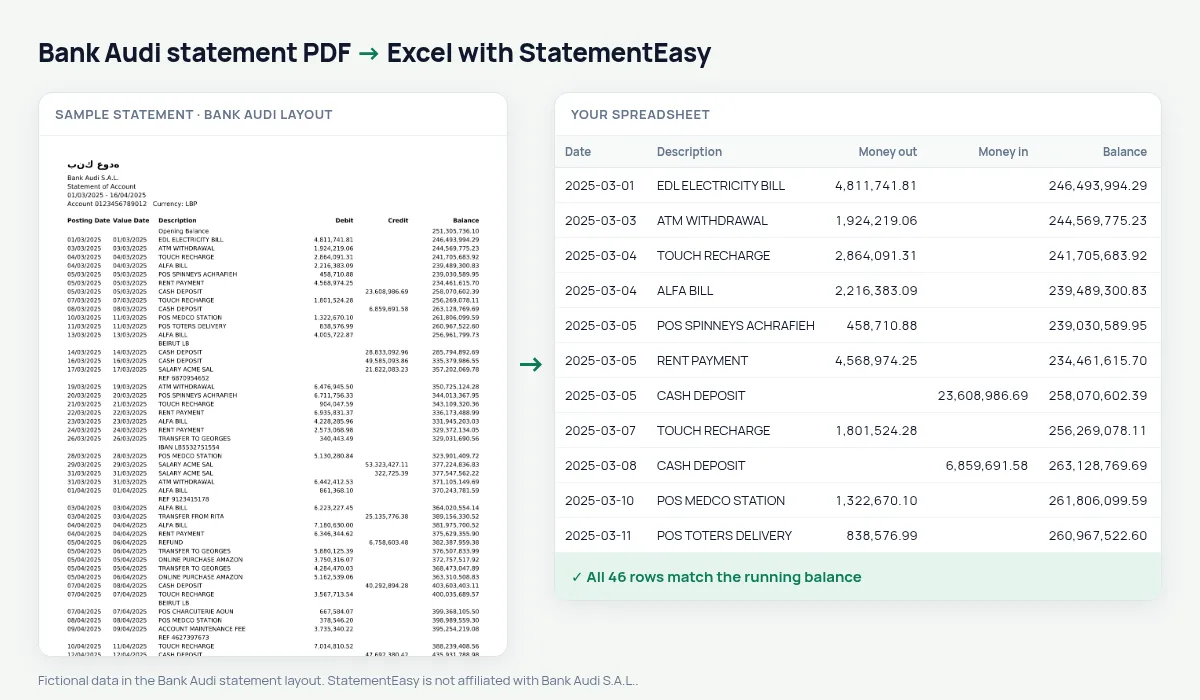
Since 2019 many Bank Audi customers hold several accounts: Lebanese pounds, local dollars and fresh dollars, each with its own statement. Each shows a Posting Date and a Value Date, then Description, Debit, Credit and Balance.
StatementEasy converts each statement on its own, keeps both dates and checks every balance — without converting currencies.
Download your Bank Audi statement
- Sign in to Audi Online or the Bank Audi app.
- Choose the account — LBP or USD — and Statement.
- Download the PDF.
- Drop it into the converter above.
Bank Audi columns in your sheet
| On the statement | In your sheet |
|---|---|
| Posting Date | Date |
| Value Date | Value date, its own column |
| Debit / Credit | Money out / money in |
| Balance | Checked on every row |
One sheet per account and currency
Lira and dollar statements are never mixed: balances are checked within one account, and amounts stay in the currency printed.
Lira amounts in the millions
Figures like 3,450,000.00 are read in full, separators and decimals included.
An example line
08/03/2025 08/03/2025 EDL ELECTRICITY BILL 3,450,000.00 41,862,500.00 becomes money out 3450000.00 and balance 41862500.00.Last tested October 2026. StatementEasy is not affiliated with Bank Audi S.A.L..
Questions
Does it convert lira to dollars?
No, every amount stays in the currency on the statement.
Is my statement uploaded?
Your browser reads the PDF first, on your device. Only if it cannot read it is the file read on our server, and deleted right after.
Is StatementEasy made by Bank Audi?
No. StatementEasy is an independent tool and is not affiliated with Bank Audi S.A.L..
Your next statement, in a spreadsheet
Free, no limits. No sign-up.