Boubyan Bank statement to Excel
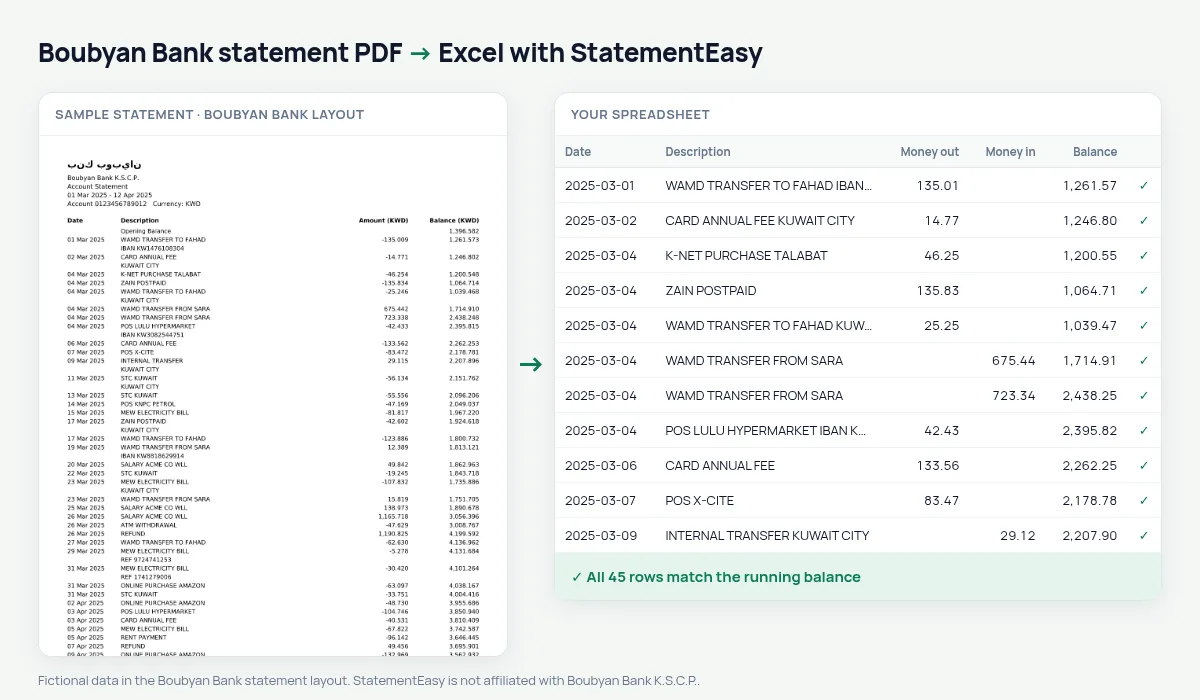
Boubyan’s single Amount column becomes money out and money in, in dinars and fils.
- Checked every row against your balance
- Private read on your device first
- Excel & CSV plus QuickBooks, Xero and Quicken files
- Free no sign-up, no page limits
Boubyan Bank prints one signed Amount (KWD) column next to the balance, with dates like 05 Mar 2025 and amounts to three decimals.
StatementEasy splits the column, keeps the fils and checks every balance against the one before it.
Download your Boubyan statement
- Open the Boubyan app.
- Choose the account, then Statement.
- Save or share the PDF.
- Drop it into the converter above.
Boubyan columns in your sheet
| On the statement | In your sheet |
|---|---|
| Amount (KWD), negative | Money out |
| Amount (KWD), positive | Money in |
| Balance (KWD) | Checked on every row |
Small balances read correctly
An account that never reaches 1,000 dinars never shows a thousands separator. The converter uses the statement’s currency and IBAN to know 912.480 means nine hundred and twelve dinars.
A first budget
The Monthly and Categories sheets show what came in, what went out and where — restaurants, delivery, shopping, the car.
An example line
16 Mar 2025 K-NET PURCHASE TALABAT -6.750 912.480 becomes money out 6.750 and balance 912.480.Last tested October 2026. StatementEasy is not affiliated with Boubyan Bank K.S.C.P..
Questions
Is money out in brackets supported?
Yes, and the balance check confirms it.
Is my statement uploaded?
Your browser reads the PDF first, on your device. Only if it cannot read it is the file read on our server, and deleted right after.
Is StatementEasy made by Boubyan Bank?
No. StatementEasy is an independent tool and is not affiliated with Boubyan Bank K.S.C.P..
Your next statement, in a spreadsheet
Free, no limits. No sign-up.