CIB Egypt statement to Excel
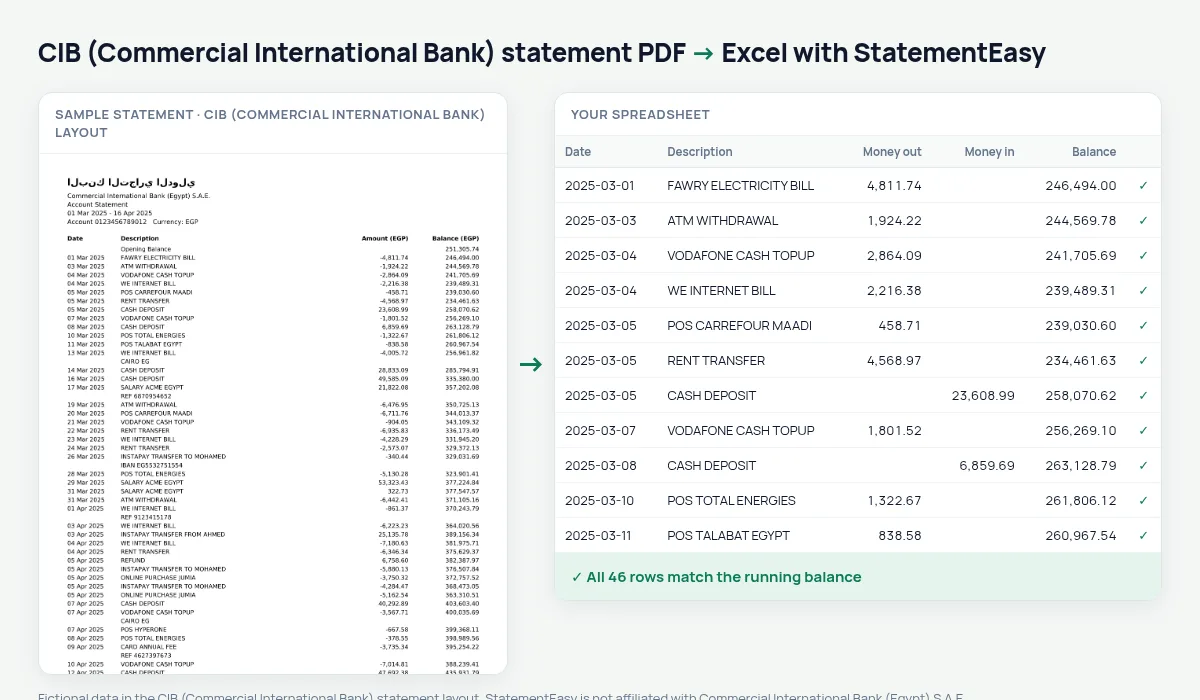
CIB’s single Amount column becomes money out and money in, every balance checked.
- Checked every row against your balance
- Private read on your device first
- Excel & CSV plus QuickBooks, Xero and Quicken files
- Free no sign-up, no page limits
Commercial International Bank, Egypt’s largest private bank, prints one signed Amount (EGP) column beside the balance, with dates like 05 Mar 2025.
StatementEasy splits that column, turns the dates into real dates and checks every row against the one before it.
Download your CIB statement
- Sign in to CIB Mobile Banking or CIB Online.
- Open the account and choose e-Statement.
- Download the PDF.
- Drop it into the converter above.
CIB columns in your sheet
| On the statement | In your sheet |
|---|---|
| Amount (EGP), negative | Money out |
| Amount (EGP), positive | Money in |
| Balance (EGP) | Checked on every row |
Freelancers paid from abroad
Money in alone gives your monthly income; the Monthly sheet is what an accountant asks for at tax time. Convert USD or EUR accounts separately.
An example line
16 Mar 2025 ONLINE PURCHASE JUMIA -899.00 54,318.60 becomes money out 899.00 and balance 54318.60.Card fees abroad
Foreign purchases post in pounds with their fees; Categories totals those fees for the year.
Last tested October 2026. StatementEasy is not affiliated with Commercial International Bank (Egypt) S.A.E..
Questions
Do USD accounts at CIB convert?
Yes, each account in its own sheet.
Is my statement uploaded?
Your browser reads the PDF first, on your device. Only if it cannot read it is the file read on our server, and deleted right after.
Is StatementEasy made by CIB (Commercial International Bank)?
No. StatementEasy is an independent tool and is not affiliated with Commercial International Bank (Egypt) S.A.E..
Your next statement, in a spreadsheet
Free, no limits. No sign-up.