Crédit Agricole statement to Excel
Turn your Crédit Agricole statement into a spreadsheet, whatever your regional bank, with the totals checked.
- Checked every row against your balance
- Private read on your device first
- Excel & CSV plus QuickBooks, Xero and Quicken files
- Free no sign-up, no page limits
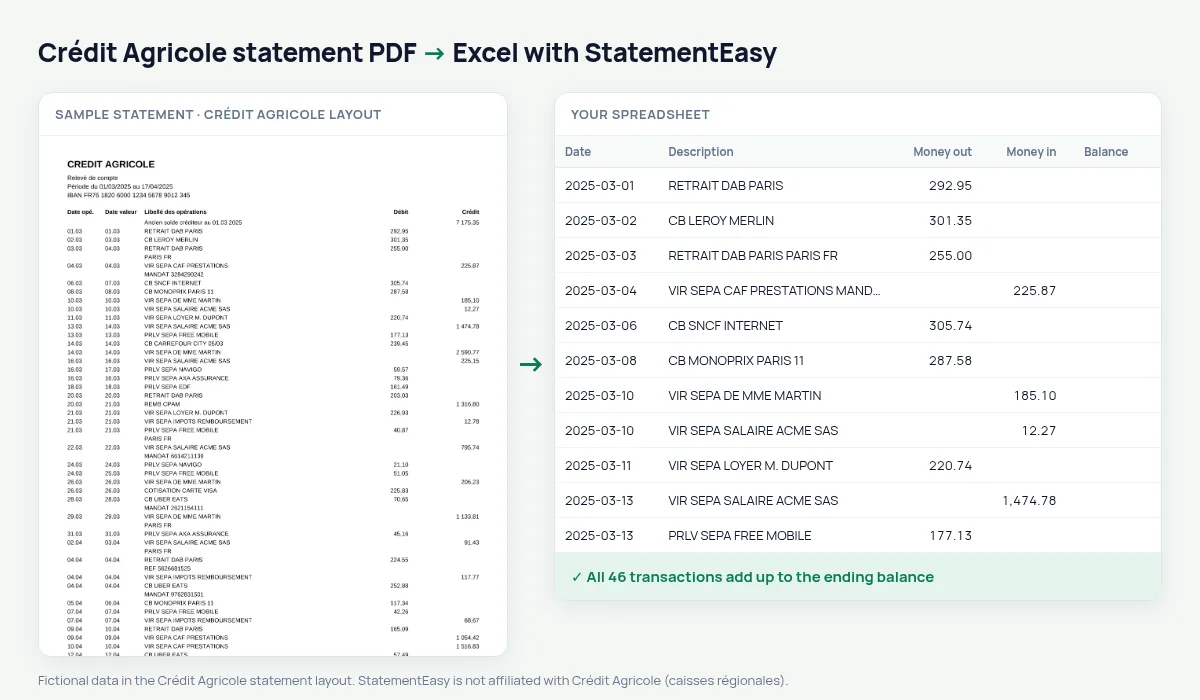
A Crédit Agricole statement lists Date opé., Date valeur, Libellé des opérations, Débit and Crédit between the old and new balance, with short dates (05.03). StatementEasy gives every date its year, keeps the value date and checks the totals against the new balance.
Download your Crédit Agricole statement
- Log in to Ma Banque on the web or in the app.
- Open e-Documents, then the account statements.
- Pick the month and download the PDF.
- Drop the Crédit Agricole PDF into the converter above.
Crédit Agricole columns in your sheet
| On the statement | In your sheet |
|---|---|
| 05.03 | 2025-03-05 |
| Débit / Crédit | Money out / money in |
| Ancien / Nouveau solde | Used for the check |
Every regional bank
From Île-de-France to Provence Côte d’Azur, the regional Crédit Agricole banks share one statement model, so a statement from any of them is read the same way.
Farmers and the self-employed
Crédit Agricole is the bank of many farms and small businesses. Export OFX for your farm management or accounting software, and use the Categories sheet to separate sales, supplies, fuel and loan repayments over the season.
Last tested October 2026. StatementEasy is not affiliated with Crédit Agricole (caisses régionales).
Questions
Is my regional bank supported?
Yes; the totals check confirms it on your file.
Is my statement uploaded?
Your browser reads the PDF first. Only if it cannot is the file read on our server, and deleted after reading.
Is StatementEasy made by Crédit Agricole?
No. StatementEasy is an independent tool and is not affiliated with Crédit Agricole (caisses régionales).
Your next statement, in a spreadsheet
Free, no limits. No sign-up.