Amen Bank statement to Excel
Turn your Amen Bank statement into a spreadsheet, every balance checked to the millime.
- Checked every row against your balance
- Private read on your device first
- Excel & CSV plus QuickBooks, Xero and Quicken files
- Free no sign-up, no page limits
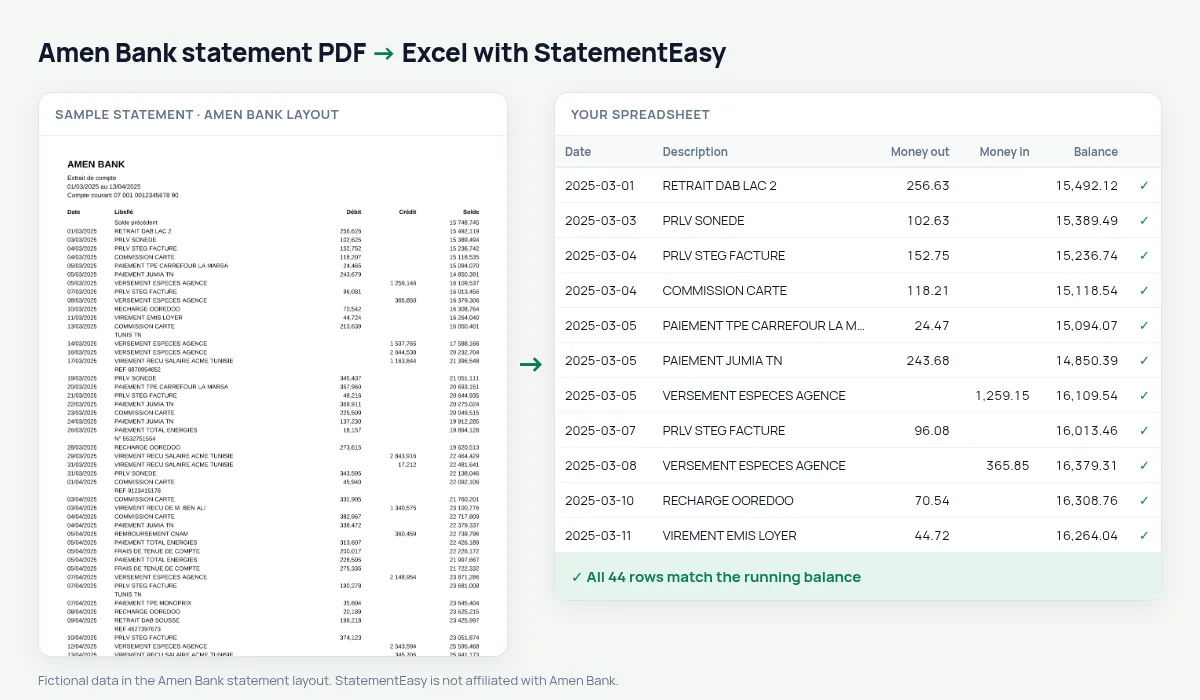
The Amen Bank statement lists Date, Libellé, Débit, Crédit and Solde from the Solde précédent, with a balance after every transaction and amounts like 875,300. StatementEasy reads the millimes and checks each line against the printed balance.
Download your Amen Bank statement
- Open Amen First Bank or the Amen Mobile app.
- Choose the account, then Relevés.
- Pick the period and download the PDF.
- Drop the Amen Bank PDF into the converter above.
Amen Bank columns in your sheet
| On the statement | In your sheet |
|---|---|
| Débit / Crédit | Money out / money in |
| 875,300 | 875.300 dinars |
| Solde | Checked on every row |
Bank fees over a year
Account fees and card commissions recur every month; the Recurring sheet lists them with their usual amount.
Transfers from abroad
Money sent by family abroad, salaries and cash deposits are all credits; the Monthly sheet shows them month by month with the closing balance.
Checked line by line
Amen Bank prints the balance after each operation, so every row is checked against it to the millime and a misread amount is pointed out exactly where it happens.
Last tested October 2026. StatementEasy is not affiliated with Amen Bank.
Questions
Is 875,300 read in dinars?
Yes: 875,300 is 875.3 dinars.
Is my statement uploaded?
Your browser reads the PDF first, on your device. Only if it cannot read it is the file read on our server, and deleted after reading.
Is StatementEasy made by Amen Bank?
No. StatementEasy is an independent tool and is not affiliated with Amen Bank.
Your next statement, in a spreadsheet
Free, no limits. No sign-up.