FAB statement to Excel
Turn your First Abu Dhabi Bank statement into a spreadsheet with both dates kept and every balance checked.
- Checked every row against your balance
- Private read on your device first
- Excel & CSV plus QuickBooks, Xero and Quicken files
- Free no sign-up, no page limits
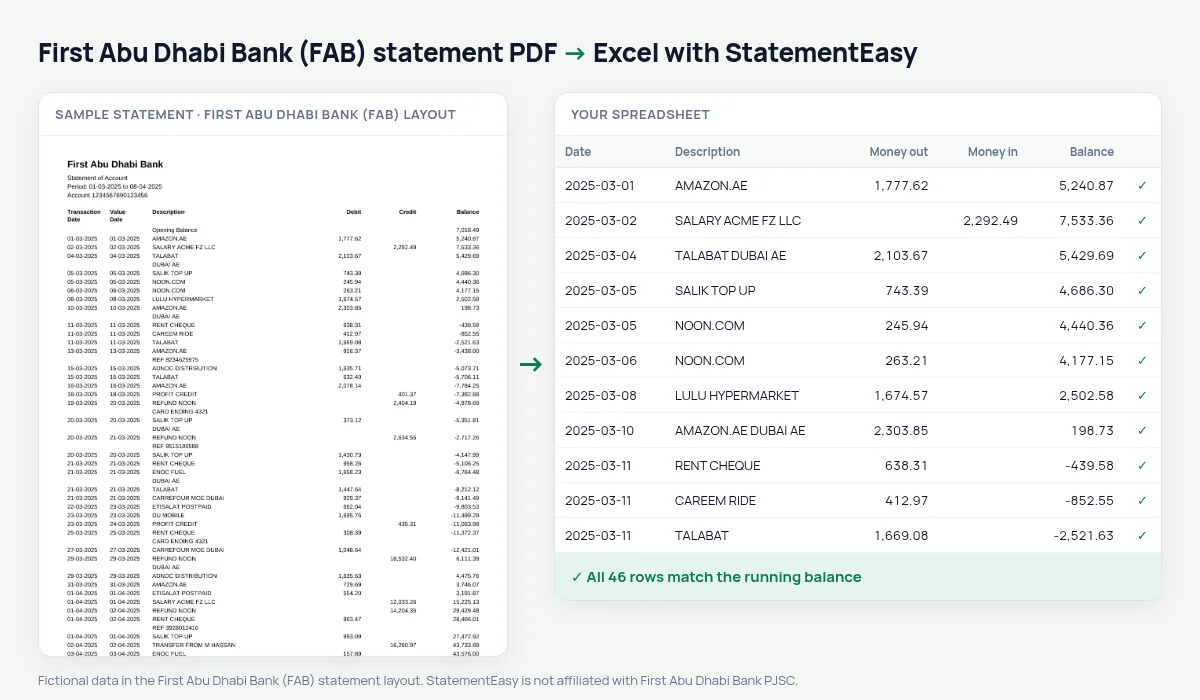
FAB statements list Transaction Date, Value Date, Description, Debit, Credit and Balance, with the date titles printed over two lines and dates written 05-03-2025. StatementEasy joins the two-line titles, keeps the value date in its own column and checks every balance from the opening balance.
Download your First Abu Dhabi Bank statement
- Log in to FAB Mobile or FAB online banking.
- Open the account, then e-Statements.
- Save the First Abu Dhabi Bank statement as a PDF.
- Drop the First Abu Dhabi Bank PDF into the converter above.
First Abu Dhabi Bank columns in your sheet
| On the First Abu Dhabi Bank statement | In your sheet |
|---|---|
| Transaction Date | Date |
| Value Date | Value date |
| Debit / Credit | Money out / money in |
| Balance | Checked on every row |
| 05-03-2025 | 2025-03-05 |
Salary transfer accounts
Many employers in Abu Dhabi pay salaries into FAB accounts. The Monthly sheet shows each month’s salary and closing balance on one line — the figures a landlord or a lender looks at.
Two dates per row
The transaction date is when you paid or received money; the value date is when the bank booked it. Both are kept, so you can sort by either when you reconcile.
Into Excel or your books
Download Excel with real dates and numbers, CSV for accounting software, or QuickBooks and Xero files.
Last tested October 2026. StatementEasy is not affiliated with First Abu Dhabi Bank PJSC.
Questions
Does it work with FAB Islamic accounts?
Statements with Debit, Credit and Balance columns are read the same way; the balance check confirms the result.
Can I convert several months at once?
Yes, and choose “All files combined” for one sheet.
Can I convert a FAB credit card statement?
Use the credit card converter.
Is my statement uploaded?
Your browser reads the PDF first. Only if it cannot is the file read on our server, and deleted after reading.
Is StatementEasy made by First Abu Dhabi Bank (FAB)?
No. StatementEasy is an independent tool and is not affiliated with First Abu Dhabi Bank PJSC.
Your next statement, in a spreadsheet
Free, no limits. No sign-up.