Global Bank statement to Excel
Your Global Bank statement in date order, every balance checked.
- Checked every row against your balance
- Private read on your device first
- Excel & CSV plus QuickBooks, Xero and Quicken files
- Free no sign-up, no page limits
Global Bank, a Panamanian private bank, prints dates like 05 mar 2025 and often lists the most recent transaction first.
StatementEasy puts the rows in date order, checks every balance in the real order and recognises the closing balance at the top.
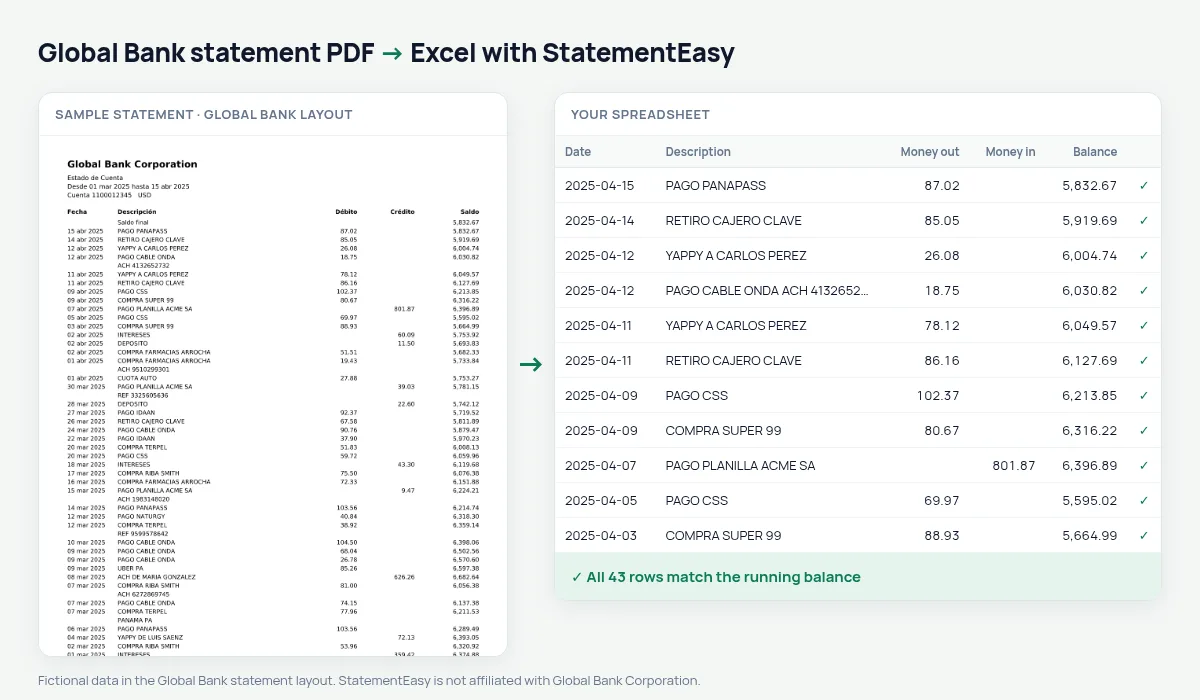
Download your Global Bank statement
- Sign in to Global Bank en Línea or the app.
- Open the account and choose Estados de cuenta.
- Download the PDF.
- Drop it into the converter above.
Global Bank columns in your sheet
| On the statement | In your sheet |
|---|---|
| 05 mar 2025 | 05/03/2025 |
| Débito | Money out |
| Crédito | Money in |
| Newest first | Oldest first, or as printed |
Newest first
Keep the bank’s order or put the oldest first from the Date column menu; the balance check follows the real order.
An example line
21 mar 2025 COMPRA TERPEL 38.00 4,215.70 becomes money out 38.00 and balance 4,215.70.Closing balance at the top
On newest-first statements the first balance line is the closing balance and the opening balance comes last. Both are recognised, so the summary shows the right figures.
Car loan instalments
If you pay a car loan to Global Bank, the monthly instalment appears as a debit; the Recurring sheet gives the year’s total.
Last tested October 2026. StatementEasy is not affiliated with Global Bank Corporation.
Questions
Can I keep the printed order?
Yes, that is the default.
Is my statement uploaded?
Your browser reads the PDF first, on your device. Only if it cannot read it is the file read on our server, and deleted right after.
Is StatementEasy made by Global Bank?
No. StatementEasy is an independent tool and is not affiliated with Global Bank Corporation.
Your next statement, in a spreadsheet
Free, no limits. No sign-up.