Multibank statement to Excel
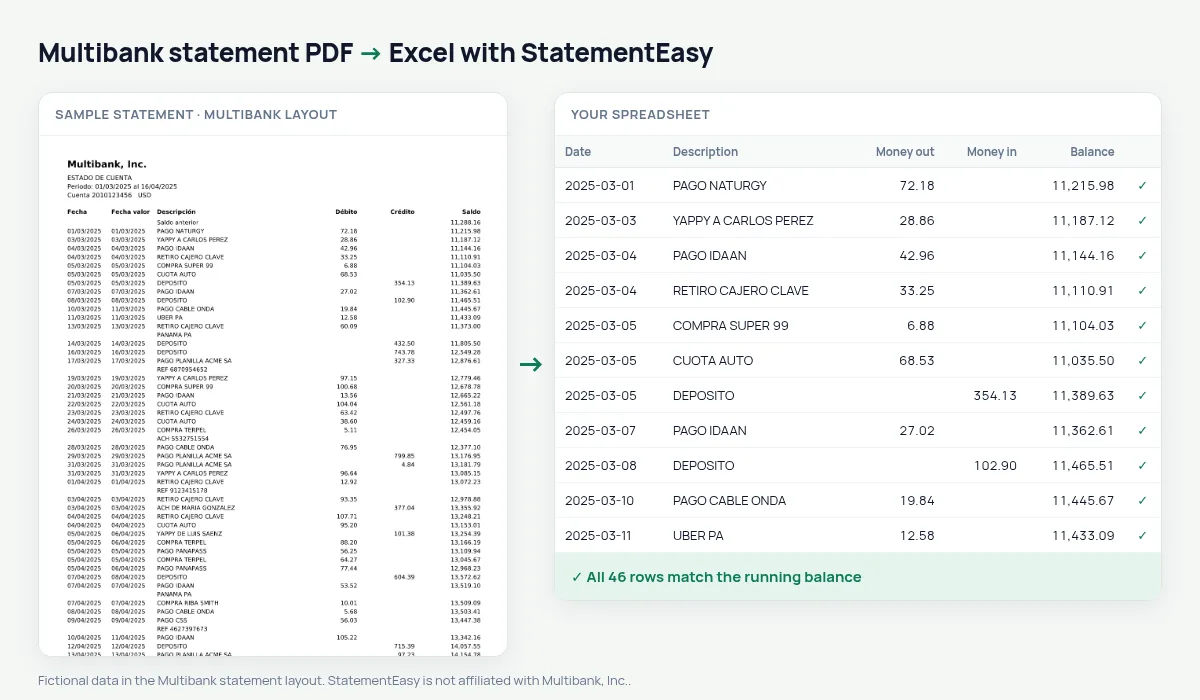
Your Multibank statement as a spreadsheet, both dates kept and every balance checked.
- Checked every row against your balance
- Private read on your device first
- Excel & CSV plus QuickBooks, Xero and Quicken files
- Free no sign-up, no page limits
Multibank, strong in business banking and Colón Free Zone trade, prints Fecha, Fecha valor, Descripción, Débito, Crédito and Saldo.
StatementEasy keeps both dates and checks every balance.
Download your Multibank statement
- Sign in to Multibank en Línea or the app.
- Choose the account, then Estado de cuenta.
- Download the PDF.
- Drop it into the converter above.
Multibank columns in your sheet
| On the statement | In your sheet |
|---|---|
| Fecha valor | Value date, its own column |
| Débito | Money out |
| Crédito | Money in |
Free Zone businesses
International payments keep their description, so you can group by supplier or client.
An example line
12/03/2025 13/03/2025 ACH DE MARIA GONZALEZ 2,450.00 18,903.55 becomes money in 2,450.00.Value dates
A transfer from abroad can be booked one day and credited later. The value date stays in its own column for reconciliation; hide it from the column menu otherwise.
Several accounts at once
Drop all your account statements together: each gets its own tab and balance check, and “All files combined” gives one ledger with a File column.
Last tested October 2026. StatementEasy is not affiliated with Multibank, Inc..
Questions
Can I hide the value date?
Yes, from the column menu.
Is my statement uploaded?
Your browser reads the PDF first, on your device. Only if it cannot read it is the file read on our server, and deleted right after.
Is StatementEasy made by Multibank?
No. StatementEasy is an independent tool and is not affiliated with Multibank, Inc..
Your next statement, in a spreadsheet
Free, no limits. No sign-up.