HSBC Hong Kong statement to Excel
Your HSBC Hong Kong statement as a spreadsheet, every balance checked in HKD.
- Checked every row against your balance
- Private read on your device first
- Excel & CSV plus QuickBooks, Xero and Quicken files
- Free no sign-up, no page limits
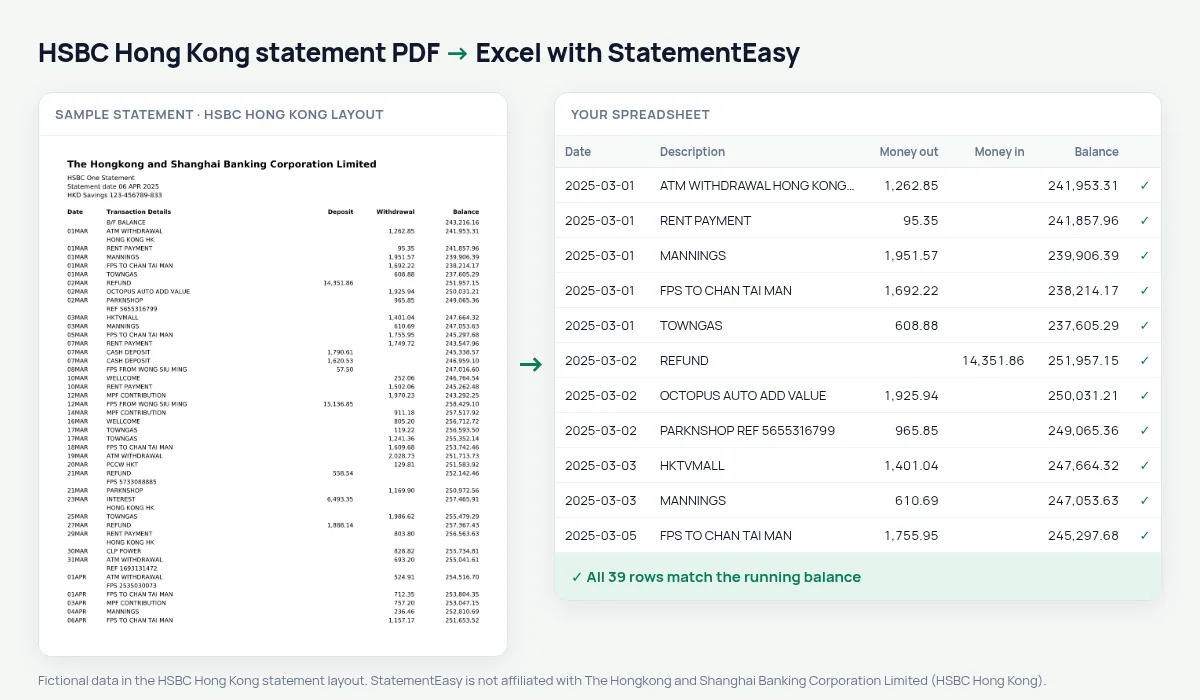
The Hongkong and Shanghai Banking Corporation was founded in Hong Kong in 1865 and is still the city’s largest bank. Its HSBC One and Premier statements list each account in turn — Date, Transaction Details, Deposit, Withdrawal and Balance — with dates written as 05MAR and the opening balance on a B/F BALANCE line.
Deposit comes before Withdrawal on HSBC Hong Kong statements, the reverse of most banks. StatementEasy reads each column by its heading, not its position, gives every date its year from the statement date and checks the balance after every row.
Download your HSBC Hong Kong statement
- Sign in to the HSBC HK app or HSBC Online Banking.
- Open e-Statements / e-Advices. HSBC keeps several years of e-Statements online.
- Pick the month and download the PDF.
- Drop it into the converter above. Excel, CSV, OFX, QIF or QuickBooks and Xero files in seconds.
HSBC Hong Kong columns in your sheet
| On the statement | In your sheet |
|---|---|
| 05MAR | 05/03/2025, a real date |
| Transaction Details | Description |
| Deposit | Money in |
| Withdrawal | Money out |
| B/F BALANCE | Opening balance, not a transaction |
Deposit before Withdrawal
A copy-paste from the PDF puts the first amount column in the first spreadsheet column — so on an HSBC Hong Kong statement every deposit can end up as spending.
StatementEasy matches each amount to its heading. The balance check proves it: if a deposit were read as a withdrawal, the next balance would not match.
Salaries tax and MPF
Salary, MPF contributions, rent and donations all keep their descriptions. Convert the twelve statements of a tax year (April to March) together and search for what you need for your tax return; the Monthly sheet shows income and spending per month.
FPS and Octopus top-ups
Faster Payment System transfers show the other party’s name, and Octopus auto add-value appears as its own line. Filter for them in the sheet to see how much you send or top up each month.
An example line
On the PDF: 05MAR PARKNSHOP HONG KONG HK 286.50 48,213.70 under Withdrawal. In your sheet: date 05/03/2025, money out 286.50, balance 48,213.70.
Last tested October 2026. StatementEasy is not affiliated with The Hongkong and Shanghai Banking Corporation Limited (HSBC Hong Kong).
Questions
Does it read multi-currency accounts?
This layout is tested on the HKD savings and current account section; foreign-currency sections are read generically.
Can I convert a whole year?
Yes, drop all the PDFs and choose “All files together”.
Can I keep a single signed amount column?
Yes, choose “One amount (+/−)” in the table settings.
Is my HSBC statement PDF password-protected?
Some banks protect e-statement PDFs with a password. If yours asks for one, type it into the converter: it is used only on your device to open the file. See our guide to password-protected statements.
Where do I download HSBC HK statements?
In the HSBC HK app or Online Banking, under e-Statements / e-Advices, choose the account and month and save the PDF.
Is my statement uploaded?
Your browser reads the PDF first, on your device. Only if it cannot read it is the file read on our server, and deleted right after.
Is StatementEasy made by HSBC Hong Kong?
No. StatementEasy is an independent tool and is not affiliated with The Hongkong and Shanghai Banking Corporation Limited (HSBC Hong Kong).
Your next statement, in a spreadsheet
Free, no limits. No sign-up.