ANZ New Zealand statement to Excel
Your ANZ statement as a spreadsheet, every NZD balance checked.
- Checked every row against your balance
- Private read on your device first
- Excel & CSV plus QuickBooks, Xero and Quicken files
- Free no sign-up, no page limits
ANZ Bank New Zealand is the country’s largest bank, with Go, Freedom and business accounts across both islands. Its statement prints Date (05 Mar, without a year), Transaction details, Withdrawals, Deposits and Balance, starting from an opening balance.
StatementEasy gives each date its year from the statement period, reads Withdrawals and Deposits and checks the balance after every row. ANZ New Zealand is recognised separately from ANZ Australia.
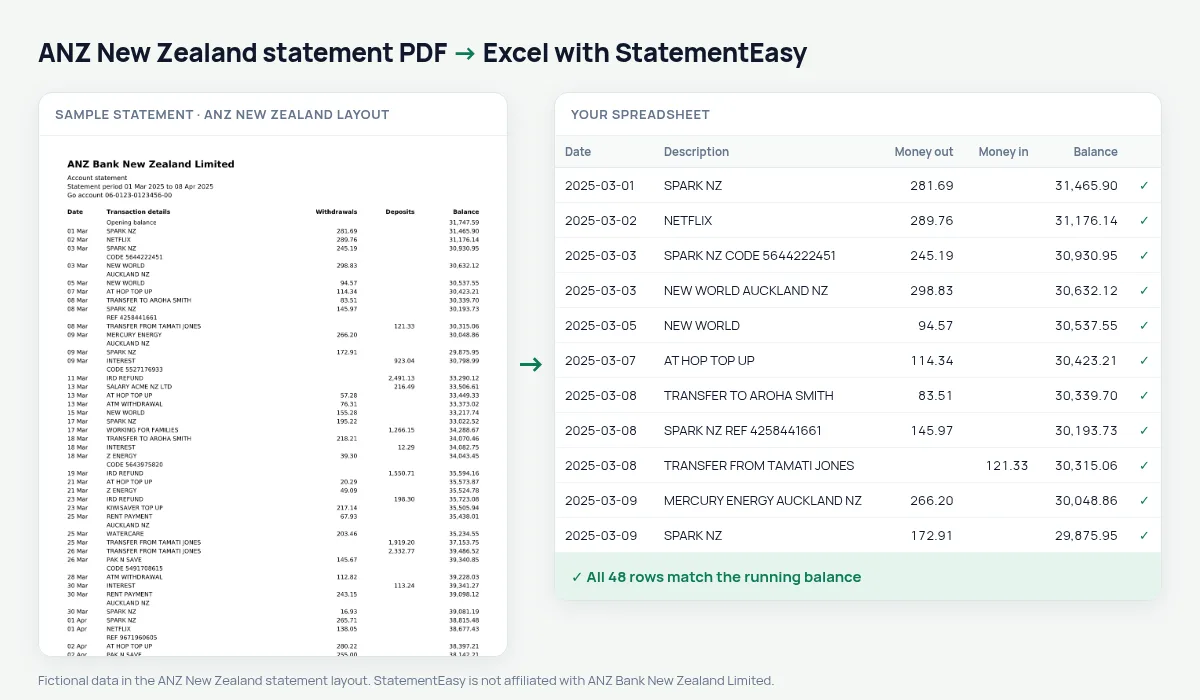
Download your ANZ statement
- Sign in to ANZ Internet Banking or the ANZ goMoney app.
- Open the account, then Statements. Statements are available as PDFs for several years.
- Pick the period and download the PDF.
- Drop it into the converter above. Excel, CSV, OFX, QIF or Xero and QuickBooks files in seconds.
ANZ columns in your sheet
| On the statement | In your sheet |
|---|---|
| 05 Mar | 05/03/2025 |
| Transaction details | Description |
| Withdrawals | Money out |
| Deposits | Money in |
| Opening balance | Opening balance, not a transaction |
The New Zealand tax year
The tax year runs from 1 April to 31 March. Convert the statements of the year together and you have one table of income, KiwiSaver contributions and expenses — handy for a rental property or side income you declare to Inland Revenue.
The converter does not calculate tax; it gives you clean, checked figures.
Into Xero or MYOB
Sole traders and small businesses can import the converted CSV into Xero, MYOB or other accounting software, or use the OFX and Xero files directly.
An example line
On the PDF: 05 Mar WOOLWORTHS NZ AUCKLAND NZ 142.80 3,215.60. In your sheet: date 05/03/2025, money out 142.80, balance 3,215.60.
Last tested October 2026. StatementEasy is not affiliated with ANZ Bank New Zealand Limited.
Questions
Australian ANZ statements?
They have their own page.
Can I convert a whole year?
Yes, drop all the PDFs and choose “All files together”.
How do I download an ANZ statement?
In ANZ Internet Banking or goMoney, open the account, choose Statements, pick the period and save the PDF.
What is an ANZ statement of position?
It is a form for loan applications listing your assets and debts, not a bank statement. Lenders often ask for both; the converter handles the statements.
Is my statement uploaded?
Your browser reads the PDF first, on your device. Only if it cannot read it is the file read on our server, and deleted right after.
Is StatementEasy made by ANZ New Zealand?
No. StatementEasy is an independent tool and is not affiliated with ANZ Bank New Zealand Limited.
Your next statement, in a spreadsheet
Free, no limits. No sign-up.