TSB New Zealand statement to Excel
Your TSB statement as a spreadsheet, every balance checked.
- Checked every row against your balance
- Private read on your device first
- Excel & CSV plus QuickBooks, Xero and Quicken files
- Free no sign-up, no page limits
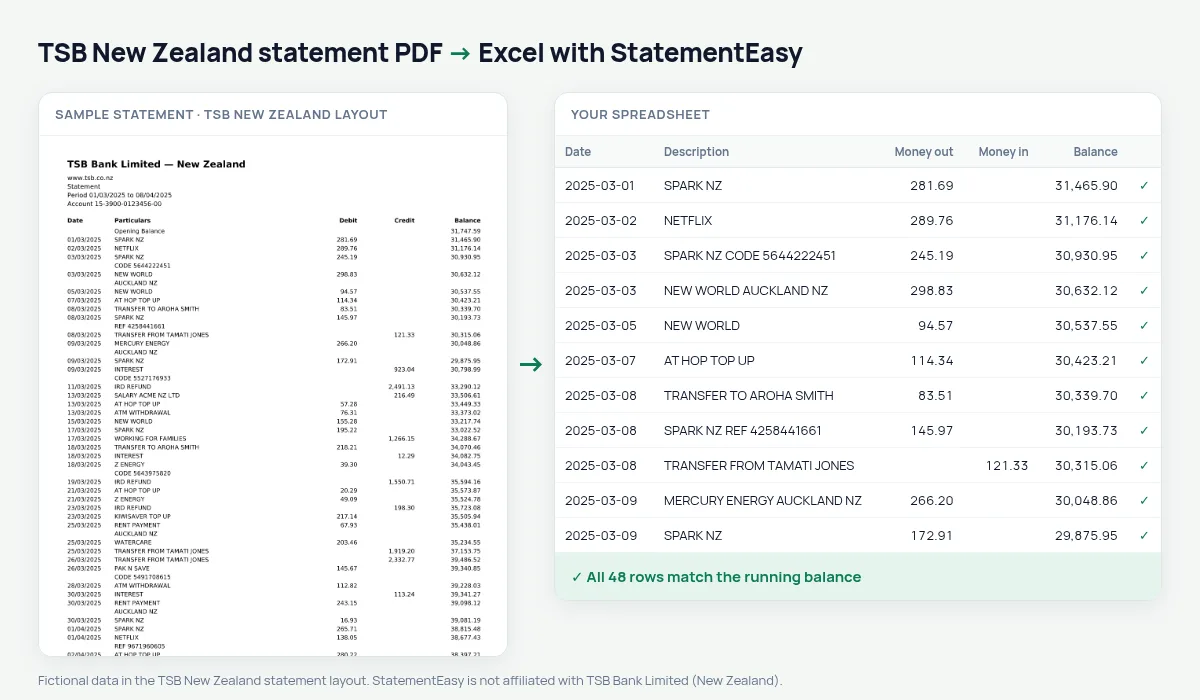
TSB in New Zealand began as the Taranaki Savings Bank in New Plymouth in 1850 and is owned by a community trust. Its statement prints Date, Particulars, Debit, Credit and Balance.
StatementEasy reads Debit and Credit, starts from the opening balance and checks every row. TSB New Zealand is recognised separately from TSB in the UK.
Download your TSB statement
- Sign in to TSB internet banking or the TSB app.
- Open the account, then Statements.
- Pick the period and download the PDF.
- Drop it into the converter above. Excel, CSV, OFX, QIF or Xero and QuickBooks files in seconds.
TSB columns in your sheet
| On the statement | In your sheet |
|---|---|
| Date | Date |
| Particulars | Description |
| Debit | Money out |
| Credit | Money in |
| Opening Balance | Opening balance |
Taranaki and beyond
Farms, small businesses and families across Taranaki bank with TSB. Several accounts can be dropped together, each with its own tab and balance check.
Seasonal income
Farm and contracting income often arrives in a few large payments a year. The Monthly sheet shows the peaks and the quiet months side by side, which helps when you plan provisional tax or talk to the bank about an overdraft.
An example line
On the PDF: 10/03/2025 Z ENERGY 88.50 2,016.30. In your sheet: money out 88.50, balance 2,016.30.
Last tested October 2026. StatementEasy is not affiliated with TSB Bank Limited (New Zealand).
Questions
UK TSB?
This page is for TSB New Zealand.
Several months?
Yes.
How do I download a TSB statement?
In TSB internet banking or the app, open the account, then Statements, and save the PDF.
Is my statement uploaded?
Your browser reads the PDF first, on your device. Only if it cannot read it is the file read on our server, and deleted right after.
Is StatementEasy made by TSB New Zealand?
No. StatementEasy is an independent tool and is not affiliated with TSB Bank Limited (New Zealand).
Your next statement, in a spreadsheet
Free, no limits. No sign-up.