BADR statement to Excel
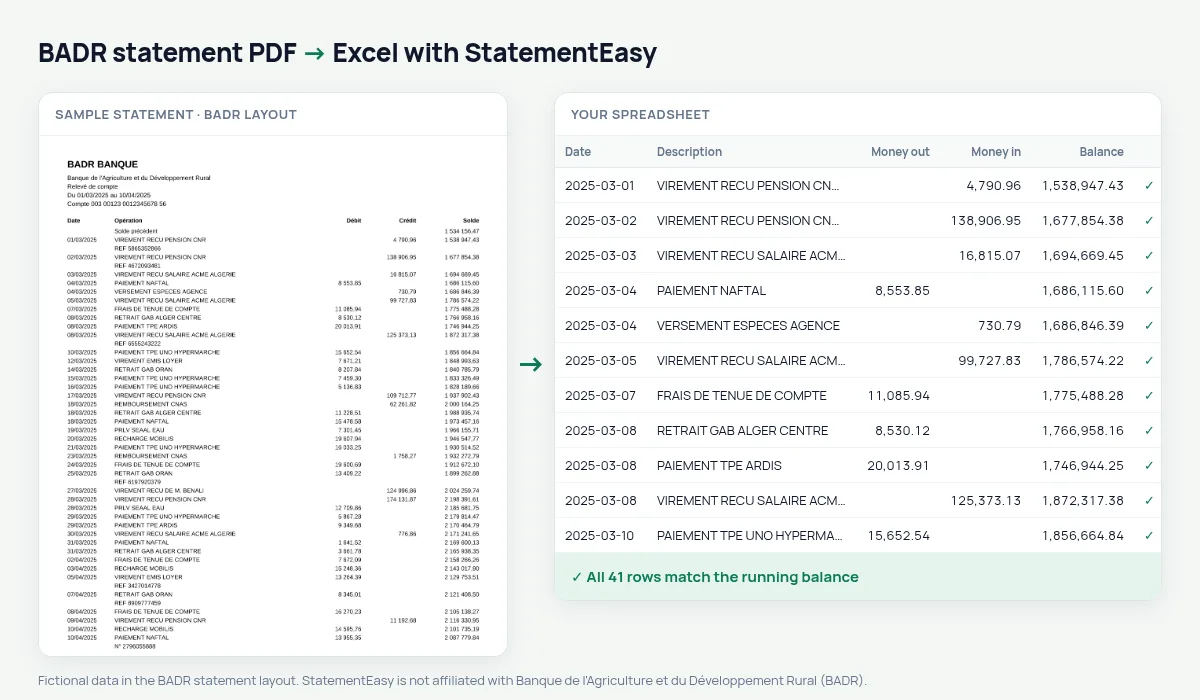
Turn your BADR statement into a spreadsheet in dinars, with the balance checked on every line.
- Checked every row against your balance
- Private read on your device first
- Excel & CSV plus QuickBooks, Xero and Quicken files
- Free no sign-up, no page limits
On a BADR account a farming season reads line by line: the seasonal loan released, fertiliser and seed bought, crops sold to the OAIC, instalments repaid. Each Opération carries a Débit or a Crédit and the resulting Solde. StatementEasy takes those lines one by one, amounts like 210 400,00 included, and recomputes the balance at every step.
Download your BADR statement
- Log in to BADR e-banking.
- Choose the account, then Relevés.
- Pick the period and download the PDF.
- Drop the BADR PDF into the converter above.
BADR columns in your sheet
| BADR column | What it becomes |
|---|---|
| Opération (crop sale, fertiliser…) | Searchable description |
| Crédit: sales, subsidies, loan release | Money in |
| Débit: inputs, fuel, instalments | Money out |
Farms and rural businesses
Sort a season’s crop sales, seed and fertiliser purchases and loan repayments with the Categories sheet.
Seasonal loans
Agricultural loan repayments come back at fixed dates; the Recurring sheet lists them with their amount.
A balance on every line
BADR prints the balance after each operation, so each row is checked against it individually.
Last tested October 2026. StatementEasy is not affiliated with Banque de l'Agriculture et du Développement Rural (BADR).
Questions
Can I combine a whole season?
Yes. Drop the statements together and choose “All files combined”.
Is my statement uploaded?
Your browser reads the PDF first, on your device. Only if it cannot read it is the file read on our server, and deleted after reading.
Is StatementEasy made by BADR?
No. StatementEasy is an independent tool and is not affiliated with Banque de l'Agriculture et du Développement Rural (BADR).
Your next statement, in a spreadsheet
Free, no limits. No sign-up.