BEA statement to Excel
Turn your Banque Extérieure d’Algérie statement into a spreadsheet with the totals checked.
- Checked every row against your balance
- Private read on your device first
- Excel & CSV plus QuickBooks, Xero and Quicken files
- Free no sign-up, no page limits
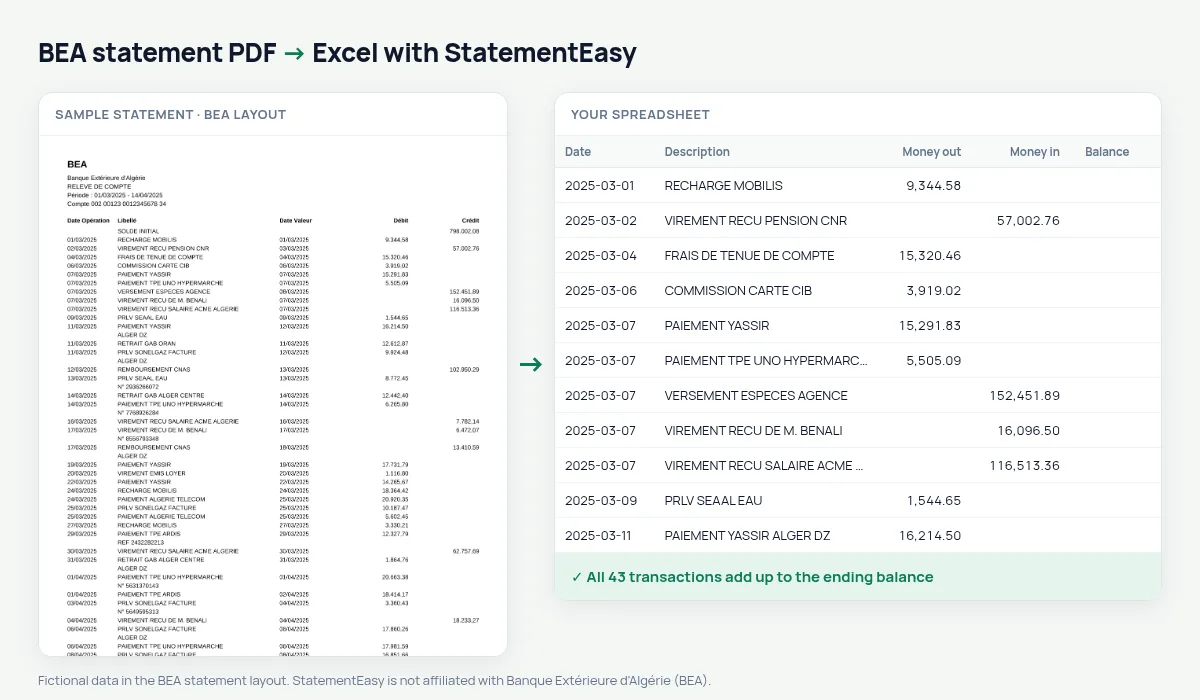
The BEA statement lists Date Opération, Libellé, Date Valeur, Débit and Crédit between the SOLDE INITIAL and SOLDE FINAL, without a balance per line. Amounts use dots for thousands: 1.250.000,00. StatementEasy reads them as numbers and checks the totals.
Download your BEA statement
- Log in to BEA e-banking.
- Choose the account, then Relevés.
- Pick the period and download the PDF.
- Drop the BEA PDF into the converter above.
BEA columns in your sheet
| On the statement | In your sheet |
|---|---|
| Date Opération / Date Valeur | Date / value date |
| Débit / Crédit | Money out / money in |
| 1.250.000,00 | 1250000.00 DZD |
Trade and currency accounts
BEA is Algeria’s foreign-trade bank; import and exchange operations keep their full description.
Import, export and Sonatrach
BEA is the bank of foreign trade and of Sonatrach. Domiciliation, exchange and international transfer lines keep their full description, so you can total them per supplier or client.
Checked without a running balance
Every debit and credit read is added up and compared with the SOLDE FINAL; a missed line breaks the equation.
Last tested October 2026. StatementEasy is not affiliated with Banque Extérieure d'Algérie (BEA).
Questions
Are amounts like 1.250.000,00 read correctly?
Yes: dots group thousands and the comma marks the cents.
Is my statement uploaded?
Your browser reads the PDF first, on your device. Only if it cannot read it is the file read on our server, and deleted after reading.
Is StatementEasy made by BEA?
No. StatementEasy is an independent tool and is not affiliated with Banque Extérieure d'Algérie (BEA).
Your next statement, in a spreadsheet
Free, no limits. No sign-up.