Banrural statement to Excel
Your Banrural statement as a spreadsheet in quetzales, every balance checked.
- Checked every row against your balance
- Private read on your device first
- Excel & CSV plus QuickBooks, Xero and Quicken files
- Free no sign-up, no page limits
Banrural, the bank with Guatemala’s widest branch network, opens its statement with Saldo anterior and lists Concepto, Débitos, Créditos and Saldo. StatementEasy uses the previous balance as the opening balance and checks every row.
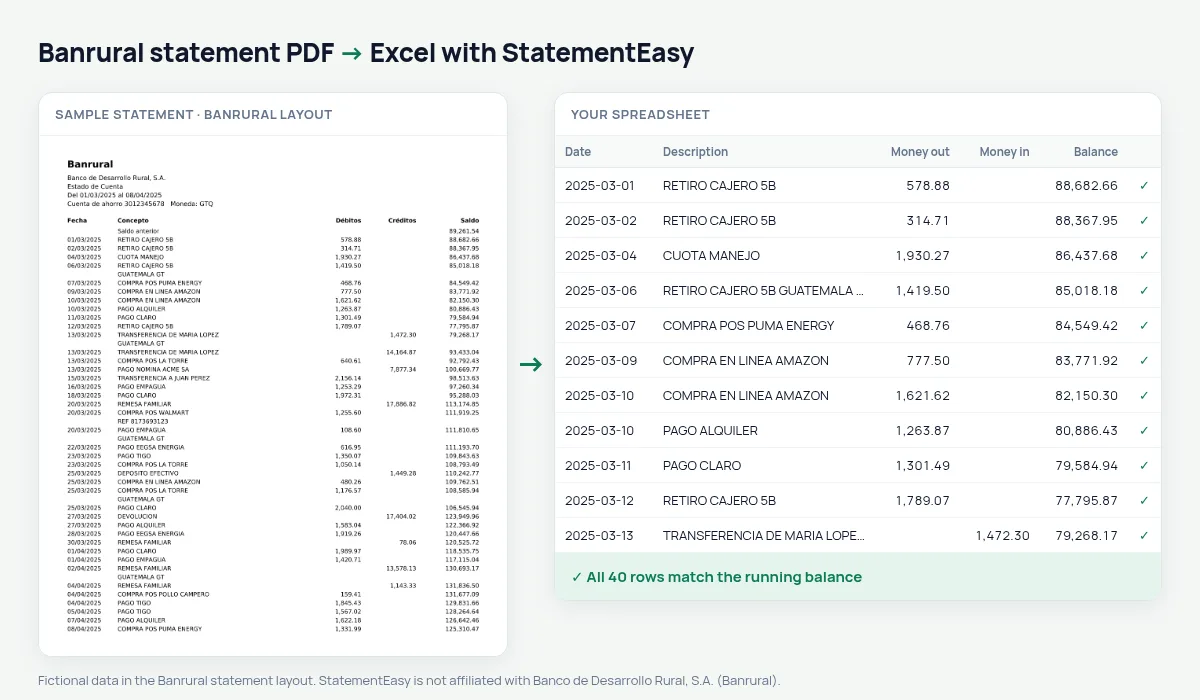
Download your Banrural statement
- Sign in to Banrural Virtual or the app.
- Open the account and choose Estado de cuenta.
- Download the PDF.
- Drop it into the converter above.
Banrural columns in your sheet
| On the statement | In your sheet |
|---|---|
| Saldo anterior | Opening balance, not a row |
| Débitos | Money out |
| Créditos | Money in |
Farmers, co-ops and shops
Money in and out are split, and the Monthly sheet shows harvest months against slow ones.
An example line
15/03/2025 PAGO TIGO 99.00 6,874.15 becomes money out 99.00 and balance 6874.15.Last tested October 2026. StatementEasy is not affiliated with Banco de Desarrollo Rural, S.A. (Banrural).
Questions
Do savings accounts work?
Yes, when they show débitos, créditos and saldo.
Is my statement uploaded?
Your browser reads the PDF first, on your device. Only if it cannot read it is the file read on our server, and deleted right after.
Is StatementEasy made by Banrural?
No. StatementEasy is an independent tool and is not affiliated with Banco de Desarrollo Rural, S.A. (Banrural).
Your next statement, in a spreadsheet
Free, no limits. No sign-up.