Commerzbank statement to Excel
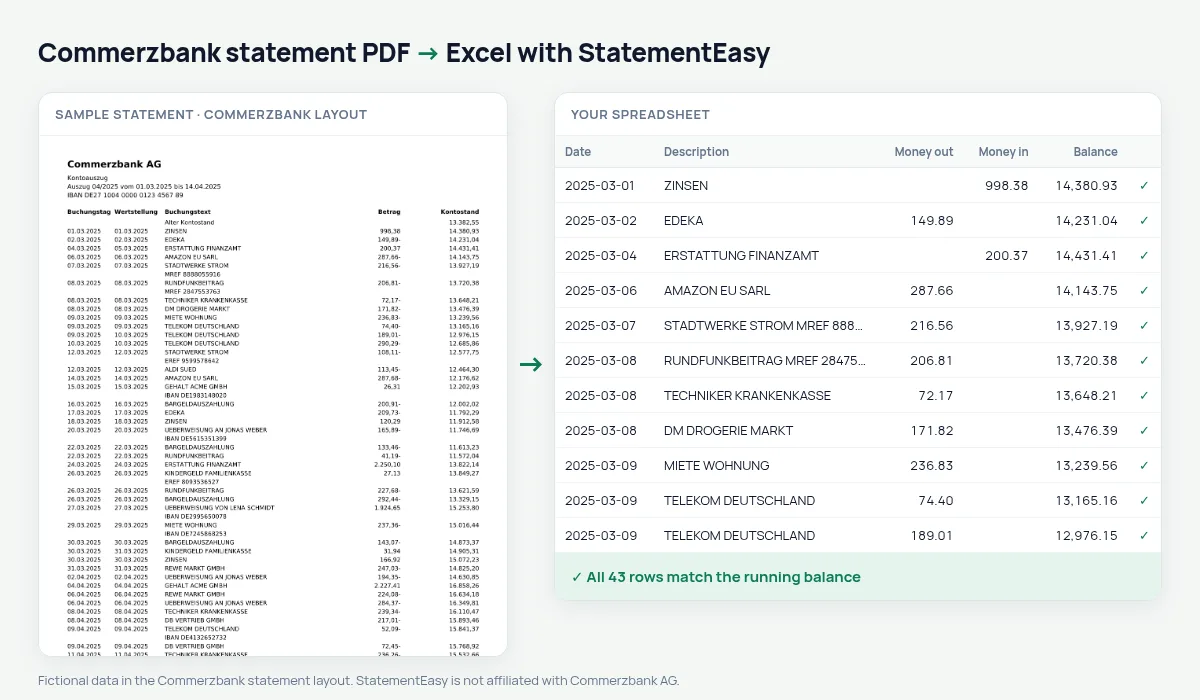
Your Commerzbank statement as a spreadsheet, trailing minus signs read correctly.
- Checked every row against your balance
- Private read on your device first
- Excel & CSV plus QuickBooks, Xero and Quicken files
- Free no sign-up, no page limits
Commerzbank writes debits with the minus after the number, such as 12,50-.
StatementEasy reads them as money out and checks the Kontostand on every row.
Download your Commerzbank statement
- Sign in to Commerzbank online banking or the app.
- Open Postbox, then Kontoauszüge.
- Download the PDF.
- Drop it into the converter above.
Commerzbank columns in your sheet
| On the statement | In your sheet |
|---|---|
| Betrag 12,50- | Money out 12.50 |
| Wertstellung | Value date |
| Kontostand | Balance |
An example line
14.03.2025 14.03.2025 STADTWERKE STROM 86,00- 2.104,55 becomes money out 86.00.Why the minus sign matters
Commerzbank prints debits with the minus after the number. Pasted into a spreadsheet, “86,00-” stays text and is not counted, so a hand-made budget quietly misses your spending. In the converted file every amount is a real number in money out or money in.
For freelancers
Many freelancers and small businesses keep their business account at Commerzbank. Convert a quarter or a year at once and give your Steuerberater one spreadsheet, or a CAMT.053 or MT940 file for their software.
Last tested October 2026. StatementEasy is not affiliated with Commerzbank AG.
Questions
comdirect?
It has its own page.
Business accounts?
Yes, they use the same layout.
Statements in English?
Statements are in German; your spreadsheet can use English column names.
Is my statement uploaded?
Your browser reads the PDF first, on your device. Only if it cannot read it is the file read on our server, and deleted right after.
Is StatementEasy made by Commerzbank?
No. StatementEasy is an independent tool and is not affiliated with Commerzbank AG.
Your next statement, in a spreadsheet
Free, no limits. No sign-up.