Exim Bank Tanzania statement to Excel
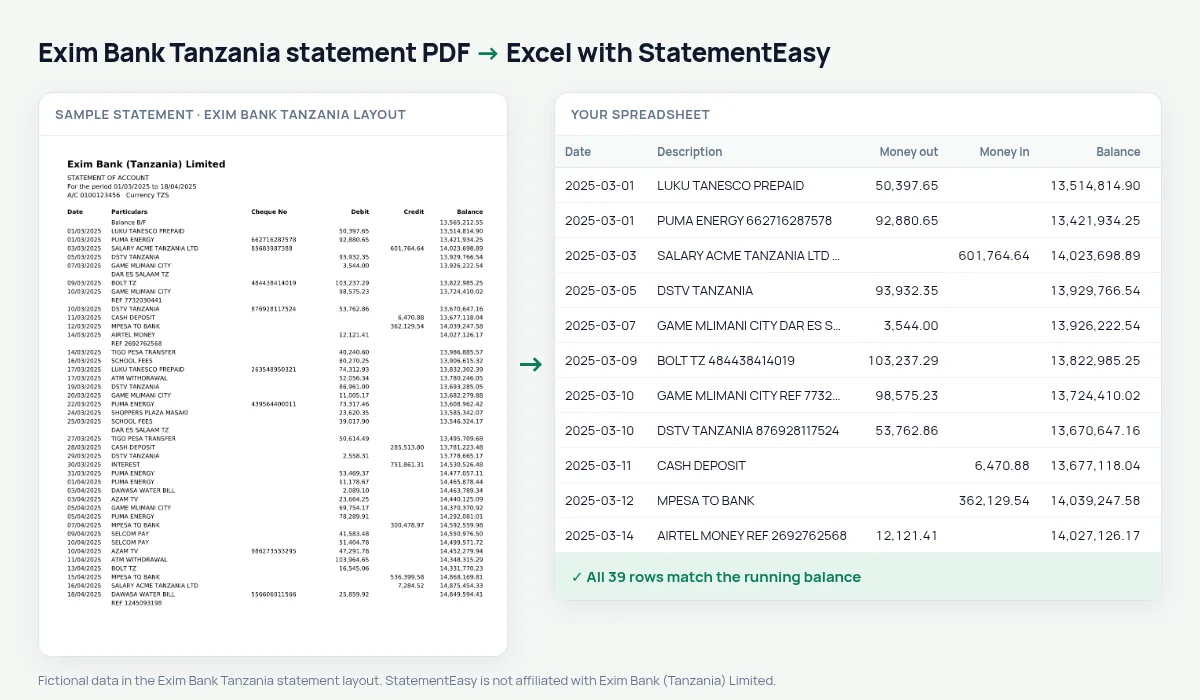
Your Exim Bank Tanzania statement in a spreadsheet, cheque numbers kept with each line, every balance checked.
- Checked every row against your balance
- Private read on your device first
- Excel & CSV plus QuickBooks, Xero and Quicken files
- Free no sign-up, no page limits
Exim Bank (Tanzania) was founded in Dar es Salaam in 1997 and serves many trading families and businesses, especially in import and export. Its statement lists Date, Particulars, Cheque No, Debit, Credit and Balance, starting from a Balance B/F.
StatementEasy keeps the cheque number with the particulars, takes the Balance B/F as the opening balance and checks every running balance.
How to download your Exim Bank statement
- Open Exim Mobile or Exim Internet Banking.
- Go to the account and choose Statement. Choose the dates.
- Download the PDF.
- Drop it into the converter above.
Exim Bank Tanzania columns in your sheet
| On the statement | In your sheet |
|---|---|
| Date | Date |
| Particulars | Description |
| Cheque No | Kept with the description |
| Debit | Money out |
| Credit | Money in |
| Balance B/F | Opening balance |
Traders and import payments
Import businesses pay suppliers abroad, receive customer payments in shillings and settle duties and clearing fees. In your sheet every line keeps its particulars, so you can group the payments to one supplier, or total the clearing and port charges for a shipment.
For larger businesses, the CSV goes straight into the accounting system.
Cheques that cleared
The cheque number stays in the description, so a search in Excel or in the converter’s table finds the cheque and shows the day it was paid.
An example line
On the PDF: 15/03/2025 PAYMENT TO SUPPLIER 100245 2,750,000.00 18,402,600.00. In your sheet: date 15/03/2025, description PAYMENT TO SUPPLIER 100245, money out 2,750,000.00.
Combining months
Drop several monthly statements together; each Balance B/F is checked against the month before, and “All files combined” gives one sheet.
Last tested October 2026. StatementEasy is not affiliated with Exim Bank (Tanzania) Limited.
Questions
What if a line has no cheque number?
The column stays empty; nothing shifts.
Can I convert a USD account?
Yes, each currency in its own sheet.
Does it work for Exim Bank outside Tanzania?
This layout is the Tanzanian one; other countries are not tested yet.
Is my statement uploaded?
Your browser reads the PDF first, on your device. Only if it cannot read it is the file read on our server, and deleted right after.
Is StatementEasy made by Exim Bank Tanzania?
No. StatementEasy is an independent tool and is not affiliated with Exim Bank (Tanzania) Limited.
Your next statement, in a spreadsheet
Free, no limits. No sign-up.