M-Pesa Tanzania statement to Excel
Your Vodacom M-Pesa statement as a spreadsheet, every send, payment and withdrawal with the wallet balance checked.
- Checked every row against your balance
- Private read on your device first
- Excel & CSV plus QuickBooks, Xero and Quicken files
- Free no sign-up, no page limits
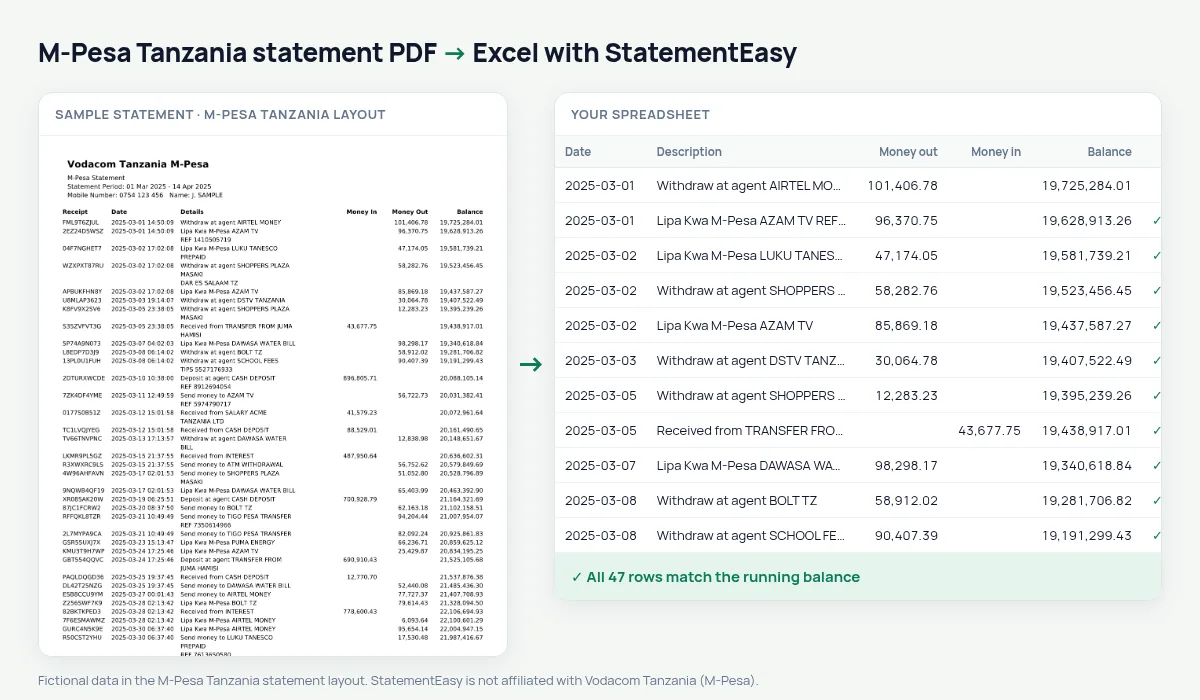
Vodacom launched M-Pesa in Tanzania in 2008 and it is now how millions of Tanzanians send money, pay bills, buy LUKU electricity tokens and pay shops with Lipa kwa M-Pesa. Its statement lists the Receipt, the Date with the time, the Details, Money In, Money Out and Balance.
StatementEasy recognises the receipt code before the date, even when it runs into the date on the page, reads the date with its time and checks that every wallet balance follows from the one before.
How to get your M-Pesa statement
- Open the M-Pesa app. Look for the statement option in your account.
- Choose the period. The statement is sent as a PDF to your email.
- Save the PDF from your email.
- Drop it into the converter above.
M-Pesa Tanzania columns in your sheet
| On the statement | In your sheet |
|---|---|
| Receipt | Kept with the details |
| Date | Date (with the time) |
| Details | Description |
| Money In | Money in |
| Money Out | Money out |
| Balance | Wallet balance, checked |
Lipa kwa M-Pesa for shop owners
If customers pay your shop with Lipa kwa M-Pesa, your statement is your sales record. The converted sheet totals what came in each day and each month and what you paid to suppliers, which is the first thing a microfinance lender or a SACCO asks to see.
Sort by details to see your best customers or your biggest suppliers.
Receipt codes that run into the date
M-Pesa receipt codes are ten letters and digits. When a code is wide on the page it touches the date and the PDF stores both as one piece. The converter splits them again, so no transaction is lost and the code stays with the details.
An example line
On the PDF: SFK3H8L2QA 2025-03-12 09:14:22 Send money to JUMA HAMISI 25,000.00 348,600.00. In your sheet: date 12/03/2025, description with the receipt code, money out 25,000.00, wallet balance 348,600.00.
LUKU, bills and airtime
Electricity tokens, water bills, TV subscriptions and airtime are paid many times a month. The Recurring sheet gathers them so you can see what each costs you over the year.
Last tested October 2026. StatementEasy is not affiliated with Vodacom Tanzania (M-Pesa).
Questions
Is this the same as Kenyan M-PESA?
No, Safaricom’s M-PESA in Kenya has its own layout; both are supported.
Tigo Pesa or Airtel Money?
Not tested yet; send us a statement through the contact page and we will add the layout.
Can I combine M-Pesa with my bank statement?
Yes, drop both and choose “All files combined”; each balance is checked in its own file.
Is my statement uploaded?
Your browser reads the PDF first, on your device. Only if it cannot read it is the file read on our server, and deleted right after.
Is StatementEasy made by M-Pesa Tanzania?
No. StatementEasy is an independent tool and is not affiliated with Vodacom Tanzania (M-Pesa).
Your next statement, in a spreadsheet
Free, no limits. No sign-up.