ING Netherlands statement to Excel
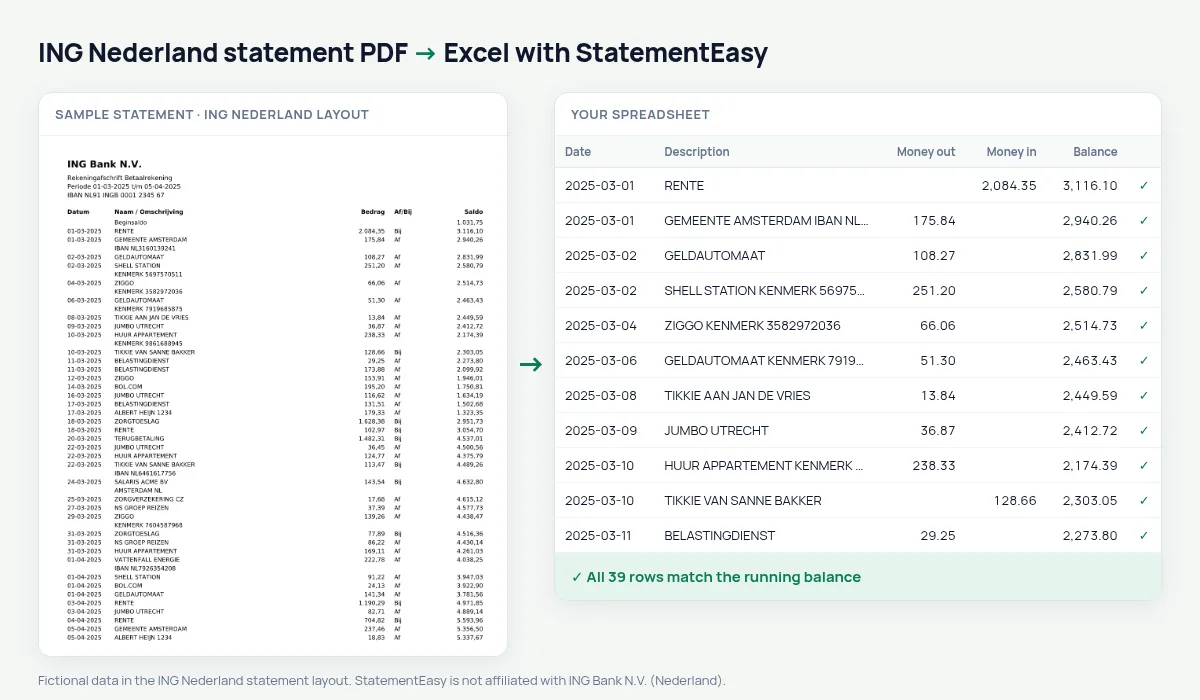
Your ING statement as a spreadsheet, money out and in in their own columns, every balance checked.
- Checked every row against your balance
- Private read on your device first
- Excel & CSV plus QuickBooks, Xero and Quicken files
- Free no sign-up, no page limits
ING Nederland prints Datum, Naam / Omschrijving, Bedrag, Af/Bij and Saldo: one unsigned amount with Af (out) or Bij (in) next to it.
StatementEasy reads the amount together with its Af or Bij marker and checks every balance.
Download your ING statement
- Sign in to Mijn ING or the ING app.
- Choose the account, then Afschriften.
- Download the PDF.
- Drop it into the converter above.
ING columns in your sheet
| On the statement | In your sheet |
|---|---|
| Bedrag + Af | Money out |
| Bedrag + Bij | Money in |
| Beginsaldo | Opening balance |
For expats in the Netherlands
Renting, applying for a mortgage or filing your Dutch tax return all need statements; the Monthly sheet gives the overview in English.
An example line
14-03-2025 ALBERT HEIJN 1234 42,85 Af 1.215,30 becomes money out 42.85 and balance 1215.30.Box 3 balance
Dutch savings tax uses your balance on 1 January; combine December and January and the Summary sheet shows it.
Af and Bij
ING prints the amount in one column and a separate Af (out) or Bij (in) marker next to it. Copied into a spreadsheet, every amount looks positive; the converter uses the marker so money out really is money out.
Box 3 and the 1 January balance
For the Dutch income tax return, savings are taxed in box 3 on the balance at 1 January. Your December statement gives the closing balance of the year; convert it with the rest and you have every account’s figure in one sheet.
Last tested October 2026. StatementEasy is not affiliated with ING Bank N.V. (Nederland).
Questions
Can I use the ING CSV or MT940 export?
Yes, those are read too.
ING CSV or MT940 export?
Yes, both are read too.
English statements?
The Dutch layout is the one tested; your sheet can use English column names.
Is my statement uploaded?
Your browser reads the PDF first, on your device. Only if it cannot read it is the file read on our server, and deleted right after.
Is StatementEasy made by ING Nederland?
No. StatementEasy is an independent tool and is not affiliated with ING Bank N.V. (Nederland).
Your next statement, in a spreadsheet
Free, no limits. No sign-up.