Rabobank statement to Excel
Your Rabobank statement as a spreadsheet, every balance checked.
- Checked every row against your balance
- Private read on your device first
- Excel & CSV plus QuickBooks, Xero and Quicken files
- Free no sign-up, no page limits
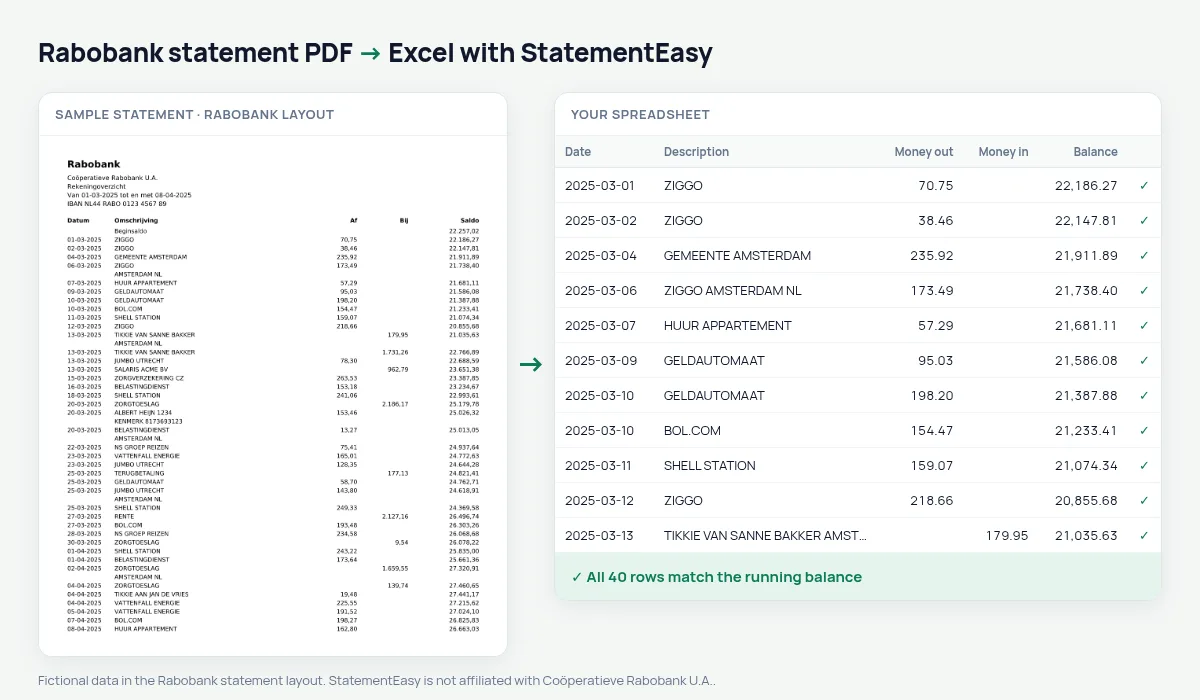
Rabobank, the Dutch cooperative bank, prints Datum, Omschrijving, Af, Bij and Saldo.
StatementEasy reads Af as money out and Bij as money in and checks every balance.
Download your Rabobank statement
- Sign in to Rabo Online Banking or the Rabo App.
- Choose the account, then statements.
- Download the PDF.
- Drop it into the converter above.
Rabobank columns in your sheet
| On the statement | In your sheet |
|---|---|
| Af | Money out |
| Bij | Money in |
An example line
05-03-2025 VATTENFALL ENERGIE 132,40 2.860,15 becomes money out 132.40 and balance 2860.15.For farms and small businesses
The Monthly and Categories sheets show income and costs, a start for your bookkeeping.
A cooperative bank
Rabobank grew out of local farmers’ cooperatives and is still a cooperative today, strong in agriculture and small business. Its statement lists Af, Bij and Saldo, which the converter reads and checks row by row.
Splitting bills
Tikkie requests and payment requests show the other person’s name. Filter for them and see what you paid and got back each month.
Last tested October 2026. StatementEasy is not affiliated with Coöperatieve Rabobank U.A..
Questions
Business accounts?
Yes, same layout.
Business accounts?
Yes, they use the same layout.
CSV export?
Yes.
Is my statement uploaded?
Your browser reads the PDF first, on your device. Only if it cannot read it is the file read on our server, and deleted right after.
Is StatementEasy made by Rabobank?
No. StatementEasy is an independent tool and is not affiliated with Coöperatieve Rabobank U.A..
Your next statement, in a spreadsheet
Free, no limits. No sign-up.