Maybank statement to Excel
Turn your Maybank statement into a spreadsheet: the signed transaction amounts split into money in and out, and every balance checked.
- Checked every row against your balance
- Private read on your device first
- Excel & CSV plus QuickBooks, Xero and Quicken files
- Free no sign-up, no page limits
Maybank statements list ENTRY DATE, VALUE DATE, TRANSACTION DESCRIPTION, TRANSACTION AMOUNT and STATEMENT BALANCE. The amount carries its sign after the number — 1,234.56- for money out, 500.00+ for money in — which spreadsheets cannot read. StatementEasy reads the trailing sign, splits the amount into money out and money in, keeps both dates and checks every balance from the BEGINNING BALANCE.
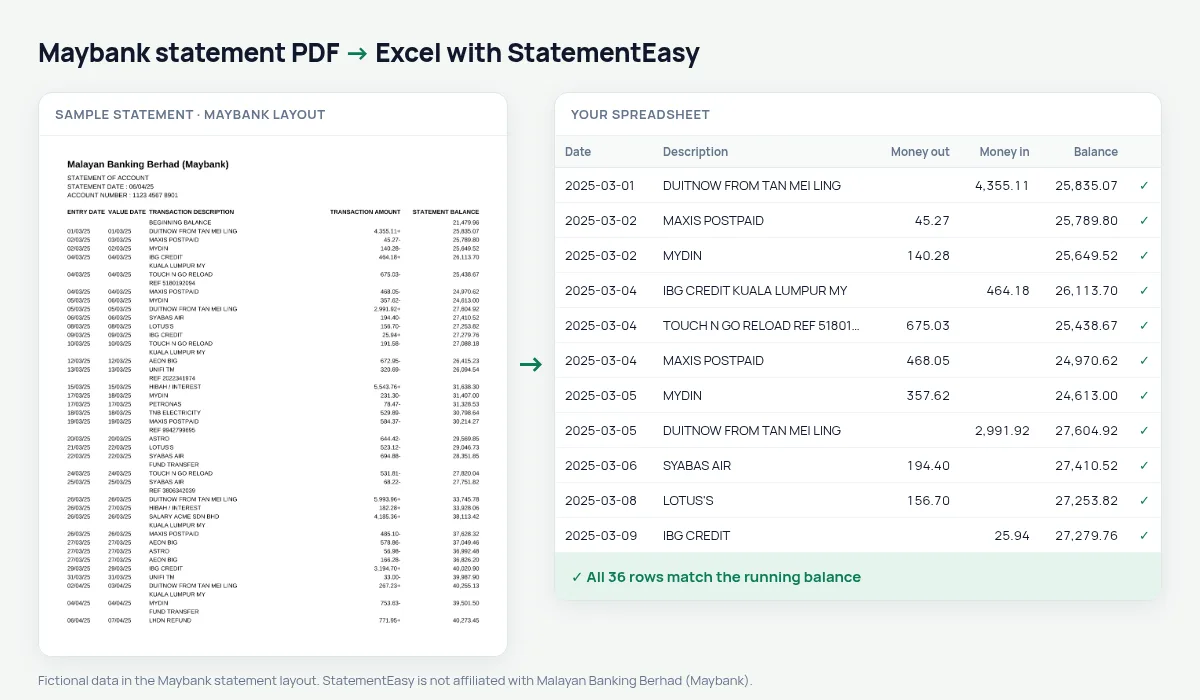
Download your Maybank statement
- Log in to Maybank2u (web) or the MAE app.
- Open the account, then Statements.
- Save the Maybank statement as a PDF.
- Drop the Maybank PDF into the converter above.
Maybank columns in your sheet
| On the Maybank statement | In your sheet |
|---|---|
| 1,234.56- | Money out 1234.56 |
| 500.00+ | Money in 500.00 |
| ENTRY DATE / VALUE DATE | Date / value date |
| STATEMENT BALANCE | Checked on every row |
| BEGINNING BALANCE | Start of the check, not a row |
DuitNow, IBG and JomPAY
Maybank descriptions name the channel — DuitNow, IBG, JomPAY, card purchases — with the payee on the next line. Each transaction’s lines are joined, and the Categories sheet totals them per month.
For LHDN and your accountant
Convert January to December for your income tax return, filter credits to total income and export CSV for your accountant.
Keep the bank’s signed column
Prefer one signed amount column? Choose “One amount (+/−)” before exporting.
Last tested October 2026. StatementEasy is not affiliated with Malayan Banking Berhad (Maybank).
Questions
Why does Maybank put the minus after the amount?
That is Maybank’s format. StatementEasy reads the trailing sign correctly.
Does it work with Maybank Islamic accounts?
Statements with the same columns are read the same way; the balance check confirms the result.
Is my statement uploaded?
Your browser reads the PDF first. Only if it cannot is the file read on our server, and deleted after reading.
Is StatementEasy made by Maybank?
No. StatementEasy is an independent tool and is not affiliated with Malayan Banking Berhad (Maybank).
Your next statement, in a spreadsheet
Free, no limits. No sign-up.