Al Rajhi Bank statement to Excel
Your Al Rajhi statement as a clean spreadsheet in Saudi riyals, with every balance checked.
- Checked every row against your balance
- Private read on your device first
- Excel & CSV plus QuickBooks, Xero and Quicken files
- Free no sign-up, no page limits
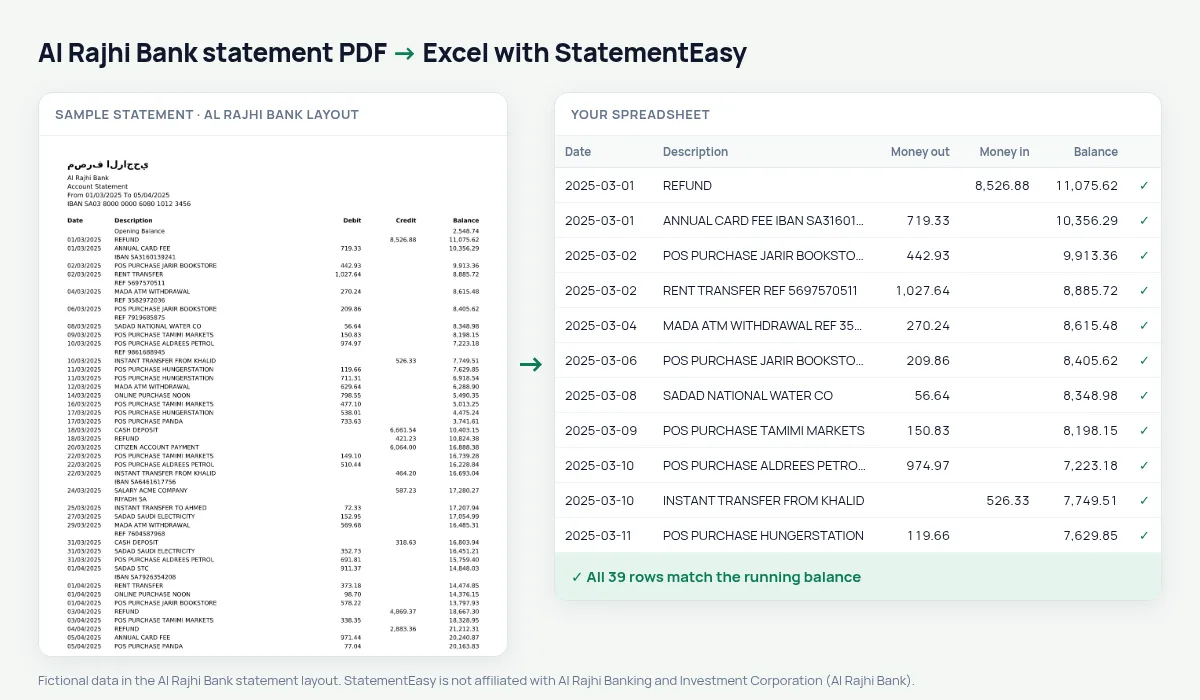
Al Rajhi Bank holds more retail accounts than any other Saudi bank, and a large share of the Kingdom’s expatriate workers are paid into one. Its PDF statement lists Date, Description, Debit, Credit and Balance in English under an Arabic letterhead, with amounts written 1,234.56.
StatementEasy reads each transaction as its own row, starts from the Opening Balance and checks that every balance equals the one before it, minus the debit or plus the credit. If one row does not add up, it is flagged.
Download your Al Rajhi statement
- Sign in to Al Rajhi Mobile or Al Rajhi Online.
- Open the account and choose Statement. Pick a month, a quarter or a full year.
- Choose English if the app offers a language, and export the PDF.
- Drop the PDF into the converter above.
From the Al Rajhi statement to your sheet
| On the statement | In your sheet |
|---|---|
| Debit / Credit | Money out / money in |
| Balance | Checked on every row |
| Opening Balance | Opening balance, not a row |
For expatriates sending money home
If your salary lands at Al Rajhi and part of it goes home every month, the transfers keep their description in the sheet. Filter by “TRANSFER” and the Monthly sheet shows how much left the account each month next to what came in — useful when you plan savings or explain your remittances.
Iqama, visas and government fees
Government payments made through SADAD — iqama renewals, visit-visa fees, traffic fines — appear as their own lines. Search for “SADAD” to collect them for the year in one place.
A March example
12/03/2025 SADAD SAUDI ELECTRICITY 342.75 18,406.20 becomes money out 342.75 and balance 18406.20, and the previous balance minus 342.75 must land exactly there.Islamic financing instalments
Personal or home financing at Al Rajhi is repaid in fixed instalments. The Recurring sheet lists them with the rent and subscriptions, so the year’s total is one number.
Last tested October 2026. StatementEasy is not affiliated with Al Rajhi Banking and Investment Corporation (Al Rajhi Bank).
Questions
Can I convert an Arabic-only statement?
For now the converter reads statements whose columns are in English. Download the English version from the app.
Can I combine several months?
Yes. Drop the files together and choose “All files together”.
Is my statement uploaded?
Your browser reads the PDF first, on your device. Only if it cannot read it is the file read on our server, and deleted right after.
Is StatementEasy made by Al Rajhi Bank?
No. StatementEasy is an independent tool and is not affiliated with Al Rajhi Banking and Investment Corporation (Al Rajhi Bank).
Your next statement, in a spreadsheet
Free, no limits. No sign-up.