CalBank statement to Excel
Your CalBank statement in a spreadsheet, cheque numbers kept with each line, every balance checked.
- Checked every row against your balance
- Private read on your device first
- Excel & CSV plus QuickBooks, Xero and Quicken files
- Free no sign-up, no page limits
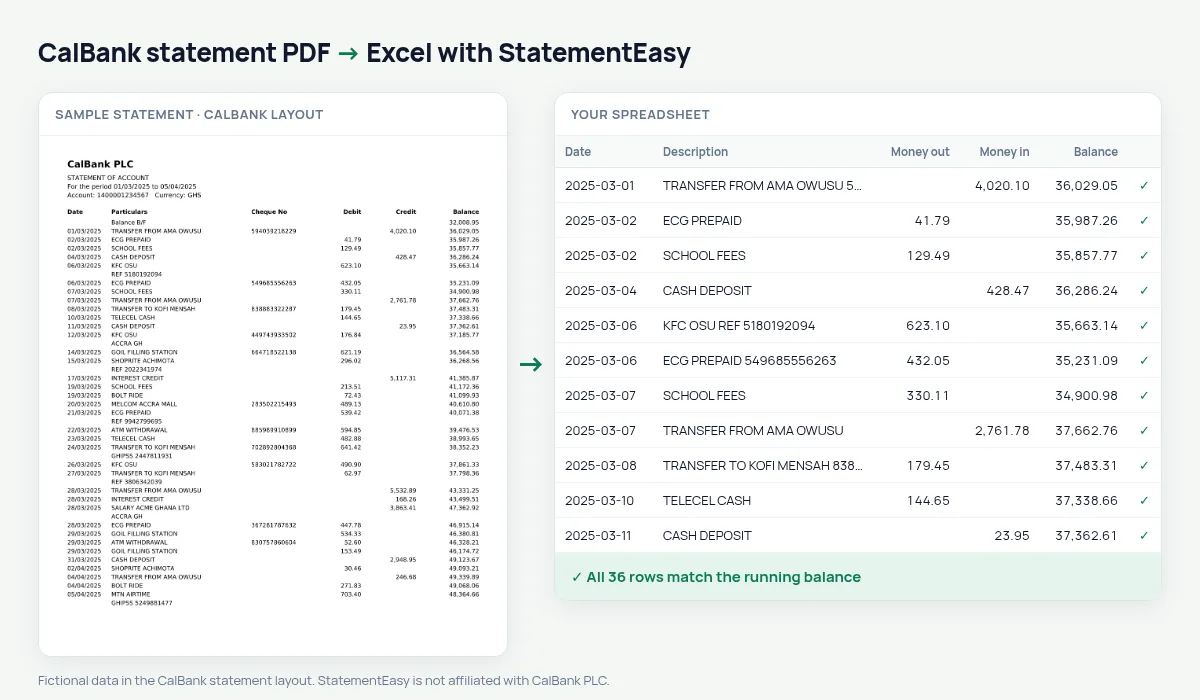
CalBank, founded in 1990 and listed on the Ghana Stock Exchange, built its name on corporate and business banking before growing its retail side. Its statement has Date, Particulars, Cheque No, Debit, Credit and Balance, opening with Balance B/F.
StatementEasy keeps the cheque number with the particulars, so it is never read as money, starts from the Balance B/F and checks that every balance adds up.
How to download your CalBank statement
- Sign in to CalBank Mobile or CalBank Online.
- Open the account and choose e-Statement. Select the period.
- Download the PDF.
- Drop it into the converter above.
CalBank columns in your sheet
| On the statement | In your sheet |
|---|---|
| Date | Date |
| Particulars | Description |
| Cheque No | Kept with the description |
| Debit | Money out |
| Credit | Money in |
| Balance B/F | Opening balance |
Finding a cheque
Businesses in Ghana still write cheques to suppliers and landlords. Because the cheque number stays in the description, you can type it into Excel’s search or the converter’s own search box and see on which day it cleared and for how much.
For an audit, that is often the one line you need.
VAT and the GRA
If your business files VAT returns with the Ghana Revenue Authority, the Monthly sheet gives sales receipts and payments per month, and the Categories sheet separates fuel, utilities and other costs. It does not compute the tax for you, but it gives your accountant clean numbers.
An example line
On the PDF: 11/03/2025 PAYMENT TO SUPPLIER 004512 6,300.00 42,118.90. In your sheet: date 11/03/2025, description PAYMENT TO SUPPLIER 004512, money out 6,300.00, balance 42,118.90.
Dozens of accounts, one routine
Companies with several CalBank accounts can drop all the statements at once; each gets its own tab and its own balance check, and “All files combined” gives a single ledger with a File column.
Last tested October 2026. StatementEasy is not affiliated with CalBank PLC.
Questions
What if a line has no cheque number?
The column is simply empty; nothing is shifted.
Can I import into QuickBooks?
Yes, choose QuickBooks (.qbo) or the QuickBooks Online CSV under More formats.
Does it work for USD or EUR accounts?
Yes, each currency in its own sheet.
Is my statement uploaded?
Your browser reads the PDF first, on your device. Only if it cannot read it is the file read on our server, and deleted right after.
Is StatementEasy made by CalBank?
No. StatementEasy is an independent tool and is not affiliated with CalBank PLC.
Your next statement, in a spreadsheet
Free, no limits. No sign-up.