Ecobank Ghana statement to Excel
Your Ecobank Ghana statement in a spreadsheet, references kept with each line and every balance checked.
- Checked every row against your balance
- Private read on your device first
- Excel & CSV plus QuickBooks, Xero and Quicken files
- Free no sign-up, no page limits
Ecobank Ghana is part of the Ecobank group, the pan-African bank headquartered in Lomé, and one of the largest banks in Ghana. Its account statement has seven columns: Transaction Date, Reference, Description, Value Date, Debit, Credit and Balance, with dates printed like 05-Mar-2025.
StatementEasy reads the reference code as part of the description rather than as an amount, keeps the value date in its own column and checks every running balance from the opening balance to the last line.
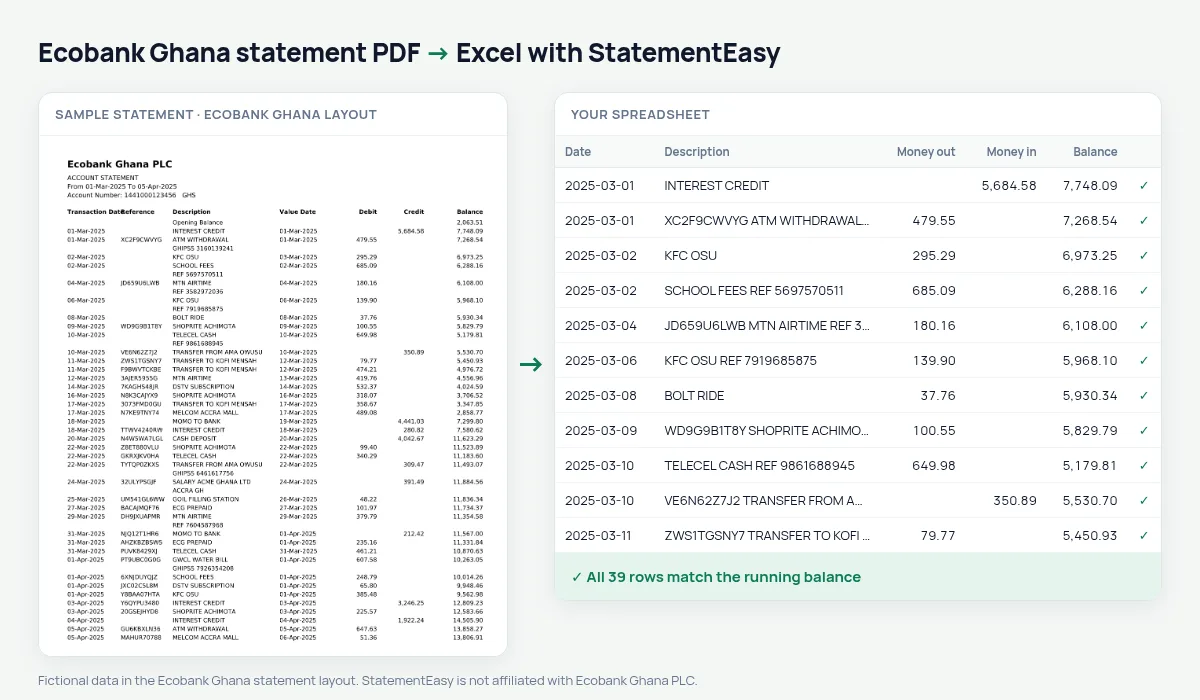
How to download your Ecobank Ghana statement
- Open the Ecobank Mobile app or Ecobank Online.
- Choose the account, then e-Statement or Statement. Select the period you need.
- Download the PDF, or open the one sent to your email.
- Drop it into the converter above.
Ecobank Ghana columns in your sheet
| On the statement | In your sheet |
|---|---|
| Transaction Date | Date |
| Reference | Kept with the description |
| Value Date | Value date, its own column |
| Debit | Money out |
| Credit | Money in |
| Balance | Balance, checked |
Transfers across Africa
Ecobank operates in more than thirty African countries, and many customers use it to send and receive money between Ghana, Nigeria, Côte d’Ivoire and the rest of West Africa. Each transfer keeps its reference, so you can match a payment from a supplier in Lagos or a relative in Abidjan to the right line in seconds.
If you also hold an Ecobank account in another country, convert both statements and keep them in separate sheets: each is checked in its own currency.
Why the reference is not an amount
Reference codes such as 2503FT0412 are made of digits and letters. A careless reader can mistake them for money; StatementEasy recognises the reference column and attaches it to the description, so Debit, Credit and Balance are only ever read from their own columns.
An example line
On the PDF: 05-Mar-2025 FT25064AB12 GWCL WATER BILL 05-Mar-2025 86.40 4,215.30. In your sheet: date 05/03/2025, description GWCL WATER BILL with its reference, money out 86.40, balance 4,215.30.
Mobile money in and out
Transfers between your Ecobank account and a MoMo wallet appear with their own narration. Filter for MOMO to see how much moved between bank and wallet each month, or convert your MoMo statement as well and combine the two.
Last tested October 2026. StatementEasy is not affiliated with Ecobank Ghana PLC.
Questions
Does it read the Ecobank Xpress Account?
Yes, when the statement shows debits, credits and a running balance.
Can I convert a USD account statement?
Yes. The amounts are read the same way; keep each currency in its own sheet.
Are statements from Ecobank in other countries supported?
Yes: Ecobank Nigeria, Senegal, Côte d’Ivoire and Cameroon statements are recognised too.
Is my statement uploaded?
Your browser reads the PDF first, on your device. Only if it cannot read it is the file read on our server, and deleted right after.
Is StatementEasy made by Ecobank Ghana?
No. StatementEasy is an independent tool and is not affiliated with Ecobank Ghana PLC.
Your next statement, in a spreadsheet
Free, no limits. No sign-up.