Davivienda statement to Excel
Turn your Davivienda statement into a spreadsheet with real numbers and every balance checked.
- Checked every row against your balance
- Private read on your device first
- Excel & CSV plus QuickBooks, Xero and Quicken files
- Free no sign-up, no page limits
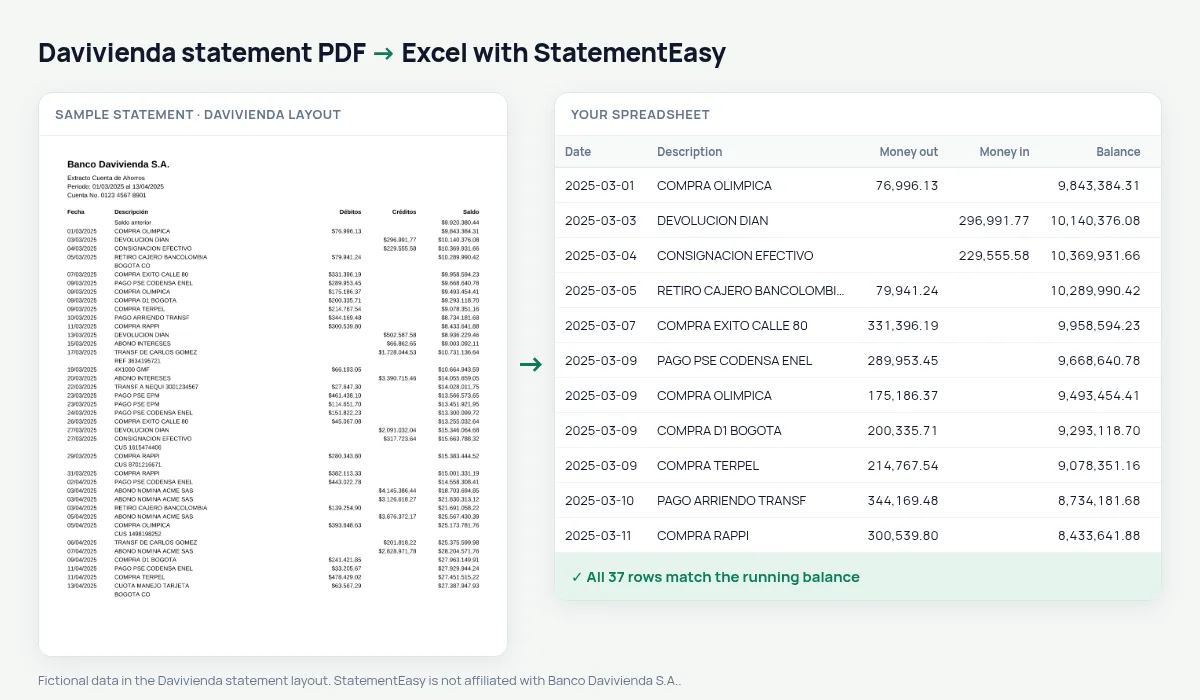
A Davivienda statement lists Fecha, Descripción, Débitos, Créditos and Saldo, with amounts like $1.234.567,00 — dots for thousands, a comma for cents.
StatementEasy removes the peso sign, reads each amount as a number and checks every balance.
Download your Davivienda statement
- Open the Davivienda app or website.
- Open Extractos.
- Download the PDF.
- Drop the PDF into the converter above.
Davivienda columns in your sheet
| On the statement | In your sheet |
|---|---|
| $1.234.567,00 | 1234567.00 |
| Débitos / Créditos | Money out / money in |
| Saldo | Checked on every row |
Two number formats
Colombian banks write amounts either 1,234,567.00 or $1.234.567,00; each statement’s format is recognised so a million is never read as a thousand.
From statement to sheet
05/03/2025 COMPRA EXITO CALLE 80 $186.450,00 $2.413.980,55 becomes money out 186450 and balance 2413980.55, as numbers.Savings and checking
Savings and checking statements share the same columns and are read the same way.
Exports
Download Excel, CSV or OFX.
What your Davivienda spreadsheet contains
Each row of the file is one transaction: the date as a real date, the full description, money in and money out as numbers in separate columns, and the running balance where Davivienda prints one. The peso sign and the dots for thousands are gone: every amount is a number. A first tab summarises the statement — period, opening and closing balance, totals in and out, and whether the check passed — and the Monthly, Categories and Recurring sheets come in the same download.
Using it for taxes, a budget or a loan
Convert the year for the DIAN return, or three months for a loan; the Monthly sheet and Insights summarise income and spending. At home, Categories groups groceries, utilities and transport by month.
Export Excel, CSV or OFX.
If something looks wrong
- A million read as a thousand — the number format is recognised from the whole statement and every balance checked.
- A row does not match — it is highlighted and can be corrected.
- A DaviPlata statement — read by the generic reader; the balance check shows the result.
Last tested October 2026. StatementEasy is not affiliated with Banco Davivienda S.A..
Questions
Can dots be mistaken for decimals?
No; the format is recognised from the whole statement and every balance is checked.
Is the checking account supported?
Yes.
Is the peso sign removed?
Yes, every amount is a number.
Is my statement uploaded?
Your browser reads the PDF first, on your device. Only if it cannot read it is the file read on our server, and deleted right after.
Is StatementEasy made by Davivienda?
No. StatementEasy is an independent tool and is not affiliated with Banco Davivienda S.A..
Your next statement, in a spreadsheet
Free, no limits. No sign-up.