GCB Bank statement to Excel
Your GCB statement as a clean spreadsheet in cedis, both dates kept and every running balance checked.
- Checked every row against your balance
- Private read on your device first
- Excel & CSV plus QuickBooks, Xero and Quicken files
- Free no sign-up, no page limits
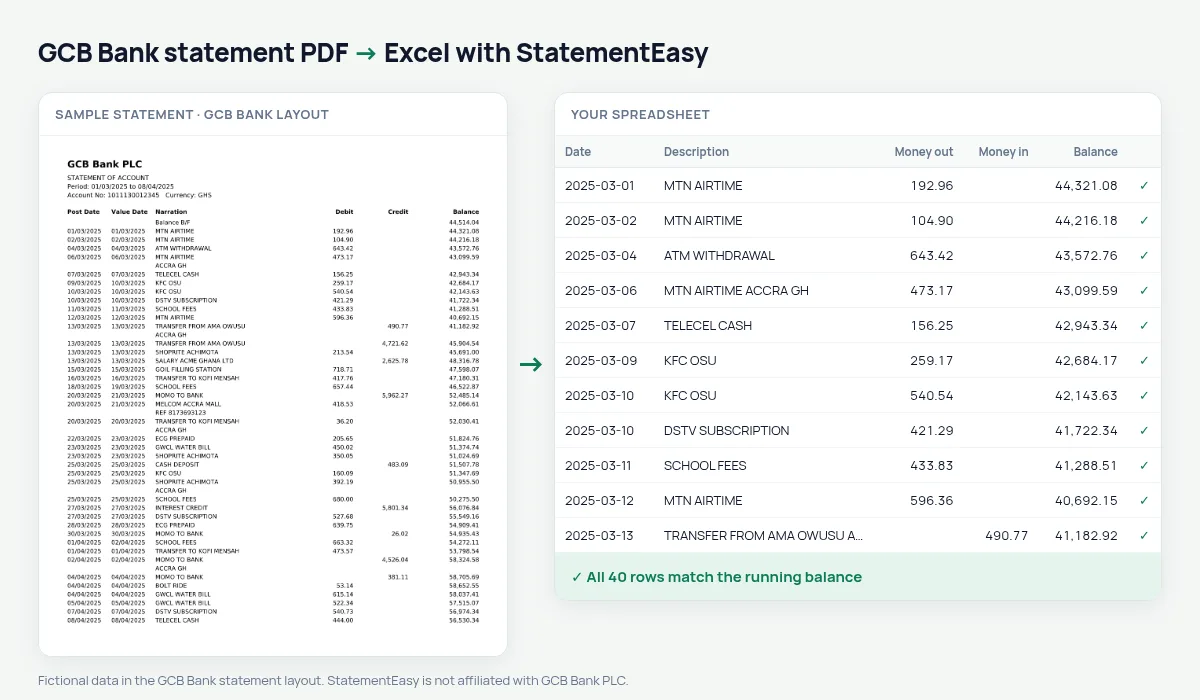
GCB Bank started in 1953 as the Bank of the Gold Coast and became Ghana Commercial Bank at independence. It still has one of the largest branch networks in the country, and many civil servants, teachers and traders receive their salary into a GCB account. Its statement lists Post Date, Value Date, Narration, Debit, Credit and Balance, opening with a Balance B/F line.
StatementEasy reads every transaction as one row, keeps both dates, takes the Balance B/F as the opening balance and checks that each balance equals the one before minus the debit or plus the credit. A row that does not add up is marked, so you know exactly where to look.
How to download your GCB statement
- Sign in to GCB Mobile or GCB Internet Banking. You can also ask a branch for a printed statement, but the downloaded PDF converts best.
- Open the account and choose Statement. Pick the start and end dates; six months is what most embassies ask for.
- Download the PDF.
- Drop it into the converter above. You get Excel, CSV, OFX or QuickBooks files in seconds.
GCB statement columns in your sheet
| On the statement | In your sheet |
|---|---|
| Post Date | Date |
| Value Date | Value date, its own column |
| Narration | Description |
| Debit | Money out |
| Credit | Money in |
| Balance | Balance, checked |
| Balance B/F | Opening balance, not a transaction |
Statements for a visa application
UK, US, Schengen and Canadian visa officers usually ask for three to six months of statements and look at three things: a steady income, the balance at the end of each month and large deposits shortly before you apply. The Monthly sheet in your download shows all three at a glance.
If the embassy wants a stamped copy from the branch, keep using it for the application; the spreadsheet is for you, so you can check the figures before you submit and explain any large lodgement in your cover letter.
Government salary and deductions
Public-sector salaries paid through the Controller and Accountant-General arrive with a long narration. Filter the description for SALARY and the sheet lists every pay day with the amount, so you can see the months a deduction or an arrear payment changed your take-home pay.
An example line
On the PDF: 14/03/2025 14/03/2025 ECG PREPAID 250.00 8,412.65. In your sheet: date 14/03/2025, money out 250.00, balance 8,412.65, and the balance before minus 250.00 must give exactly that figure.
Balance B/F is not a deposit
The Balance B/F line carries the balance from the previous period. It is read as the opening balance, never as money in, so the totals for the month are not inflated. When you combine several months, each Balance B/F should equal the closing balance of the month before.
Last tested October 2026. StatementEasy is not affiliated with GCB Bank PLC.
Questions
Does it work for GCB savings accounts?
Yes, as long as the statement shows debits, credits and a running balance.
Can I combine six monthly statements?
Yes. Drop them together and choose “All files combined” to get one sheet for the whole period, with each balance still checked.
What about a statement I received by email?
If it is a PDF with selectable text, it converts exactly like a downloaded one. A scanned paper statement is read with text recognition.
Is my statement uploaded?
Your browser reads the PDF first, on your device. Only if it cannot read it is the file read on our server, and deleted right after.
Is StatementEasy made by GCB Bank?
No. StatementEasy is an independent tool and is not affiliated with GCB Bank PLC.
Your next statement, in a spreadsheet
Free, no limits. No sign-up.