Kuda statement to Excel
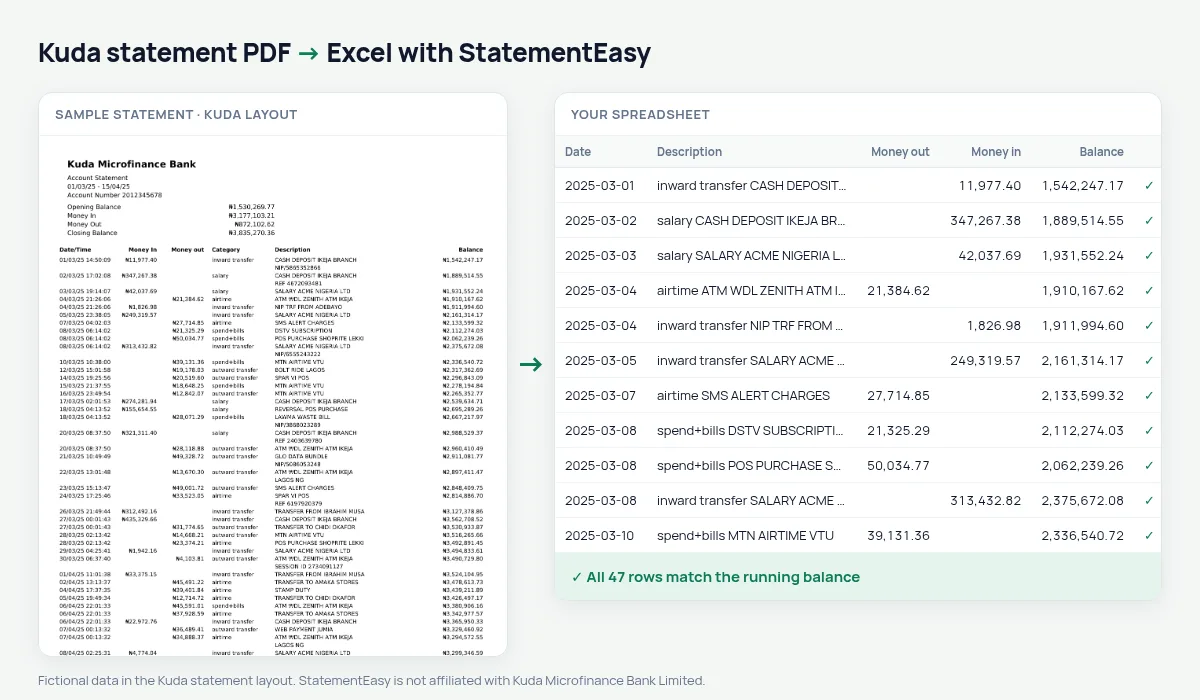
Turn your Kuda statement into a spreadsheet with money in, money out, the category and the balance on every row, checked line by line.
- Checked every row against your balance
- Private read on your device first
- Excel & CSV plus QuickBooks, Xero and Quicken files
- Free no sign-up, no page limits
Kuda statements put the money first: Date/Time, Money In, Money out, Category, To / From and Description, then the Balance at the end. Most converters expect the description before the amounts and end up with empty descriptions or amounts in the wrong column. StatementEasy recognises Kuda’s order, reads the date (the time is left out), keeps the category with the description and checks every balance.
Get your Kuda statement
- Open the Kuda app.
- Go to More (or Menu), then Statements.
- Pick the period and download or email the PDF.
- Drop the PDF here.
Kuda’s order, made usable
| On the Kuda statement | In your sheet |
|---|---|
| Date/Time 05/03/25 14:23:11 | Date 2025-03-05 |
| Money In | Money in |
| Money out | Money out |
| Category (inward transfer, spend+bills …) | Start of the description |
| Balance | Checked on every row |
Budget with Kuda’s own categories
Kuda already tags each transaction — inward transfer, outward transfer, spend+bills, airtime. Because the tag stays at the start of the description, you can filter by it in Excel, or use StatementEasy’s Categories sheet for monthly totals of food, transport, bills and more.
Kuda for freelancers
Freelancers who receive client payments into Kuda can convert a year of statements, filter inward transfers to total their income, and hand a clean spreadsheet or CSV to an accountant at tax time.
Last tested October 2026. StatementEasy is not affiliated with Kuda Microfinance Bank Limited.
Questions
Why does Kuda put the amounts before the description?
That is Kuda’s layout. StatementEasy finds the description column wherever it is, so the order does not matter.
Is the To / From name kept?
Yes, as part of the description.
Can I combine several months?
Yes. Drop the PDFs together and choose “All files combined”.
Is my statement uploaded?
Your browser reads the PDF first. Only if it cannot is the file read on our server, and deleted after reading.
Is StatementEasy made by Kuda?
No. StatementEasy is an independent tool and is not affiliated with Kuda Microfinance Bank Limited.
Your next statement, in a spreadsheet
Free, no limits. No sign-up.