Zenith Bank statement to Excel
Turn your Zenith Bank statement into a spreadsheet in naira, with debits, credits and the balance on every row, checked line by line.
- Checked every row against your balance
- Private read on your device first
- Excel & CSV plus QuickBooks, Xero and Quicken files
- Free no sign-up, no page limits
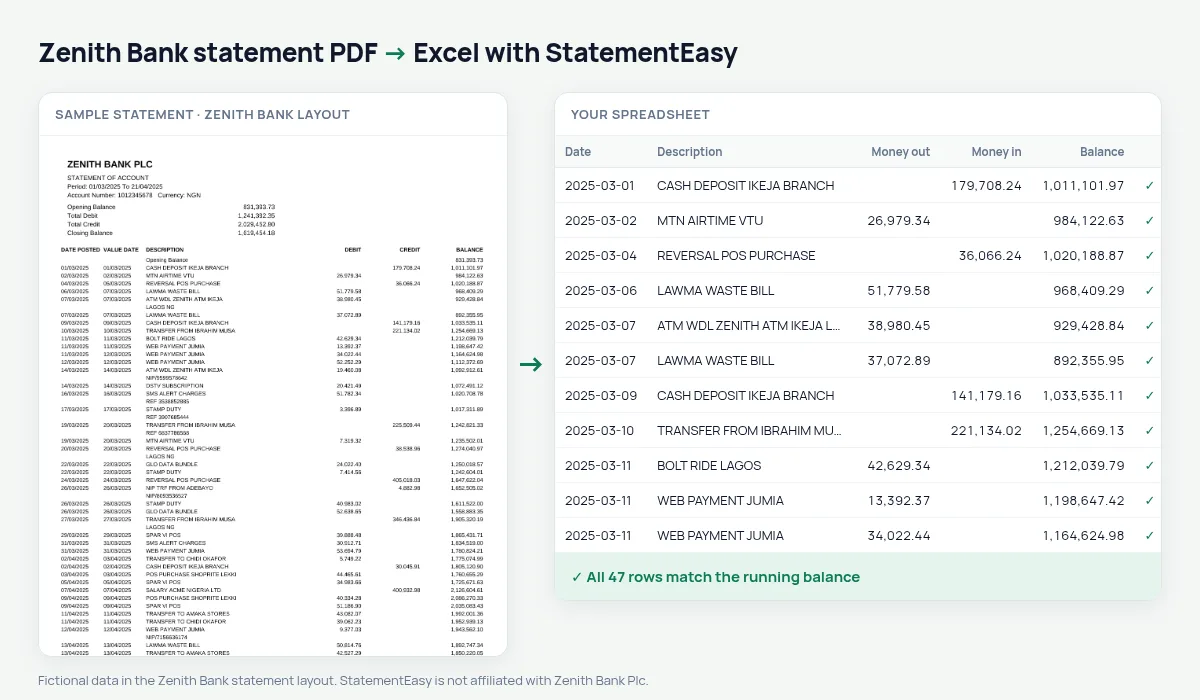
A Zenith Bank statement starts with a summary — opening balance, total debit, total credit, closing balance — and then lists DATE POSTED, VALUE DATE, DESCRIPTION, DEBIT, CREDIT and BALANCE. A busy month has hundreds of small lines: POS payments, transfers, airtime, SMS alert charges and stamp duty. StatementEasy reads every one of them as a row, keeps the value date in its own column, leaves the summary out of the transactions and checks each balance from the opening balance on.
Get your Zenith Bank statement
- Open the Zenith Bank app or Internet Banking.
- Choose Account Statement. Select the account and the period.
- Download the PDF or have it sent to your email. Emailed statements can be password-protected.
- Drop the PDF here. Type the password if it asks for one.
Zenith columns in your sheet
| On the Zenith statement | In your sheet |
|---|---|
| DATE POSTED | Date |
| VALUE DATE | Value date |
| DEBIT / CREDIT | Money out / money in |
| BALANCE | Checked on every row |
| Opening balance and totals summary | Not added as rows |
How much do charges cost you?
SMS alert fees, stamp duty on transfers above ₦10,000, card maintenance and transfer charges are small one by one and add up over a year. Filter the description for SMS, STAMP DUTY or CHARGE, or open the Categories sheet, where bank fees are grouped and totalled per month.
Zenith statements for a visa application
Embassies usually ask for the last six months, stamped by the bank, and look at regular income and the balance. Before you request the official statement, convert your own PDF and open the Monthly sheet — money in, money out and the closing balance of each month — and Insights, which lists large deposits you may be asked to explain. The bank’s stamped statement is still what you submit.
For your business books
Zenith current accounts used for a business can be exported to CSV for accounting software, or to Excel for your accountant. Reconcile compares the statement with an export from your books and shows the payments that appear on one side only.
Last tested October 2026. StatementEasy is not affiliated with Zenith Bank Plc.
Questions
My statement has hundreds of pages. Will it work?
Yes. Long statements are read page by page, and the balance is followed across every page break.
Can I convert a Zenith domiciliary (dollar) account statement?
Domiciliary statements are read by the same rules, with amounts in the account’s currency; the balance check on your file confirms the result.
My statement is password-protected. What do I do?
Drop the PDF and type the password when asked. It is used in your browser to open the file.
Is my statement uploaded?
Your browser reads the PDF first. Only if it cannot is the file read on our server, and deleted after reading.
Is StatementEasy made by Zenith Bank?
No. StatementEasy is an independent tool and is not affiliated with Zenith Bank Plc.
Your next statement, in a spreadsheet
Free, no limits. No sign-up.