Millennium bcp statement to Excel
Turn your Millennium bcp statement into a spreadsheet with full dates and every balance checked.
- Checked every row against your balance
- Private read on your device first
- Excel & CSV plus QuickBooks, Xero and Quicken files
- Free no sign-up, no page limits
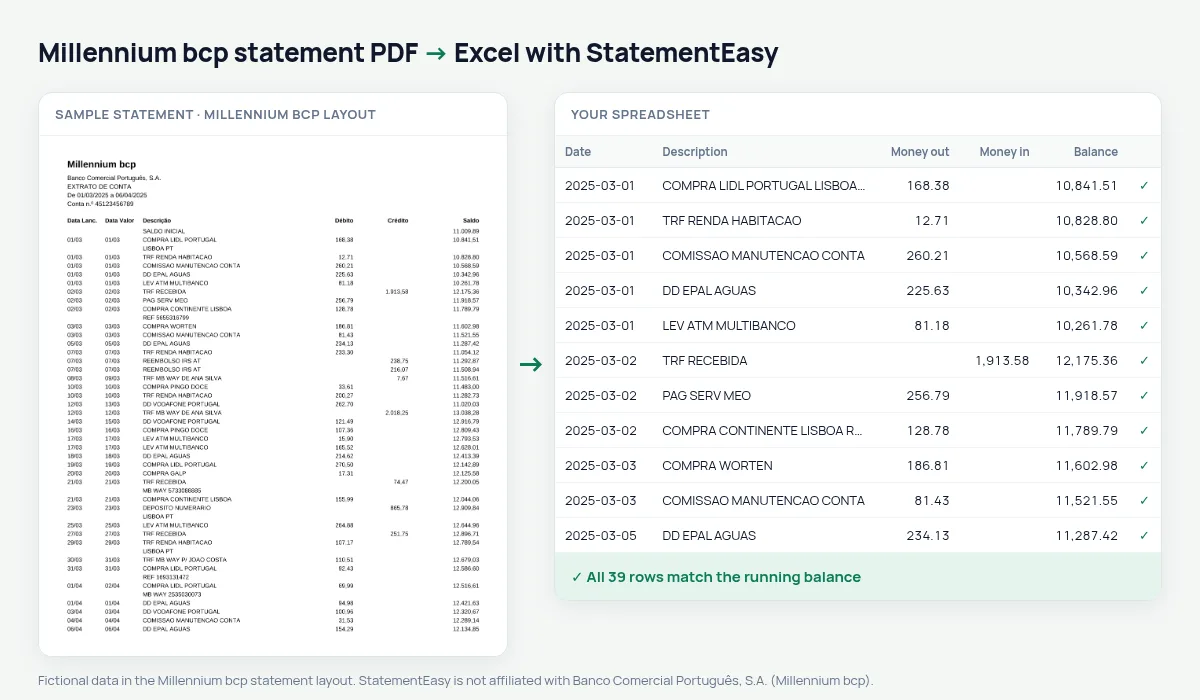
A Millennium bcp statement prints the posting and value dates as 05/03 without the year, then the description, Débito, Crédito and Saldo.
StatementEasy gives every date its year from the statement period — including across December and January — and checks each balance from the SALDO INICIAL.
Download your Millennium statement
- Open the Millennium app or website.
- Go to Contas, then Extratos.
- Download the PDF.
- Drop the PDF into the converter above.
Millennium columns in your sheet
| On the statement | In your sheet |
|---|---|
| 05/03 | 2025-03-05 |
| Débito / Crédito | Money out / money in |
| Saldo | Checked on every row |
Dates without a year
The year comes from the statement period, so a December–January statement gets the right year on every row.
For freelancers and small firms
Export CSV or Excel for your accountant and use the Categories sheet for sales, suppliers and bank fees.
A December–January statement
On a statement from 15/12/2024 to 14/01/2025, 28/12 gets 2024 and 03/01 gets 2025, so December and January appear as separate months.
Accounts, cards and savings
This page covers the current account; card and savings statements are separate, but card payments and transfers to savings appear in the account as debits.
From PDF to sheet
Your browser opens the PDF, reads each page, finds the Débito, Crédito and Saldo columns and only shows the sheet after checking the balances.
What your Millennium bcp spreadsheet contains
Each row of the file is one transaction: the date as a real date, the full description, money in and money out as numbers in separate columns, and the running balance where Millennium bcp prints one. Dates printed without the year come out complete, and the value date has its own column. A first tab summarises the statement — period, opening and closing balance, totals in and out, and whether the check passed — and the Monthly, Categories and Recurring sheets come in the same download.
Using it for IRS or a mortgage
Convert January to December for the IRS return, or the last months for a mortgage application: the Monthly sheet groups every transaction under the right month, even across a year change.
Freelancers can export CSV for invoicing software and use Categories to separate sales, suppliers and fees.
If something looks wrong
- A date in the wrong year — dates take their year from the printed period; check the PDF is a full statement with its header.
- A row does not match — it is highlighted and can be corrected.
- A card statement — card statements use a different layout.
Last tested October 2026. StatementEasy is not affiliated with Banco Comercial Português, S.A. (Millennium bcp).
Questions
Are dates without a year correct?
Yes, the year comes from the statement period.
Are credit card statements converted?
This page covers the account statement; card statements use another layout.
Does a December–January statement get the right years?
Yes, from the statement period.
Is my statement uploaded?
Your browser reads the PDF first, on your device. Only if it cannot read it is the file read on our server, and deleted right after.
Is StatementEasy made by Millennium bcp?
No. StatementEasy is an independent tool and is not affiliated with Banco Comercial Português, S.A. (Millennium bcp).
Your next statement, in a spreadsheet
Free, no limits. No sign-up.