ANZ statement to Excel
Turn your ANZ statement into a spreadsheet with withdrawals, deposits and the balance on every row — without the page totals.
- Checked every row against your balance
- Private read on your device first
- Excel & CSV plus QuickBooks, Xero and Quicken files
- Free no sign-up, no page limits
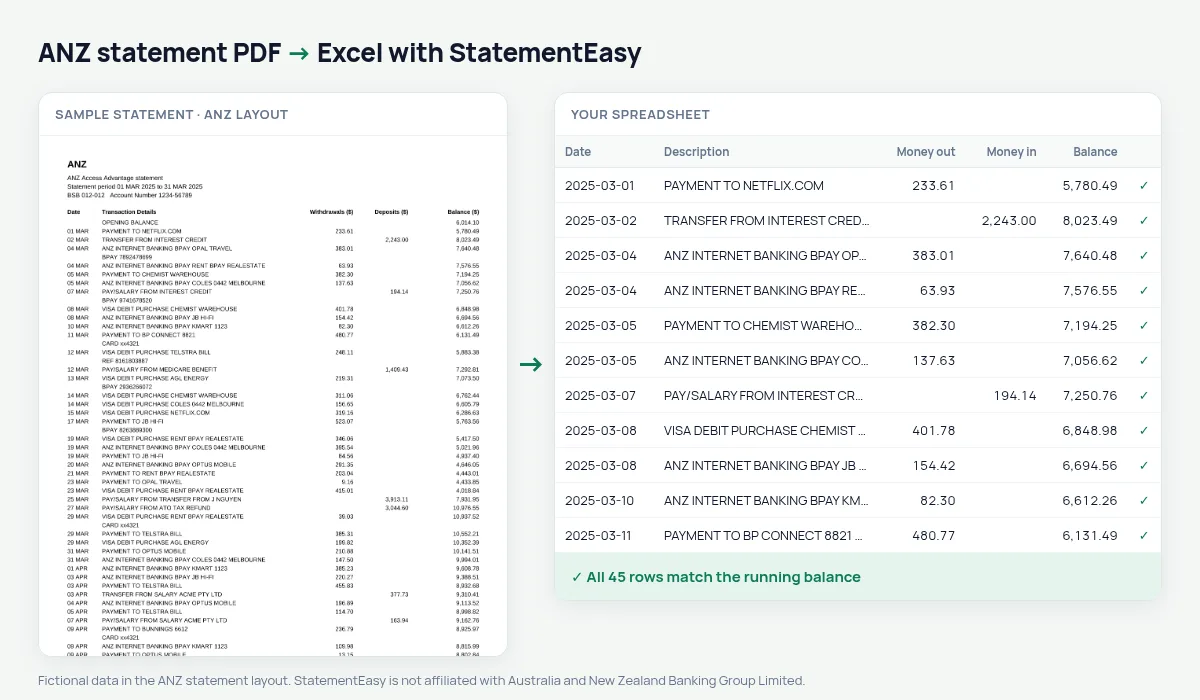
ANZ statements list Date, Transaction Details, Withdrawals ($), Deposits ($) and Balance ($), with dates like 05 MAR. Each page ends with TOTALS AT END OF PAGE and the next one starts with BALANCE BROUGHT FORWARD. Copied into a spreadsheet, those lines turn into fake transactions and double every total. StatementEasy leaves them out, gives every date its year and checks the running balance across all pages.
Download your ANZ statement
- Log on to ANZ Internet Banking or the ANZ App.
- Open the account, then Statements.
- Save the ANZ statement as a PDF.
- Drop the ANZ PDF into the converter above.
ANZ columns in your sheet
| On the ANZ statement | In your sheet |
|---|---|
| 05 MAR | 2025-03-05 |
| Withdrawals ($) | Money out |
| Deposits ($) | Money in |
| TOTALS AT END OF PAGE | Not added as rows |
| BALANCE BROUGHT FORWARD | Used for the check, not a row |
Why page totals break a copy-paste
A twelve-page statement has eleven page totals and eleven brought-forward lines. Add them to your data and every sum is wrong. Because StatementEasy follows the running balance from the opening balance to the last row, it knows which lines are transactions and which are carried totals.
ANZ statements for a home loan
Lenders usually want three months. Convert them together and open Insights for regular income, existing repayments and the lowest balance; the Monthly sheet shows money in, money out and the closing balance of each month.
ANZ VISA DEBIT purchases
Card purchases appear as VISA DEBIT PURCHASE followed by the merchant and often a card number line. StatementEasy joins those lines into one description, and the optional Payee column pulls out the merchant name so you can total spending per store.
Last tested October 2026. StatementEasy is not affiliated with Australia and New Zealand Banking Group Limited.
Questions
Does it work with ANZ Plus?
ANZ Plus statements have their own layout; they are read by the generic rules, and the balance check on your file shows whether everything was found.
Can I export to Xero?
Yes. Download Xero CSV, or plain CSV for other software.
Are VISA DEBIT purchases kept with the merchant name?
Yes. The whole description is kept, so you can filter by merchant.
Is my statement uploaded?
Your browser reads the PDF first. Only if it cannot is the file read on our server, and deleted after reading.
Is StatementEasy made by ANZ?
No. StatementEasy is an independent tool and is not affiliated with Australia and New Zealand Banking Group Limited.
Your next statement, in a spreadsheet
Free, no limits. No sign-up.