Banco do Brasil statement to Excel
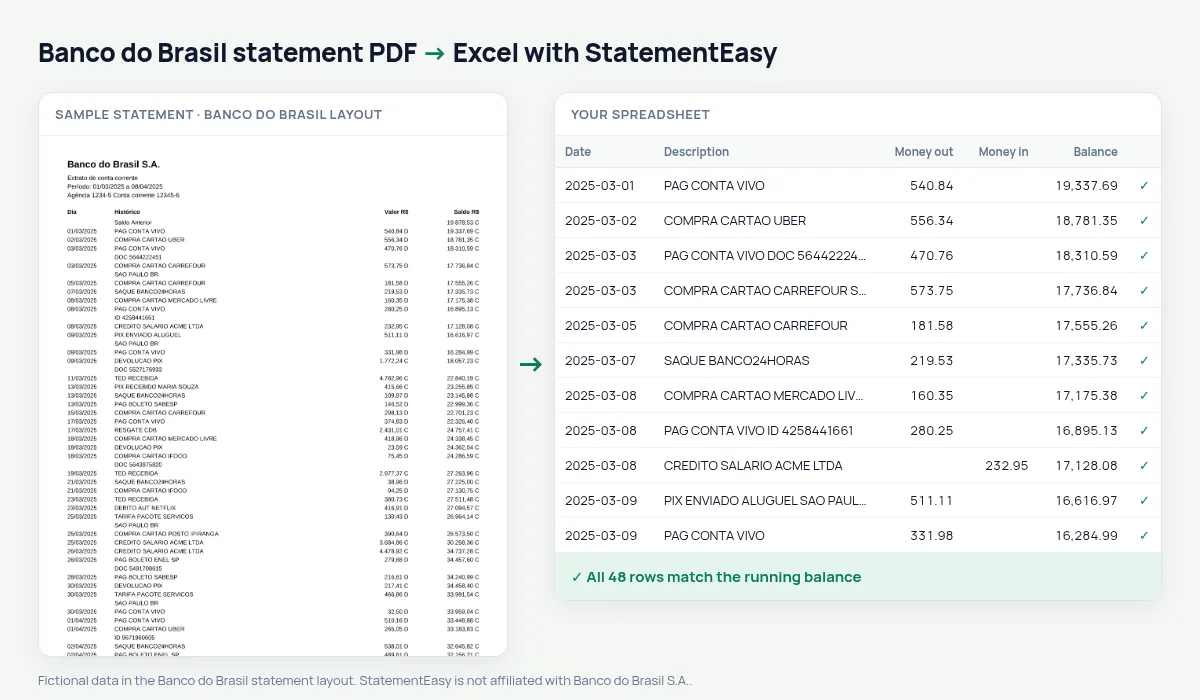
Turn your Banco do Brasil statement into a spreadsheet: every C becomes money in, every D money out.
- Checked every row against your balance
- Private read on your device first
- Excel & CSV plus QuickBooks, Xero and Quicken files
- Free no sign-up, no page limits
Banco do Brasil marks each amount with a letter: 150,00 D for a debit and 2.500,00 C for a credit; the balance carries one too. In a spreadsheet those letters turn numbers into text.
StatementEasy reads the letter, puts each amount in the right column as a real number and checks every balance.
Download your Banco do Brasil statement
- Open the BB app or internet banking.
- Open Extrato and choose the period.
- Save it as a PDF.
- Drop the PDF into the converter above.
Banco do Brasil columns in your sheet
| On the statement | In your sheet |
|---|---|
| 150,00 D | Money out 150.00 |
| 2.500,00 C | Money in 2500.00 |
| Saldo C / D | Checked on every row |
C and D
C is a credit, D a debit; a balance marked D is overdrawn. In the sheet the letters disappear and balances become positive or negative numbers.
Salaries and pensions
Many public salaries and pensions are paid into Banco do Brasil accounts; the Monthly sheet shows each payment month by month.
From statement to sheet
05/03/2025 Pix - Enviado JOAO SILVA 150,00 D 2.350,00 C becomes date 2025-03-05, description “Pix - Enviado JOAO SILVA”, money out 150.00, balance 2350.00. A balance of 120,00 D becomes −120.00.Ourocard and the account
This page covers the current account statement; Ourocard card bills use a different layout, though their payments appear in the account as debits.
For your accountant
Export Excel or OFX; with every amount already in a money-in or money-out column, no formula is needed for the C and D letters.
What your Banco do Brasil spreadsheet contains
Each row of the file is one transaction: the date as a real date, the full description, money in and money out as numbers in separate columns, and the running balance where Banco do Brasil prints one. The C and D letters disappear: money in and money out each have a column, and an overdrawn balance becomes a negative number. A first tab summarises the statement — period, opening and closing balance, totals in and out, and whether the check passed — and the Monthly, Categories and Recurring sheets come in the same download.
Using it for salaries, pensions and rural accounts
Many public-sector salaries and pensions are paid into Banco do Brasil accounts. The Monthly sheet shows each payment month by month, so a late or missing credit is obvious.
Farmers who run crop sales and rural credit through BB can use the Categories sheet to separate sales, inputs, fuel and loan instalments across the season, and export OFX for farm-management software.
If something looks wrong
- A balance with D — that means overdrawn; it appears as a negative number.
- A row does not match — it is highlighted and can be corrected in the table.
- An Ourocard bill — card bills use a different layout from the account statement.
Last tested October 2026. StatementEasy is not affiliated with Banco do Brasil S.A..
Questions
What does D after the balance mean?
The account is overdrawn; the balance appears as a negative number.
Is the Ourocard bill supported?
This page covers the account statement; the card bill uses another layout.
Why is the balance negative in my sheet?
Because it was marked D (overdrawn) on the statement.
Is my statement uploaded?
Your browser reads the PDF first, on your device. Only if it cannot read it is the file read on our server, and deleted right after.
Is StatementEasy made by Banco do Brasil?
No. StatementEasy is an independent tool and is not affiliated with Banco do Brasil S.A..
Your next statement, in a spreadsheet
Free, no limits. No sign-up.