Bradesco statement to Excel
Turn your Bradesco statement into a spreadsheet with credits and debits in the right columns and every balance checked.
- Checked every row against your balance
- Private read on your device first
- Excel & CSV plus QuickBooks, Xero and Quicken files
- Free no sign-up, no page limits
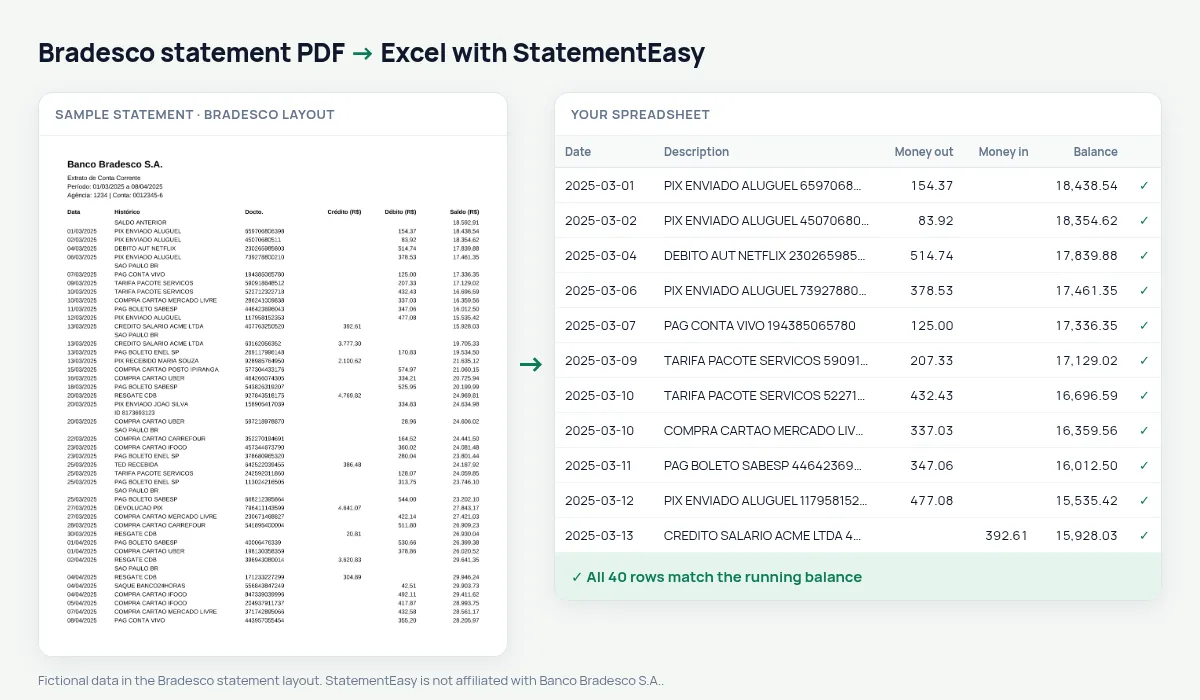
A Bradesco statement lists Data, Histórico, Docto., Crédito (R$), Débito (R$) and Saldo (R$) — with the credit column before the debit column, the opposite of most banks.
StatementEasy reads the columns by their headers, keeps the document number in its own column and checks every row against the printed balance.
Download your Bradesco statement
- Open the Bradesco app or internet banking.
- Open Extrato and choose the period.
- Export or save it as a PDF.
- Drop the PDF into the converter above.
Bradesco columns in your sheet
| On the statement | In your sheet |
|---|---|
| Crédito / Débito | Money in / money out |
| Docto. | Reference column |
| Saldo | Checked on every row |
Credits first
Columns are identified by name, and the balance check on every row confirms no credit was read as a debit.
For businesses
Export OFX for accounting software and use the Categories sheet to split clients, suppliers, taxes and fees.
A line, explained
In 05/03/2025 PIX RECEBIDO MARIA SOUZA 0012345 1.200,00 8.450,30, 0012345 is the document number, 1.200,00 sits in the Crédito column and 8.450,30 is the balance after it — the relationship checked on every line.
Bank fees
Package, TED and card fees appear as their own debits; the Recurring sheet shows what you pay each month and the Categories sheet the yearly total.
Fixing a line
If a line is blurred or unusual, the check points to it. Click the cell to correct it before downloading.
What your Bradesco spreadsheet contains
Each row of the file is one transaction: the date as a real date, the full description, money in and money out as numbers in separate columns, and the running balance where Bradesco prints one. The document number (Docto.) has its own column, which makes matching a payment with its receipt a simple search. A first tab summarises the statement — period, opening and closing balance, totals in and out, and whether the check passed — and the Monthly, Categories and Recurring sheets come in the same download.
Using it for a business or a household budget
Small businesses and self-employed professionals often run everything through a Bradesco account. The Categories sheet separates client receipts, suppliers, payroll, taxes and bank fees month by month, and an OFX export goes straight into accounting software.
At home, the Recurring sheet lists utility bills, phone and internet with their usual amount, so you can see what the household costs each month.
If something looks wrong
- A row does not match the balance — it is highlighted; click the cell to correct it.
- Credits and debits look swapped — they are read by header, and the balance on every line confirms the direction.
- A scanned statement — it can be read with OCR, but the PDF from the app or internet banking is exact.
Last tested October 2026. StatementEasy is not affiliated with Banco Bradesco S.A..
Questions
Can credits and debits get swapped?
No. They are read by header and every row is checked against the balance.
Is the document number kept?
Yes, in its own column.
Can I see a year of bank fees?
Yes. Filter by “TARIFA” or use the Categories sheet.
Is my statement uploaded?
Your browser reads the PDF first, on your device. Only if it cannot read it is the file read on our server, and deleted right after.
Is StatementEasy made by Bradesco?
No. StatementEasy is an independent tool and is not affiliated with Banco Bradesco S.A..
Your next statement, in a spreadsheet
Free, no limits. No sign-up.