Itaú statement to Excel
Turn your Itaú statement into a spreadsheet, with each day checked against the printed balance.
- Checked every row against your balance
- Private read on your device first
- Excel & CSV plus QuickBooks, Xero and Quicken files
- Free no sign-up, no page limits
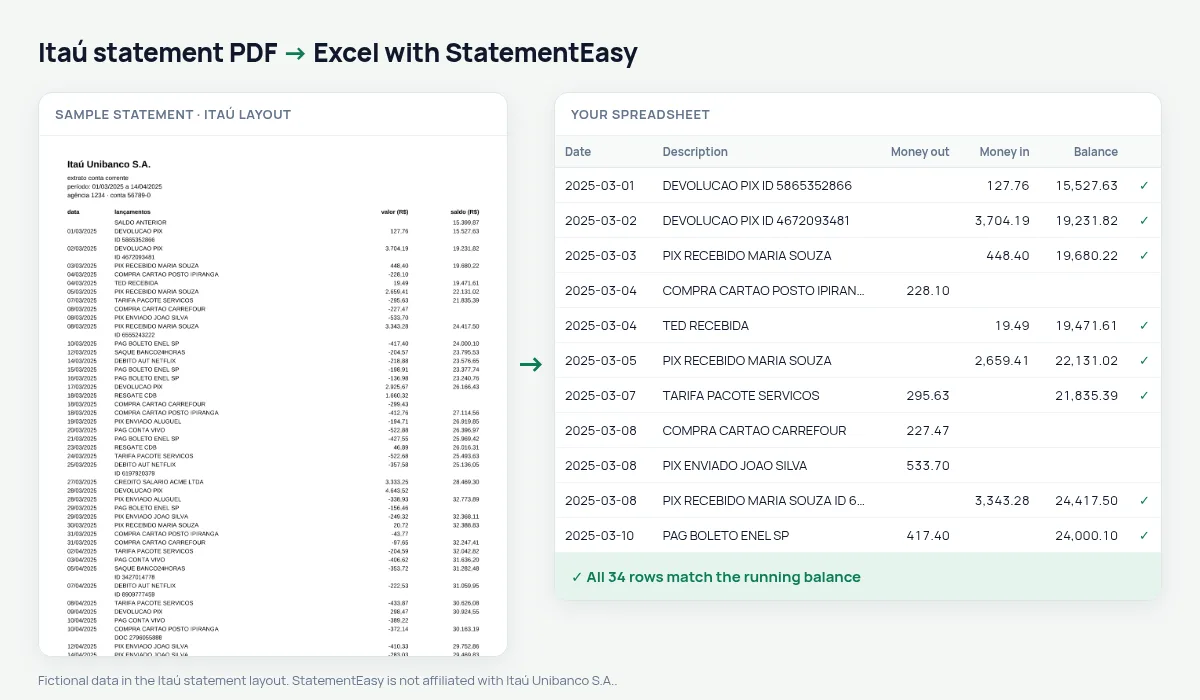
An Itaú checking statement lists data, lançamentos, a signed valor (R$) — -89,90 for money out — and the saldo, which is printed only on the last transaction of each day.
StatementEasy reads every line, splits money out and money in, and checks each day: the previous balance plus the day’s movements must equal the balance printed that evening.
Download your Itaú statement
- Open the Itaú app or internet banking.
- Open Extrato and choose the period.
- Save or share it as a PDF.
- Drop the PDF into the converter above.
Itaú columns in your sheet
| On the statement | In your sheet |
|---|---|
| -89,90 | Money out 89.90 |
| saldo, once a day | Checked each day |
| SALDO ANTERIOR | Opening balance, not a row |
A balance once a day
Many converters only check statements with a balance on every line. Here the transactions of each day are grouped and compared with that day’s balance, so every day of the month is confirmed.
Pix, TED and boletos
PIX, TED, boleto and direct-debit lines keep their full description, so you can filter and total them.
Future entries and blocked balance
Itaú statements may end with scheduled future entries and blocked-balance or limit information. Those lines are not transactions of the period and are left out of the sheet and the check.
One day, checked
Say 05/03 has a Pix received of 1.200,00, a purchase of -89,90 and a boleto of -310,45; the balance is printed only next to the boleto. The three movements are added to the previous day’s balance and compared with it.
Personal and business accounts
Personal checking statements follow this layout. Business accounts may print other columns; the generic reader then finds them by position and the balance check confirms the result.
What your Itaú spreadsheet contains
Each row of the file is one transaction: the date as a real date, the full description, money in and money out as numbers in separate columns, and the running balance where Itaú prints one. The balance appears on the rows where Itaú prints it — the last transaction of each day — and every day is marked as checked. A first tab summarises the statement — period, opening and closing balance, totals in and out, and whether the check passed — and the Monthly, Categories and Recurring sheets come in the same download.
Using it for a mortgage, rent or your accountant
Brazilian lenders usually ask for the last three to six statements together with payslips. Convert them in one go: Insights shows the salary credits, existing loan instalments and the lowest balance of each month — the figures a credit analyst looks at first.
For bookkeeping, export OFX to import the account into accounting software, or Excel for your accountant; dates and amounts are already real values.
If something looks wrong
- A day does not match — that day is highlighted; one of its lines was misread, and you can correct it in the table.
- Future entries listed — scheduled entries at the end of the statement are left out on purpose.
- A business account — other columns are found by the generic reader and the balance check tells you if all was read.
Last tested October 2026. StatementEasy is not affiliated with Itaú Unibanco S.A..
Questions
Why do some rows have no balance?
Itaú prints the balance only on the last transaction of the day; the check is done per day.
Are future entries included?
No, only the transactions of the period.
Can I use it for my Brazilian tax return?
It helps find and total values; the return itself should use the bank’s income report.
Is my statement uploaded?
Your browser reads the PDF first, on your device. Only if it cannot read it is the file read on our server, and deleted right after.
Is StatementEasy made by Itaú?
No. StatementEasy is an independent tool and is not affiliated with Itaú Unibanco S.A..
Your next statement, in a spreadsheet
Free, no limits. No sign-up.