Bank of Baroda statement to Excel
Turn your Bank of Baroda statement into a spreadsheet — narrations kept whole, money out and in as numbers, and the balance checked on every line.
- Checked every row against your balance
- Private read on your device first
- Excel & CSV plus QuickBooks, Xero and Quicken files
- Free no sign-up, no page limits
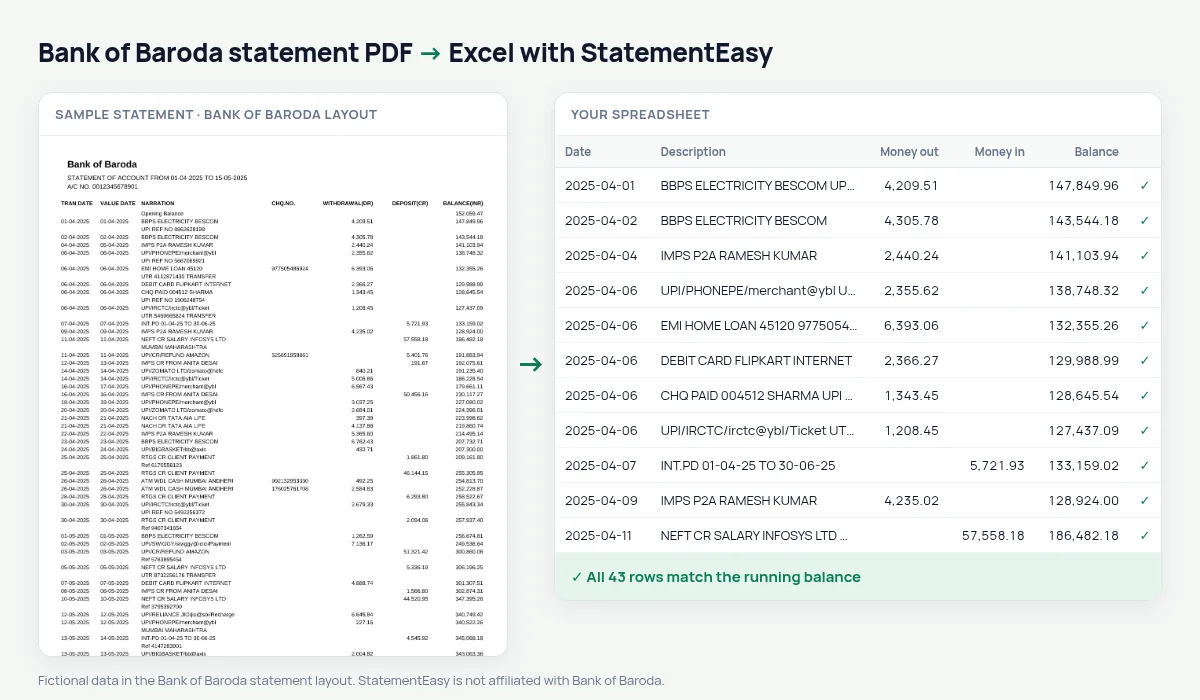
Bank of Baroda prints its column titles in capitals with the direction in brackets: TRAN DATE, VALUE DATE, NARRATION, CHQ.NO., WITHDRAWAL(DR), DEPOSIT(CR), BALANCE(INR). Accounts moved over from Vijaya Bank and Dena Bank in 2019 get the same statement. StatementEasy recognises these titles, takes the Opening Balance row as the starting point and checks each balance after it.
Get the PDF from bob World
- Log in to bob World Internet banking.
- Open Accounts, then Account Statement. Pick the account and the period.
- Download the statement as PDF.
- Drop the PDF here.
In the bob World app, the statement is on the account screen. A statement printed at the branch and scanned is read with OCR, which is less exact than the downloaded PDF.
From the statement to your sheet
| On the BOB statement | In your sheet |
|---|---|
| TRAN DATE / VALUE DATE | Date and value date columns |
| NARRATION | Description, joined if it wraps |
| WITHDRAWAL(DR) | Money out |
| DEPOSIT(CR) | Money in |
| BALANCE(INR) | Balance, checked on every row |
Business and trade accounts
Bank of Baroda current accounts often carry GST payments, supplier transfers and cheque deposits in the same month. The Categories sheet separates them, and Reconcile matches the statement with an export from your books to show what is missing on either side.
e-statement or Internet banking statement
Bank of Baroda can email a monthly e-statement, or you can download a statement for any period from bob World. Both are text PDFs. The downloaded statement lets you pick the exact dates — a financial year for your return, or the last six months for a loan — so it is usually the more useful one to convert.
What a converted BOB statement is used for
- Income tax: total the interest credits and other income for the year in the Categories sheet.
- Loans: Insights lists EMIs, salary and month-end balances in one place.
- Bookkeeping: export CSV, QBO or Xero CSV for your accounting software.
- Disputes: search the spreadsheet for a payee or an amount instead of scrolling through the PDF.
Last tested October 2026. StatementEasy is not affiliated with Bank of Baroda.
Questions
Are Vijaya Bank and Dena Bank statements supported?
Statements printed by Bank of Baroda for those accounts use its layout and are read the same way.
Is the cheque number kept?
When a CHQ.NO. is printed it is kept with the transaction; rows without one are not changed.
My PDF needs a password. What now?
Drop it and type the password when asked. It is used in your browser to open the file.
Does it work with Bank of Baroda current accounts?
Current account statements use the same columns as savings accounts and are read the same way, however many transactions they hold.
Is StatementEasy made by Bank of Baroda?
No. StatementEasy is an independent tool and is not affiliated with Bank of Baroda.
Your next statement, in a spreadsheet
Free, no limits. No sign-up.