ICICI Bank statement to Excel
Turn the ICICI detailed statement into a spreadsheet, with transaction remarks kept whole and withdrawals, deposits and balance as numbers.
- Checked every row against your balance
- Private read on your device first
- Excel & CSV plus QuickBooks, Xero and Quicken files
- Free no sign-up, no page limits
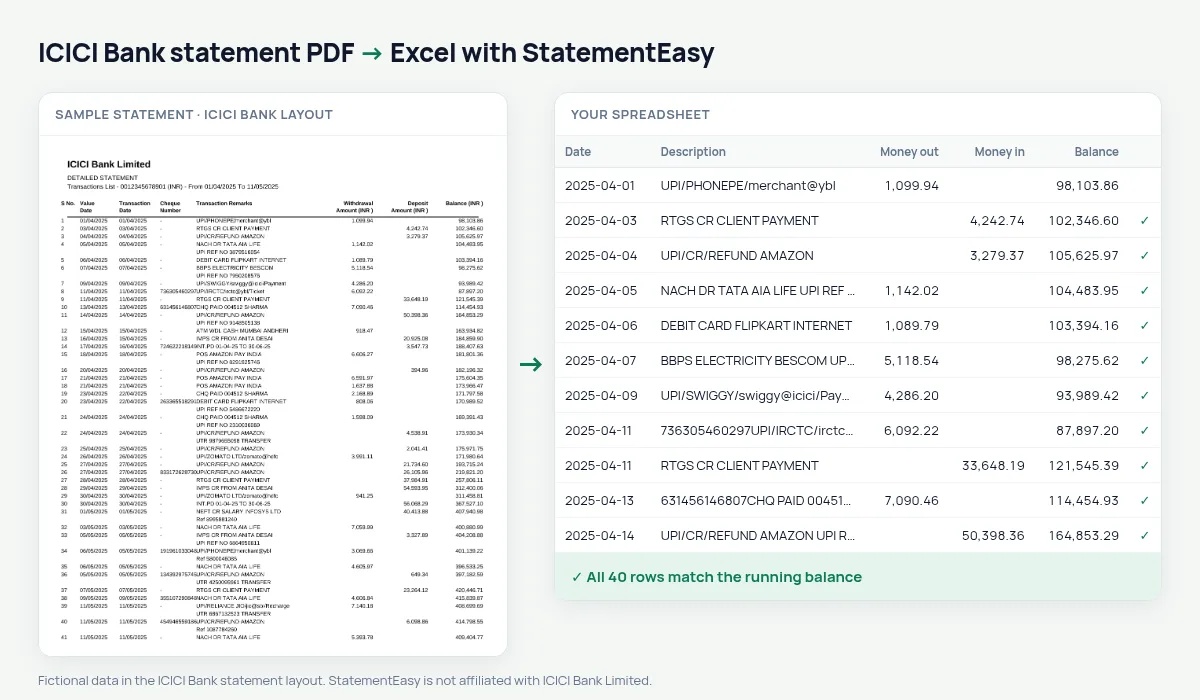
The ICICI detailed statement has eight columns: S No., Value Date, Transaction Date, Cheque Number, Transaction Remarks, Withdrawal Amount (INR ), Deposit Amount (INR ) and Balance (INR ). The remarks column is narrow, so a single UPI payment often fills three or four lines. StatementEasy keeps those lines as one description, keeps the serial number out of the date, and checks each balance.
Download the detailed statement
- Log in to ICICI Bank Internet Banking.
- Open My Accounts, then Bank Accounts, then Account Statement. Choose “Detailed statement” if you are offered a choice.
- Pick the period and download as PDF.
- Drop the PDF here. Type the password if the file is locked.
In iMobile, the statement is under Accounts, on the account itself. Emailed ICICI statements are often protected with a password built from your name and date of birth; the email explains the format.
Two dates per row
ICICI prints a value date and a transaction date. They are the same for most rows and differ for cheques and some transfers. StatementEasy keeps both, each in its own date column, so neither is lost and you can sort by either.
What the remarks become
| In Transaction Remarks | In your sheet |
|---|---|
| UPI/412345678901/Payment from PhonePe/… over 3 lines | One description |
| NEFT-…-SALARY | Categorised as income |
| ATM/CASH WDL/… | Categorised as cash |
| Cheque Number - | Left out of the description |
Detailed statement or older layout
Besides the detailed statement, ICICI has older and shorter layouts with columns such as Particulars, Withdrawals, Deposits and Balance, without the serial number. The reader finds the date, description and money columns by their titles and positions, not by a fixed template, so those layouts are read too. The balance check on your own file tells you straight away whether every row was found.
Hundreds of UPI payments a month
An ICICI account used with Google Pay or PhonePe can easily have 300 small debits a month. In the spreadsheet they become sortable rows; the Categories sheet totals food, shopping, travel and bills, and Insights lists recurring payments such as subscriptions and EMIs — useful for a budget, or to spot a payment you forgot to cancel.
For business accounts and your accountant
ICICI current account statements can be exported to CSV with separate columns for date, description, money out and money in, which most accounting software in India can import. For QuickBooks choose QBO; for Xero, the Xero CSV.
Last tested October 2026. StatementEasy is not affiliated with ICICI Bank Limited.
Questions
Does it read the ICICI statement with S No. and without?
Yes. Both layouts have the same money columns; the serial number, when it is there, is ignored.
Can I send the result to Tally or QuickBooks?
Download CSV for import, or QBO and IIF for QuickBooks. The Excel file keeps every column if you prefer to map it yourself.
Is the statement read on my device?
Your browser reads the PDF first. Only if it cannot is the file read on our server, and deleted after reading.
Which date is used for each row?
The transaction date. ICICI prints the value date first, so StatementEasy recognises the column titles and puts the transaction date on the row and the value date in its own column.
Is StatementEasy made by ICICI Bank?
No. StatementEasy is an independent tool and is not affiliated with ICICI Bank Limited.
Your next statement, in a spreadsheet
Free, no limits. No sign-up.