Kotak Mahindra Bank statement to Excel
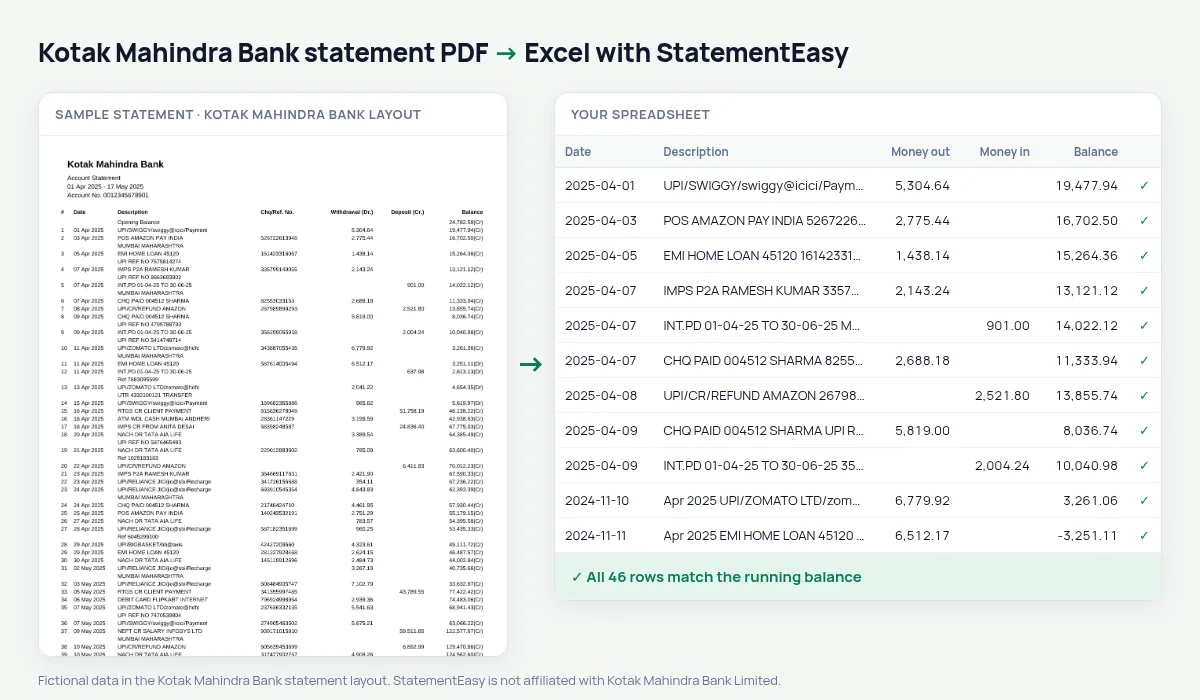
Turn your Kotak or Kotak 811 account statement into a spreadsheet, with Withdrawal (Dr.) and Deposit (Cr.) as numbers and the balance checked on every row.
- Checked every row against your balance
- Private read on your device first
- Excel & CSV plus QuickBooks, Xero and Quicken files
- Free no sign-up, no page limits
Kotak statements write the balance with its side stuck to the number — 25,000.00(Cr) — which spreadsheets cannot add up. A balance marked (Dr) means the account is overdrawn. StatementEasy turns the first into 25000.00 and the second into a negative balance, so the running balance can be checked line by line, from the Opening Balance row to the last transaction.
Download the Kotak statement
- Log in to Kotak Net Banking or open the Kotak app. Kotak 811 accounts use the same app.
- Open the account, then Statement.
- Pick the period and download the PDF.
- Drop the file here. Type the password if the PDF is locked.
Kotak columns, one by one
| On the Kotak statement | In your sheet |
|---|---|
| # (row number) | Left out |
| 01 Apr 2025 | A real date |
| Withdrawal (Dr.) | Money out |
| Deposit (Cr.) | Money in |
| 25,000.00(Cr) | Balance 25000.00 |
| 1,250.00(Dr) | Balance −1250.00 |
Spending, month by month
Many Kotak 811 accounts are used mostly for UPI. The Insights tab groups those payments by merchant and by month, shows recurring ones such as subscriptions, and the Categories sheet totals food, travel, bills and shopping — useful for a budget or for a loan application.
Reading an overdrawn Kotak account
When a Kotak balance is followed by (Dr), the account is below zero. StatementEasy writes those balances as negative numbers, so a month with an overdraft still checks row by row, and the Monthly sheet shows how low the balance went.
Kotak statements for a rental or loan application
Landlords and lenders look at three things: regular income, regular outgoing payments, and the balance at month end. Convert three to six months together and open Insights: salary credits, rent, EMIs and subscriptions are grouped, and the month-end balances are listed. The lender report built from it is a summary for you — the lender still expects the bank’s own PDF.
Last tested October 2026. StatementEasy is not affiliated with Kotak Mahindra Bank Limited.
Questions
Does it work with Kotak current account statements?
They use the same money and balance columns and are read the same way.
What if a balance is shown without (Cr)?
A balance without a marker is read as positive, the same as (Cr).
Can I use the result in Tally?
Download the CSV or Excel file: date, description, money out, money in and balance are separate columns, ready to map when you import them into your accounting software.
What is the # column on a Kotak statement?
It is the row number. It is not part of the date or the amount, so it is left out.
Is StatementEasy made by Kotak Mahindra Bank?
No. StatementEasy is an independent tool and is not affiliated with Kotak Mahindra Bank Limited.
Your next statement, in a spreadsheet
Free, no limits. No sign-up.