SBI statement to Excel
Turn your State Bank of India account statement into a spreadsheet, with debits, credits and the balance in separate columns and every row checked.
- Checked every row against your balance
- Private read on your device first
- Excel & CSV plus QuickBooks, Xero and Quicken files
- Free no sign-up, no page limits
SBI statements print their column titles over two lines — Txn / Date, Value / Date, Ref No./Cheque / No. — and start with a line like Balance as on 1 Apr 2025 : 75,222.71. Split titles like these are easy to misread as a row of data. StatementEasy joins them into one title per column, works out the opening balance from the first transaction, and checks every row after it — so you can compare the result with the “Balance as on” figure at the top.
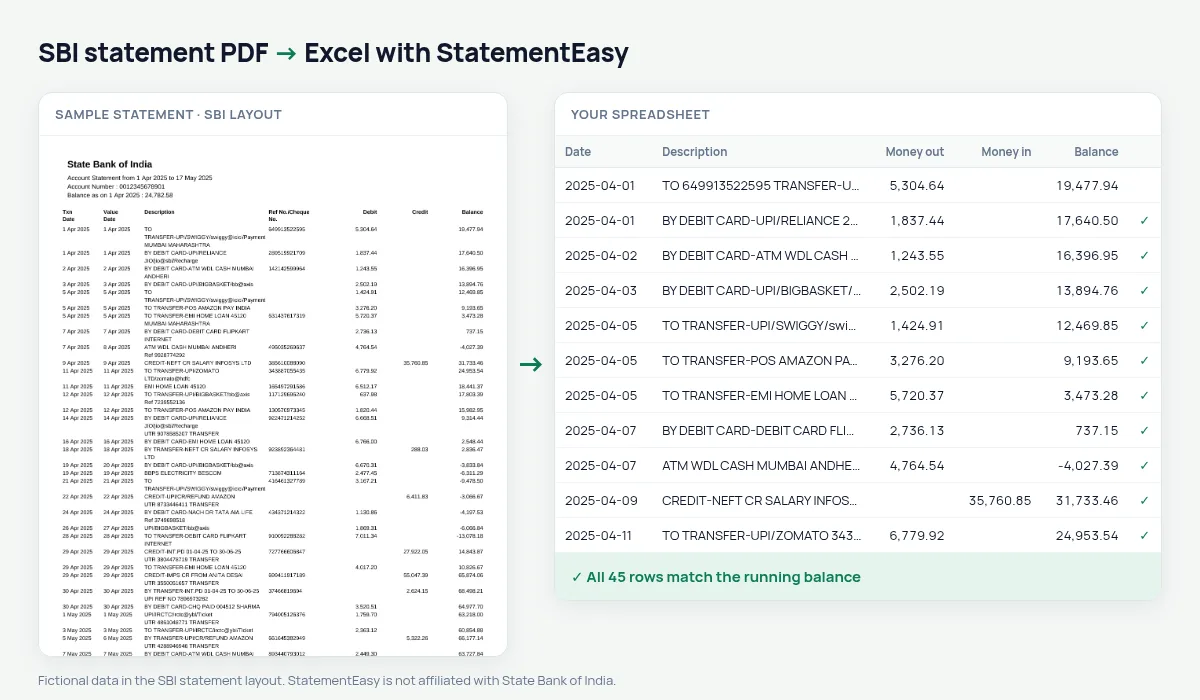
Download the statement from OnlineSBI
- Log in to OnlineSBI (retail). Personal banking, with your username and password.
- Open My Accounts & Profile, then Account Statement. Select the account.
- Choose the period and “View in PDF” or download. A date range up to a year works.
- Save the PDF and drop it here.
In the YONO SBI app, open the account and choose Account Statement to get the PDF. Statements SBI emails to you are usually locked with a password made of the last five digits of your registered mobile number and your date of birth (DDMMYY); the email says which.
How SBI statement details are read
| On the SBI statement | In your sheet |
|---|---|
| 1 Apr 2025 | A real date, exported in the format you choose |
| Txn Date and Value Date | Two separate date columns |
| TO TRANSFER-UPI/DR/… over two lines | One description |
| 1,25,000.00 | 125000.00 |
| Balance as on … | Not added as a row; matches the opening balance |
For loans, visas and tax
SBI statements are the ones most often asked for with education loans, home loans and visa files. The Insights tab shows income per month, EMIs and other recurring payments, and large credits someone may ask about. For your ITR, filter the credits to find interest and other income — the Categories sheet adds them up.
OnlineSBI, YONO or branch: which file works best
The statement from OnlineSBI is a text PDF with the seven columns described above and gives the most exact result. The YONO SBI statement and the monthly e-statement sent by email are also text PDFs; their header can look slightly different, but the money columns are the same, and the balance check on your file confirms the result. A passbook page or a statement stamped at the branch and scanned is an image and is read with OCR (beta).
Long narrations and reference numbers
SBI narrations such as TO TRANSFER-UPI/DR/412345678901/SWIGGY/YESB/… rarely fit on one line. StatementEasy joins the lines of each transaction into one description. When a narration wraps, the reference number printed beside it can end up inside the description rather than at the end; the amounts and the balance are not affected, and every digit of the reference is kept.
An SBI statement for an education loan or a visa
Lenders and consulates usually want six to twelve months. Convert them together with “All files combined” and open the Monthly sheet: it shows money in, money out and the closing balance of each month on one line. Large one-off deposits stand out in Insights — those are the ones you may be asked to explain, so it helps to know them before you submit.
Last tested October 2026. StatementEasy is not affiliated with State Bank of India.
Questions
Can I convert an SBI passbook scan?
A scanned or photographed passbook is read with OCR, which is less reliable than a downloaded PDF. Use the statement from OnlineSBI or YONO when you can.
My statement covers more than one page. Is the balance check still right?
Yes. Rows are followed across pages, and the balance after the last row is compared with the closing balance.
Does it work for SBI current accounts?
Current account statements use the same columns and are read the same way.
Does it work with SBI pension and salary package accounts?
They use the same statement columns as savings accounts and are read the same way.
Is StatementEasy made by SBI?
No. StatementEasy is an independent tool and is not affiliated with State Bank of India.
Your next statement, in a spreadsheet
Free, no limits. No sign-up.