HDFC Bank statement to Excel
Turn the HDFC statement from NetBanking or your email into a clean spreadsheet: one row per transaction, amounts as numbers, the closing balance checked on every line.
- Checked every row against your balance
- Private read on your device first
- Excel & CSV plus QuickBooks, Xero and Quicken files
- Free no sign-up, no page limits
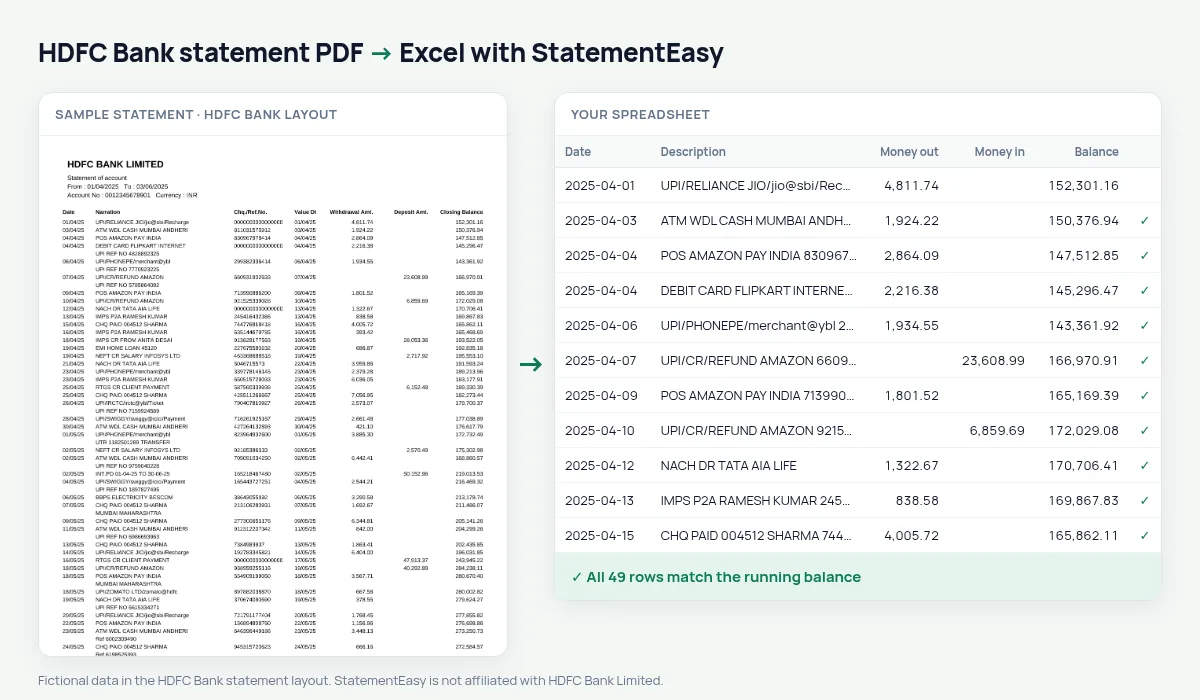
An HDFC Bank statement has seven columns — Date, Narration, Chq./Ref.No., Value Dt, Withdrawal Amt., Deposit Amt. and Closing Balance — and ends with a STATEMENT SUMMARY block. Copy it into Excel by hand and the 16-digit reference numbers turn into scientific notation, long UPI narrations split over two rows, and the summary lands in the middle of your data. StatementEasy gives you one row per transaction — date, value date, description with its reference, money out, money in, balance — and leaves the summary out.
Download the statement from HDFC NetBanking
- Log in to HDFC Bank NetBanking. Use the customer ID and password you use for the account.
- Open Accounts, then Enquire, then A/c Statement. Choose the account if you have more than one.
- Choose the period and PDF as the format. For a full year, pick 1 April to 31 March.
- Download the file and drop it here. If the PDF asks for a password, type it here too.
Statements HDFC sends by email are usually locked with your customer ID as the password. It is used in your browser to open the file and is only sent along with the file if our server has to read it.
What happens to each part of the statement
| On the HDFC statement | In your sheet |
|---|---|
| Narration over two lines | One description, UPI ID or UTR kept |
| Chq./Ref.No. 0000412345678901 | Added to the description, all 16 digits kept |
| Empty reference 0000000000000000 | Left out |
| Value Dt | Its own date column |
| Withdrawal Amt. / Deposit Amt. | Money out / money in, as numbers |
| STATEMENT SUMMARY | Not added as a row |
The summary checks the whole file
The summary at the end of an HDFC statement lists the opening balance, the number of debits and credits, their totals and the closing balance. StatementEasy reads every transaction and checks each Closing Balance against the previous one, from the opening balance to the last row. The totals of the result sit next to each other, so you can compare them with the summary’s Debits and Credits. If a single row is missing or misread, you see it before you export.
Which HDFC statement to download
HDFC gives you the same account in three forms. The NetBanking statement covers any period you choose and is the best file to convert. The monthly e-statement arrives by email as a password-protected PDF and covers one month. A statement printed at the branch and scanned is only an image: it is read with OCR (beta), which is slower and less exact. If you can, download from NetBanking — the PDF contains the text itself, so every digit is read as printed.
Common problems, and what to do
- The PDF asks for a password. For HDFC e-statements it is usually your customer ID. Type it when asked.
- Several accounts in one file. Each account’s rows are kept apart, with an Account column, so balances are checked per account.
- A year in one file. Long statements are fine: every page is read and the balance is followed across page breaks.
- A row is flagged. The result shows which row breaks the running balance; open it to see the original line. If the layout itself was misread, tell us.
Preparing your ITR with an HDFC statement
Download the statement for the financial year, 1 April to 31 March. In the spreadsheet, filter money in for INT.PD to total the savings interest, and look for credits that are not salary — rent, freelance payments, refunds — so nothing is left out of your return. Your Annual Information Statement (AIS) on the income tax portal lists the interest HDFC reported; the two totals should match.
Last tested October 2026. StatementEasy is not affiliated with HDFC Bank Limited.
Questions
Can I convert an HDFC credit card statement?
This page is about savings and current account statements. Credit card statements have a different layout; try yours — the converter tells you if it cannot check the result.
Why do reference numbers look wrong when I paste into Excel myself?
Excel turns long numbers like 0000412345678901 into 4.12346E+14. StatementEasy keeps the reference inside the description, which is text, so every digit stays.
Does it work with several months at once?
Yes. Drop all the monthly PDFs together and choose “All files combined” to get one sheet, with duplicate rows between overlapping statements removed.
Can I convert a statement downloaded from the HDFC mobile app?
Yes, as long as it is a PDF. A screenshot of the app is an image and is read with OCR, which is less reliable.
Is StatementEasy made by HDFC Bank?
No. StatementEasy is an independent tool and is not affiliated with HDFC Bank Limited.
Your next statement, in a spreadsheet
Free, no limits. No sign-up.