Capital One statement to Excel
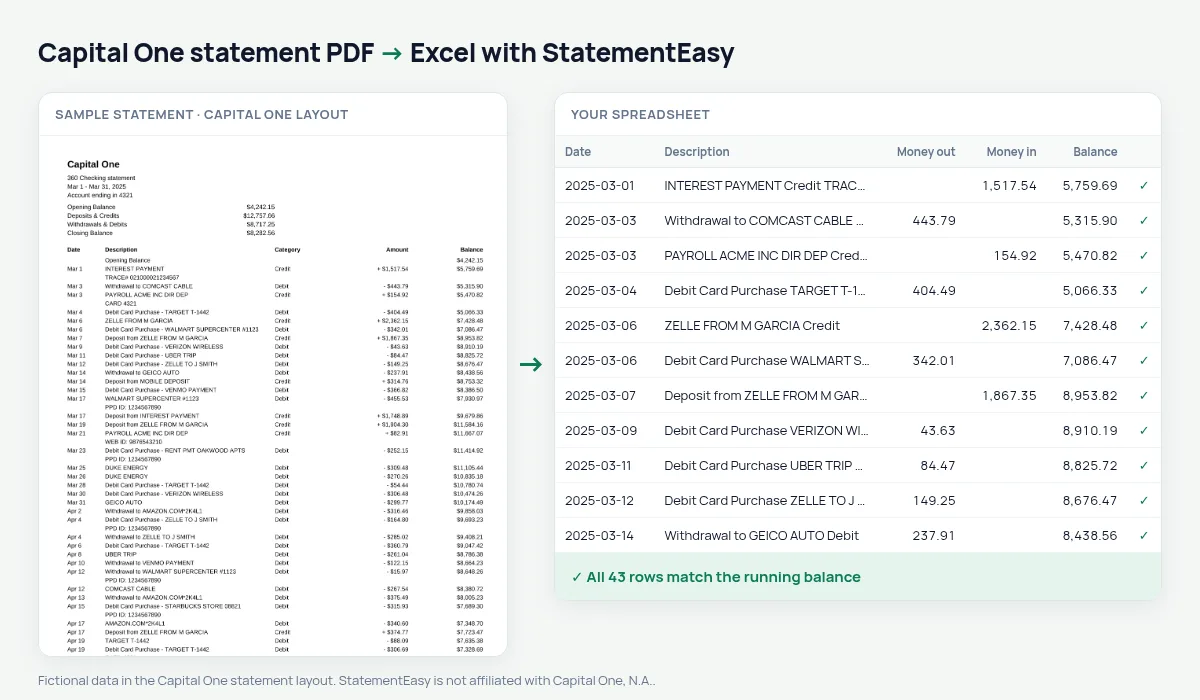
Turn your Capital One 360 statement into a spreadsheet: signed amounts split into money in and money out, real dates and the balance checked on every row.
- Checked every row against your balance
- Private read on your device first
- Excel & CSV plus QuickBooks, Xero and Quicken files
- Free no sign-up, no page limits
Capital One 360 statements use one Amount column with the sign and the dollar sign written in front — - $12.00 for money out, + $1,200.00 for money in — next to a Category (Debit or Credit) and the Balance. Dates are short, like Mar 5. Pasted into Excel, those amounts are text and the dates have no year. StatementEasy turns them into numbers in two columns, gives each date its year, and checks every balance from the Opening Balance on.
Download your Capital One statement
- Sign in at capitalone.com or in the Capital One app.
- Open the 360 account, then View Statements.
- Pick the month and download the PDF.
- Drop it here.
Capital One amounts, made usable
| On the statement | In your sheet |
|---|---|
| - $12.00 | Money out 12.00 |
| + $1,200.00 | Money in 1200.00 |
| Category Debit / Credit | Kept with the description |
| Mar 5 | 2025-03-05 |
| Opening Balance | Start of the check, not a row |
Checking and savings together
360 Checking and 360 Performance Savings statements use the same columns. Convert both and choose “All files combined” to see transfers between them, or keep them as separate sheets. Interest paid on savings shows up as money in, so a year of statements gives you the interest total for your tax return.
Budget from your statement
The Categories sheet groups your debits into groceries, gas, dining, utilities and more, with a total per month, and Recurring lists subscriptions and bills with their usual amount and day. If you prefer Capital One’s own single signed column, choose “One amount (+/−)” before exporting.
For QuickBooks and your accountant
Download QBO for QuickBooks or CSV for any other software. Reconcile compares the statement with an export from your books and lists what is on one side only.
Last tested October 2026. StatementEasy is not affiliated with Capital One, N.A..
Questions
Does it work with Capital One business statements?
Business checking statements with a signed Amount and a Balance column are read the same way; the balance check on your file confirms the result.
Why are the amounts written with + and -?
Capital One uses one column for both directions. StatementEasy reads the sign and puts each amount in money in or money out.
Can I convert a Capital One credit card statement?
Use the credit card converter.
Is my statement uploaded?
Your browser reads the PDF first. Only if it cannot is the file read on our server, and deleted after reading.
Is StatementEasy made by Capital One?
No. StatementEasy is an independent tool and is not affiliated with Capital One, N.A..
Your next statement, in a spreadsheet
Free, no limits. No sign-up.