PNC Bank statement to Excel
Turn your PNC Virtual Wallet statement into one spreadsheet in date order, with every deposit and deduction read the right way.
- Checked every row against your balance
- Private read on your device first
- Excel & CSV plus QuickBooks, Xero and Quicken files
- Free no sign-up, no page limits
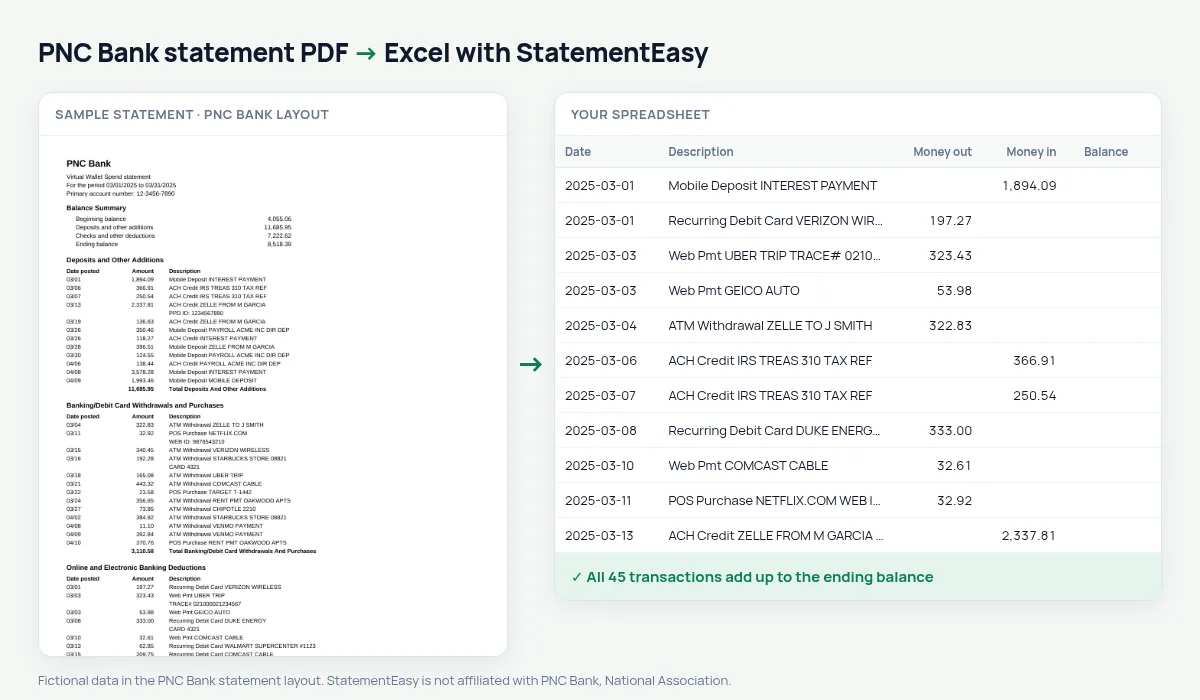
PNC prints the amount before the description: Date posted, Amount, Description. Transactions are grouped in sections — Deposits and Other Additions, Banking/Debit Card Withdrawals and Purchases, Online and Electronic Banking Deductions — and the statement ends with a Daily Balance Detail table full of dates and amounts. Tools that expect the description first lose the descriptions or read the balance table as hundreds of extra transactions. StatementEasy reads the description after the amount, takes each section’s direction, skips the Daily Balance Detail and checks the totals against the beginning and ending balance.
Download your PNC statement
- Sign on to PNC Online Banking. Or open the PNC Mobile app.
- Select the account, then Statements.
- Choose the statement and download the PDF.
- Drop it here.
The PNC layout, piece by piece
| On the PNC statement | In your sheet |
|---|---|
| Date posted 03/05 | 2025-03-05 |
| Amount (before the description) | Money in or money out, by section |
| Description, with an ID line below | One description |
| Deposits and Other Additions | Money in |
| … Withdrawals and Purchases, … Deductions | Money out |
| Daily Balance Detail | Skipped, not transactions |
Virtual Wallet: Spend, Reserve and Growth
A Virtual Wallet bundles a Spend checking account with Reserve and Growth savings. Each account’s statement follows the same section style. Convert them together to see the transfers between them, or keep them apart; interest earned on Growth appears as money in.
The Daily Balance Detail
At the end of the statement PNC lists the balance for every day: rows of 03/01 5,751.88 03/03 5,374.47 03/04 5,051.64. They look like transactions but are not. StatementEasy recognises the table and leaves it out, so your sheet holds only real deposits and deductions.
For taxes, loans and bookkeeping
For a tax return, convert January to December and total the categories you need. For a loan, the lender usually wants two or three months and asks about large deposits — Insights lists them. For QuickBooks, download QBO; for other software, CSV.
Last tested October 2026. StatementEasy is not affiliated with PNC Bank, National Association.
Questions
Does it work with PNC business checking?
Business statements use the same kind of sections and are read by the same rules; the totals check confirms the result.
Why are the transactions in a different order than on the PDF?
The PDF groups them by section. In your sheet they are put in date order, which is easier to read and to match with your records.
Are the ID lines under each transaction kept?
Yes. Lines such as PPD ID or WEB ID are joined to the description of their transaction.
Is my statement uploaded?
Your browser reads the PDF first. Only if it cannot is the file read on our server, and deleted after reading.
Is StatementEasy made by PNC Bank?
No. StatementEasy is an independent tool and is not affiliated with PNC Bank, National Association.
Your next statement, in a spreadsheet
Free, no limits. No sign-up.