Capitec statement to Excel
Turn your Capitec statement into a spreadsheet: money in and money out apart, both dates kept, and every balance checked.
- Checked every row against your balance
- Private read on your device first
- Excel & CSV plus QuickBooks, Xero and Quicken files
- Free no sign-up, no page limits
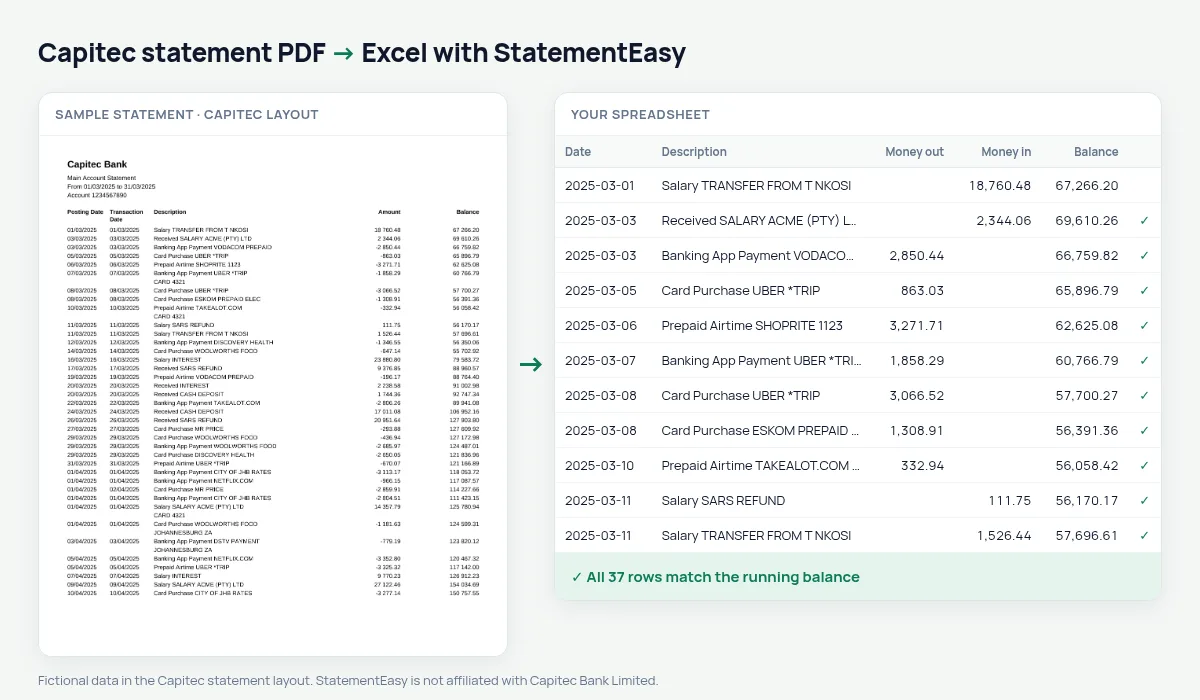
Capitec statements list Posting Date, Transaction Date, Description, Amount and Balance, with one signed Amount column — -349.90 for a purchase, 12 500.00 for a salary — and amounts written with a space between thousands. StatementEasy splits the amount into money out and money in, uses the posting date for the row and keeps the transaction date as the value date, and checks every balance.
Download your Capitec statement
- Open the Capitec app.
- Choose the account, then Statements.
- Pick the period and download or email the PDF.
- Drop the Capitec PDF into the converter above.
Capitec columns in your sheet
| On the Capitec statement | In your sheet |
|---|---|
| Posting Date | Date |
| Transaction Date | Value date |
| -349.90 | Money out 349.90 |
| 12 500.00 | Money in 12500.00 |
| Balance | Checked on every row |
Prepaid airtime, electricity and card purchases
Capitec descriptions name the kind of transaction — Card Purchase, Banking App Payment, Prepaid Airtime, Prepaid Electricity. The Categories sheet totals them per month, and Recurring lists what you pay every month.
Statements as proof of income
Landlords and credit providers often ask for three months. Convert them together and open Insights for regular income and the lowest balance; the Monthly sheet shows money in and out per month.
Capitec Global One and savings
Capitec’s main account and its savings plans can appear on separate statements. Convert them separately, or drop them together and use the File column to tell them apart in the combined sheet.
Last tested October 2026. StatementEasy is not affiliated with Capitec Bank Limited.
Questions
Why are there two dates on each row?
The posting date is when Capitec processed the transaction, the transaction date when it happened. Both are kept.
Can I keep one signed amount column?
Yes. Choose “One amount (+/−)” before exporting.
Is my statement uploaded?
Your browser reads the PDF first. Only if it cannot is the file read on our server, and deleted after reading.
Is StatementEasy made by Capitec?
No. StatementEasy is an independent tool and is not affiliated with Capitec Bank Limited.
Your next statement, in a spreadsheet
Free, no limits. No sign-up.