Chime statement to Excel
Turn your Chime monthly statement into a spreadsheet with money in and money out apart, the settlement date kept, and the totals checked.
- Checked every row against your balance
- Private read on your device first
- Excel & CSV plus QuickBooks, Xero and Quicken files
- Free no sign-up, no page limits
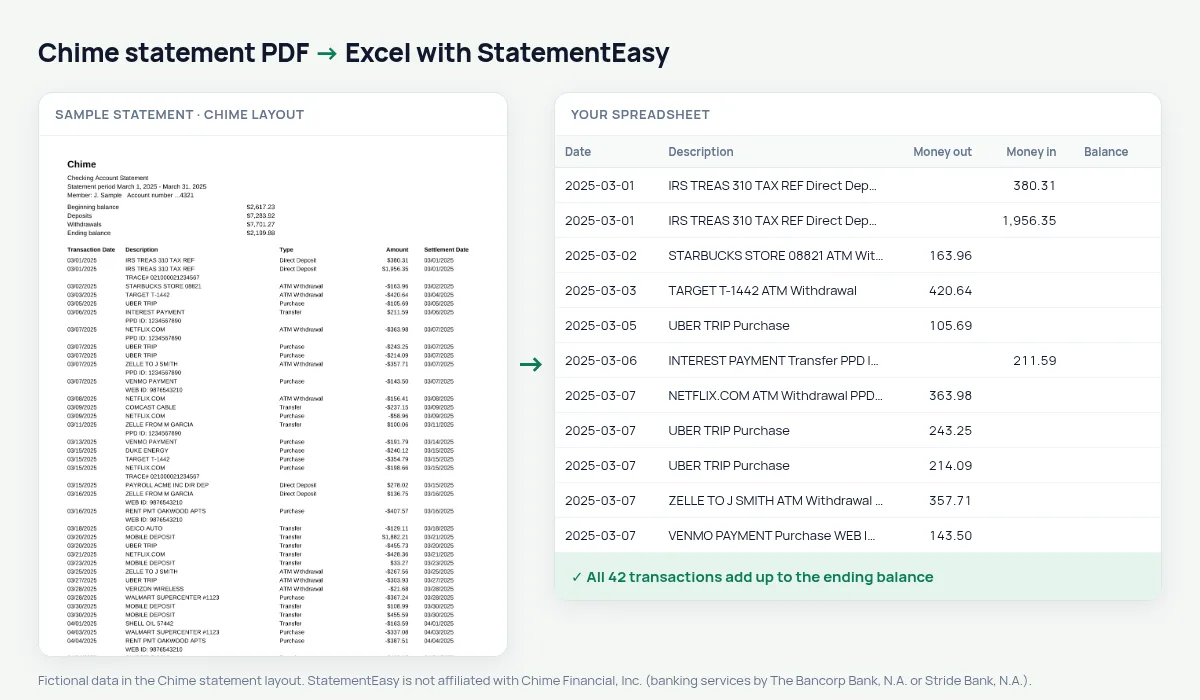
Chime statements list Transaction Date, Description, Type, Amount and Settlement Date, with signed amounts — -$12.40 for a purchase, $1,850.00 for a direct deposit — and no balance after each line. The beginning and ending balance are in the summary at the top. StatementEasy splits the amounts into money out and money in, keeps the settlement date as the value date, and checks that beginning balance + deposits − withdrawals equals the ending balance.
Get your Chime statement
- Open the Chime app or chime.com.
- Go to Settings or Documents, then Statements.
- Pick the month and download the PDF.
- Drop it here.
Chime columns in your sheet
| On the Chime statement | In your sheet |
|---|---|
| -$12.40 | Money out 12.40 |
| $1,850.00 | Money in 1850.00 |
| Type (Purchase, Direct Deposit, Transfer) | Kept with the description |
| Settlement Date | Value date |
| Beginning / ending balance (summary) | Used to check the totals |
Chime statements as proof of income
Many Chime members are asked for statements when renting an apartment, applying for a loan or for benefits. Convert two or three months and open Insights: direct deposits are grouped as income, with the average per month, and recurring bills are listed. Send the Chime PDF itself; the spreadsheet is to check it first.
Checking and Credit Builder
This page is about the Chime Checking Account statement. Credit Builder and savings statements have their own layout; try yours — the converter tells you if it cannot check the result.
Last tested October 2026. StatementEasy is not affiliated with Chime Financial, Inc. (banking services by The Bancorp Bank, N.A. or Stride Bank, N.A.).
Questions
Why is there no balance column in my sheet?
Chime statements do not print a balance after each transaction. The check uses the beginning and ending balance and the totals instead.
Is Chime a bank?
Chime is a financial technology company; banking services are provided by partner banks named on the statement. StatementEasy reads the statement either way.
Is my statement uploaded?
Your browser reads the PDF first. Only if it cannot is the file read on our server, and deleted after reading.
Is StatementEasy made by Chime?
No. StatementEasy is an independent tool and is not affiliated with Chime Financial, Inc. (banking services by The Bancorp Bank, N.A. or Stride Bank, N.A.).
Your next statement, in a spreadsheet
Free, no limits. No sign-up.