Halifax statement to Excel
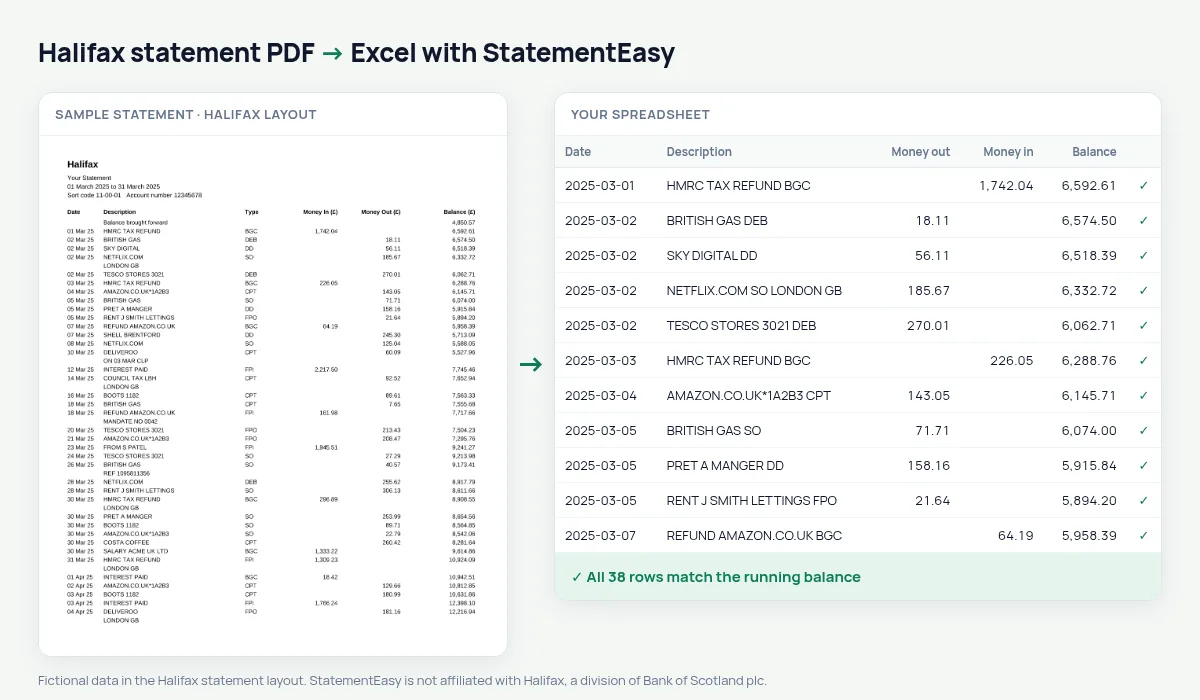
Turn your Halifax current account statement into a spreadsheet with every payment, its type code and the balance after it.
- Checked every row against your balance
- Private read on your device first
- Excel & CSV plus QuickBooks, Xero and Quicken files
- Free no sign-up, no page limits
Halifax statements have a Type column between the description and the money: Date, Description, Type, Money In (£), Money Out (£), Balance (£). The type is a short code — DEB for a card payment, DD for a direct debit, FPO and FPI for faster payments out and in. StatementEasy keeps the code with the description, so you can filter on it, and makes sure it is never read as part of an amount. The Balance brought forward line starts the check.
Download your Halifax statement
- Log on to Halifax Online Banking. Or open the Halifax app.
- Select the account, then View statements.
- Choose the statement and Download as PDF.
- Drop the PDF here.
Halifax type codes
| Code | Meaning |
|---|---|
| DEB | Debit card payment |
| DD | Direct debit |
| SO | Standing order |
| FPO / FPI | Faster payment out / in |
| BGC | Bank giro credit (money paid in, often salary) |
| CPT | Cash machine withdrawal |
Find every direct debit in a minute
Filter the description for DD and SO to list every regular payment, or open the Recurring sheet, which finds repeating payments by payee and amount. It is the quickest way to see what leaves your account each month before a mortgage application or when you switch banks.
Lloyds and Bank of Scotland
Halifax, Lloyds Bank and Bank of Scotland are all part of Lloyds Banking Group and print the same statement style with the Type column. Lloyds Bank statements and Bank of Scotland statements are read the same way.
A year of Halifax statements in one sheet
Drop twelve monthly statements together and choose “All files combined”. The rows are put in date order with a File column, duplicate rows from overlapping statements are removed, and the Monthly sheet shows money in, money out and the closing balance of each month. For Self Assessment, take the thirteen statements that cover 6 April to 5 April.
Halifax statements for a mortgage
A mortgage adviser looks at your salary (usually a BGC or FPI line on the same day each month), your direct debits and standing orders, and whether the account dips below zero. Convert the last three months and open Insights to see those together, so nothing in the statements surprises you during the application.
Last tested October 2026. StatementEasy is not affiliated with Halifax, a division of Bank of Scotland plc.
Questions
Is the Type code kept?
Yes, at the end of the description, so DD, SO or DEB can still be filtered.
Does it work with Halifax Reward and Ultimate Reward accounts?
They are current accounts with the same statement columns and are read the same way.
Can I convert a Halifax credit card statement?
Use the credit card converter; card statements have a different layout.
Is StatementEasy made by Halifax?
No. StatementEasy is an independent tool and is not affiliated with Halifax, a division of Bank of Scotland plc.
Your next statement, in a spreadsheet
Free, no limits. No sign-up.