HSBC statement to Excel
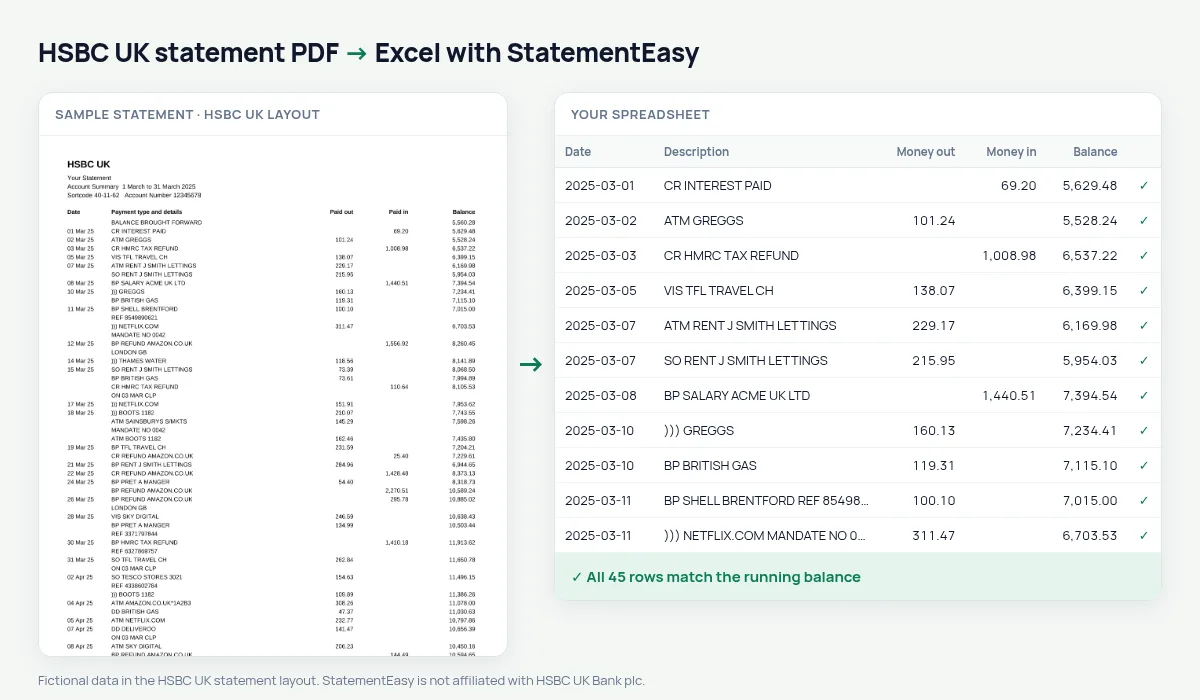
Turn your HSBC UK current account statement into a spreadsheet — one row per payment, with its own date, and the balance checked on every line.
- Checked every row against your balance
- Private read on your device first
- Excel & CSV plus QuickBooks, Xero and Quicken files
- Free no sign-up, no page limits
An HSBC UK statement prints the date only once for all the payments made that day, starts and ends each page with BALANCE BROUGHT FORWARD and BALANCE CARRIED FORWARD, and marks an overdrawn balance with a D. Copy it into Excel and half the rows have no date, the page totals turn into transactions, and the overdraft looks like money in the bank. StatementEasy gives every payment its date, leaves the page totals out and turns 125.40 D into −125.40.
Download your HSBC statement
- Log on to HSBC online banking. Or open the HSBC UK app.
- Choose the account, then Statements. In the app: the account, then View statements.
- Pick the month and download the PDF. Repeat for each month you need.
- Drop the PDFs here. Several at once is fine.
HSBC keeps several years of statements online. A screenshot of the app’s transaction list is not a statement: it is read with OCR and has no balance to check against.
What the HSBC codes mean
| Code | Meaning |
|---|---|
| DD | Direct debit |
| SO | Standing order |
| BP | Bill payment or transfer you sent |
| VIS | Visa debit card payment |
| ))) | Contactless card payment |
| ATM | Cash machine withdrawal |
| CR | Money paid in |
Dates printed once per day
On an HSBC statement, a day with six card payments has the date on the first line only. StatementEasy carries the date down to each payment until the next date appears, so you can sort, filter and total by day or month. In the Excel file every row has its date in a real date column.
For Self Assessment and your accountant
The tax year runs from 6 April to 5 April, so you need the statements of thirteen calendar months. Drop them together and choose “All files combined”: rows are put in date order and any payment that appears on two overlapping statements is counted once. Export Xero CSV, QBO for QuickBooks, or plain CSV, which FreeAgent and most other bookkeeping software can import.
first direct statements
first direct is part of HSBC UK and its statements follow the same style — Paid out, Paid in and Balance, the date once per day, brought forward lines and D for overdrawn. They are read the same way.
HSBC statements for a mortgage
Mortgage brokers usually want your last three months of HSBC statements and look at four things: your salary arriving on the same day each month, regular commitments such as loans, credit cards and childcare, any payday-loan or gambling transactions, and whether the account goes overdrawn. Convert the three statements together and open Insights to see those at a glance. Insights also shows the lowest balance and how many days the account was below zero, so an overdrawn day is easy to spot before the broker does. Send the bank’s PDFs with the application; the spreadsheet is for you.
Spending by category, without tagging
HSBC descriptions combine the payment code and the merchant — VIS TESCO STORES 3021, DD BRITISH GAS. The Categories sheet uses those words to group payments into groceries, utilities, transport, eating out and more, with a total per month. Rename a category or add your own rule once, and it applies to every statement you convert afterwards.
Last tested October 2026. StatementEasy is not affiliated with HSBC UK Bank plc.
Questions
Does it work with HSBC business account statements?
Business current account statements use the same columns and are read the same way. Statements from HSBC’s other countries have different layouts; try yours — the balance check tells you whether it was read completely.
What happens to the BALANCE BROUGHT FORWARD lines?
They are used to start the balance check on each page and are not counted as transactions.
My balance shows D. What does that mean?
D means the account was overdrawn by that amount. It becomes a negative balance in your sheet.
Is my statement uploaded?
Your browser reads the PDF first. Only if it cannot is the file read on our server, and deleted after reading.
Is StatementEasy made by HSBC UK?
No. StatementEasy is an independent tool and is not affiliated with HSBC UK Bank plc.
Your next statement, in a spreadsheet
Free, no limits. No sign-up.