Nationwide statement to Excel
Turn your Nationwide FlexAccount statement into a spreadsheet, with a full date on every row and the balance checked from the previous statement on.
- Checked every row against your balance
- Private read on your device first
- Excel & CSV plus QuickBooks, Xero and Quicken files
- Free no sign-up, no page limits
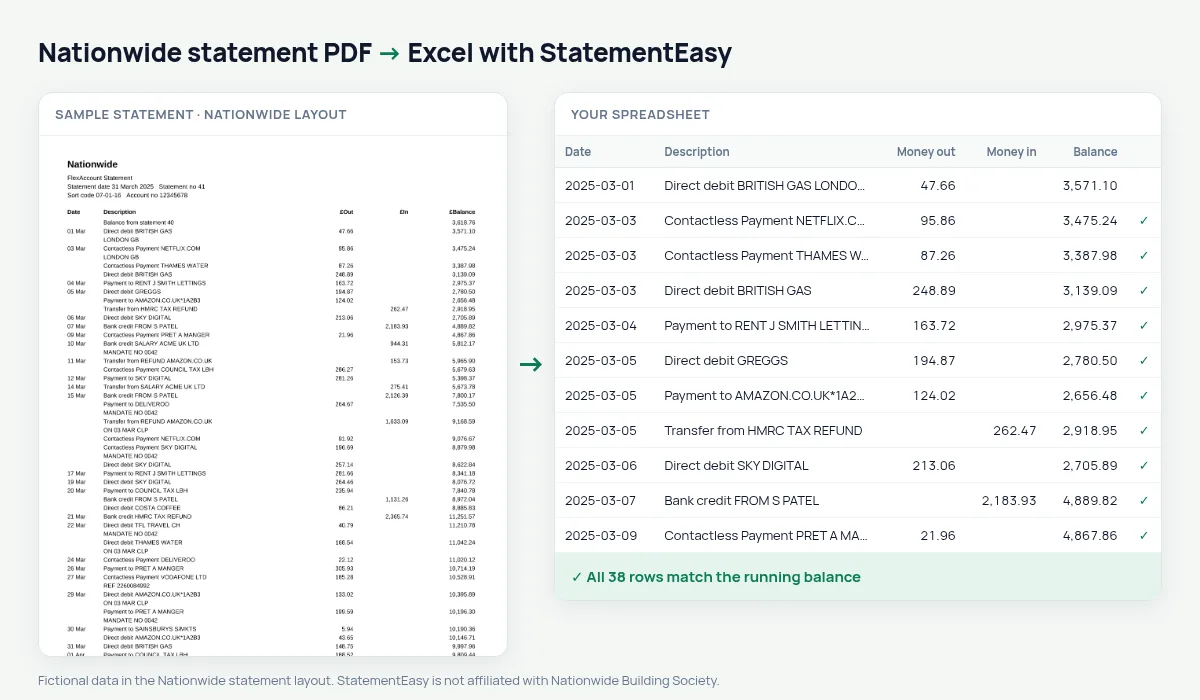
Nationwide statements have the columns Date, Description, £Out, £In and £Balance. The date is printed without a year, and only once for several payments on the same day; the first line carries the balance over from the previous statement. StatementEasy gives every row its full date, using the statement date for the year, starts the balance check from that first line, and leaves the carried-over balance out of your transactions.
Download your Nationwide statement
- Log in to Nationwide Internet Bank. Or open the Nationwide Banking app.
- Open the account and choose View statements.
- Download the statement as PDF. Statements are numbered; take the ones that cover your period.
- Drop the PDFs here.
Nationwide columns in your sheet
| On the Nationwide statement | In your sheet |
|---|---|
| 05 Mar, printed once per day | A full date on every row |
| £Out | Money out |
| £In | Money in |
| £Balance | Balance, checked on every row |
| Balance from statement 40 | Opening balance, not a row |
FlexAccount, FlexDirect, FlexPlus
Nationwide’s current accounts all use the same statement layout, so FlexAccount, FlexDirect, FlexPlus and FlexBasic statements are read the same way. Savings account statements list fewer transactions but use similar columns; the balance check on your file confirms the result.
A year of statements in one sheet
Nationwide statements are monthly and numbered. Drop all of them for the period you need, choose “All files combined”, and you get one sheet in date order. Because each statement starts from the balance of the previous one, a missing month is easy to spot: the closing balance of one statement no longer matches the opening balance of the next, and Insights lists any gap between statements.
Nationwide statements for a mortgage
If you apply for a mortgage — with Nationwide or another lender — you will usually be asked for three months of statements. Convert them together and open Insights: salary credits, existing commitments, the lowest balance and the days below zero are listed in one place. The lender report built from it is a summary to check your own file before you send the PDFs.
Where the money goes each month
The Categories sheet groups every £Out line — groceries, bills, transport, eating out, cash — and totals each category per month, while Recurring lists your direct debits and subscriptions with their usual amount. It turns a long list of “Contactless Payment” lines into a budget you can read in a minute.
Last tested October 2026. StatementEasy is not affiliated with Nationwide Building Society.
Questions
My statement runs from December into January. Are the years right?
Yes. The year comes from the statement date, and rows before New Year get the previous year.
Can I convert a Nationwide credit card statement?
Credit card statements have a different layout; use the credit card converter.
Can I send it to my accountant as CSV?
Yes: CSV, Excel, Xero CSV, QBO, OFX and QIF are all available.
Is my statement uploaded?
Your browser reads it first. Only a file it cannot read is sent to our server, and deleted after reading.
Is StatementEasy made by Nationwide?
No. StatementEasy is an independent tool and is not affiliated with Nationwide Building Society.
Your next statement, in a spreadsheet
Free, no limits. No sign-up.