IDFC FIRST Bank statement to Excel
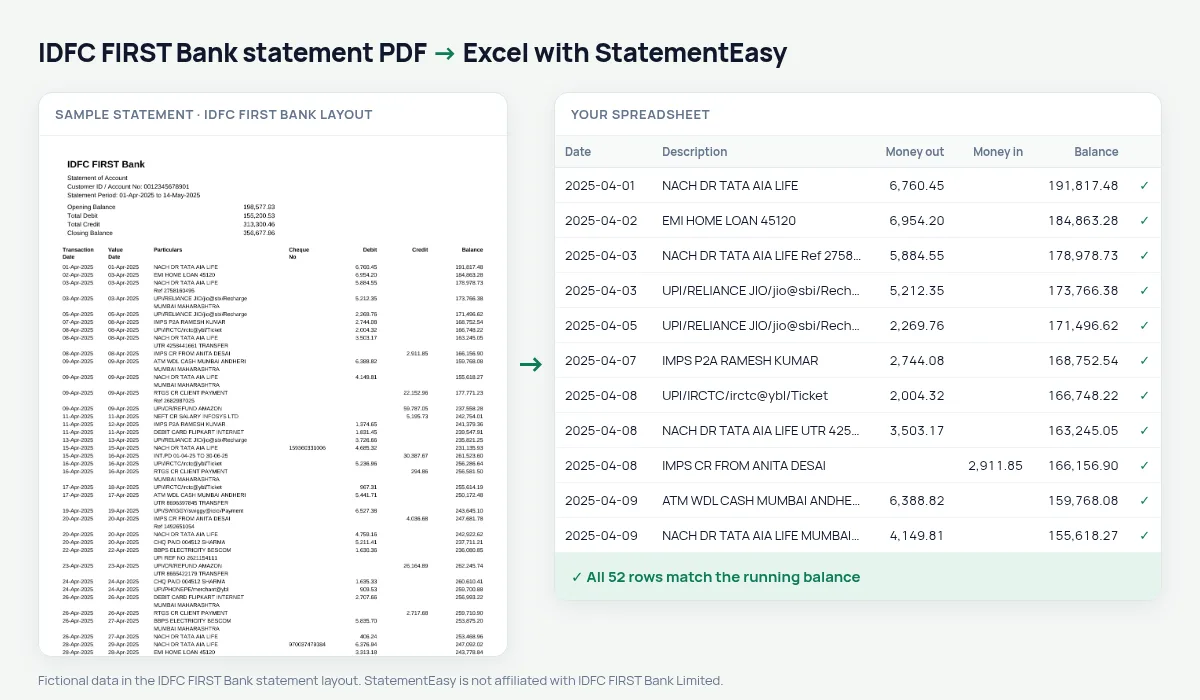
Turn your IDFC FIRST Bank statement into a spreadsheet, with each transaction on its own row and the totals checked against the summary the bank prints.
- Checked every row against your balance
- Private read on your device first
- Excel & CSV plus QuickBooks, Xero and Quicken files
- Free no sign-up, no page limits
IDFC FIRST Bank statements start with a summary — opening balance, total debit, total credit, closing balance — before the table of Transaction Date, Value Date, Particulars, Cheque No, Debit, Credit and Balance. A copy-paste mixes those summary figures into your data. StatementEasy keeps them out of the rows, starts from the opening balance and checks every transaction’s balance until it reaches the closing balance. You can compare the money in and money out totals of the result with the bank’s Total Credit and Total Debit at a glance.
Download the statement
- Open the IDFC FIRST Bank app or Net Banking.
- Go to the account, then Statements.
- Pick the period and download the PDF.
- Drop the file here.
Summary and table
| On the IDFC FIRST statement | In your sheet |
|---|---|
| Opening Balance (summary) | Start of the balance check |
| Total Debit / Total Credit | Not added as rows |
| 01-Apr-2025 | A real date |
| Particulars | Description |
| Debit / Credit / Balance | Money out / money in / balance |
Savings accounts with monthly interest
IDFC FIRST savings accounts credit interest every month. The Categories sheet collects those credits, so the interest for the year — which you declare in your return — is one number.
Dates written with month names
IDFC FIRST writes dates like 01-Apr-2025. They are read as real dates, so the spreadsheet can sort and filter them, and you can export them as day/month/year, month/day/year or year-month-day.
Using an IDFC FIRST statement for a loan or credit card
Lenders that ask for your statement look for steady income and the payments you already make. Convert the last three to six months, then check Insights: salary and other regular credits, EMIs, rent and subscriptions are grouped, with the month-end balances. You see your file the way a lender will, before you send it.
Last tested October 2026. StatementEasy is not affiliated with IDFC FIRST Bank Limited.
Questions
The summary and my rows do not match. Why?
The result tells you which rows break the running balance. Usually it is a page the PDF cut differently; tell us through the contact page and we will look at the layout.
Does it work with IDFC FIRST credit card statements?
This page covers account statements. Credit card statements are read by the generic reader; the check tells you if the result adds up.
Can I download CSV?
Yes, along with Excel, QuickBooks, Xero and other formats.
Can I convert a statement for a joint account?
Yes. Joint account statements use the same columns and are read the same way.
Is StatementEasy made by IDFC FIRST Bank?
No. StatementEasy is an independent tool and is not affiliated with IDFC FIRST Bank Limited.
Your next statement, in a spreadsheet
Free, no limits. No sign-up.