IndusInd Bank statement to Excel
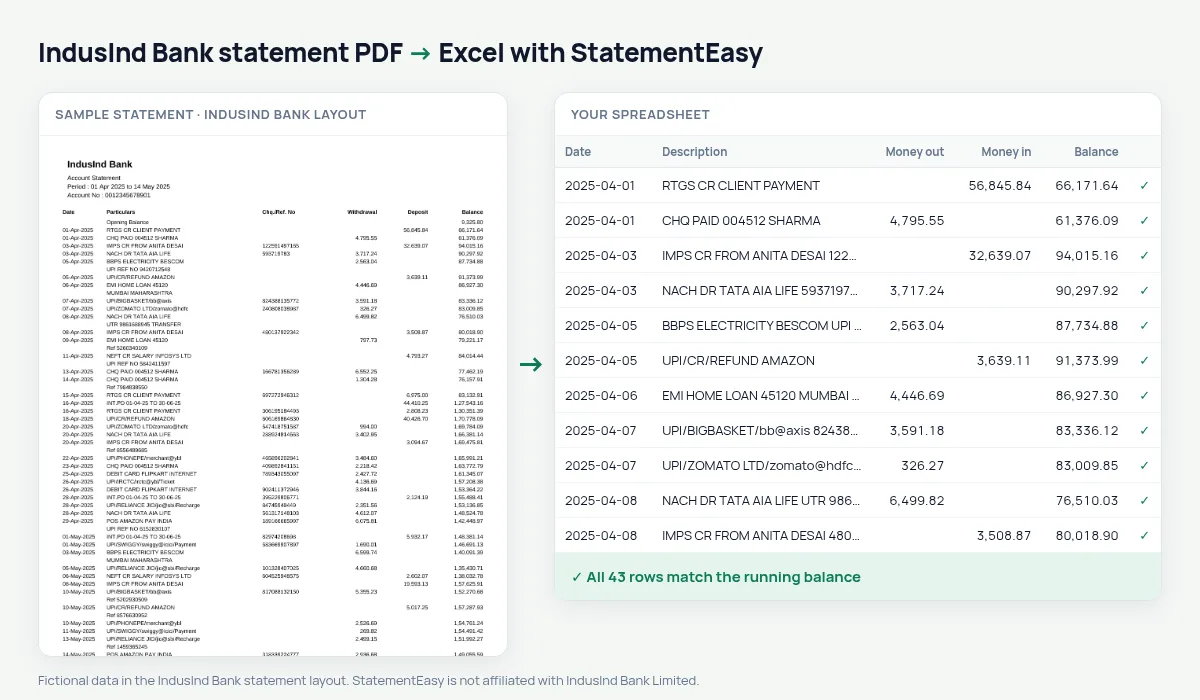
Turn your IndusInd Bank statement into a spreadsheet, with Indian-style amounts read as real numbers and the balance checked on every row.
- Checked every row against your balance
- Private read on your device first
- Excel & CSV plus QuickBooks, Xero and Quicken files
- Free no sign-up, no page limits
IndusInd Bank writes amounts the Indian way, in lakhs: 1,25,000.00 rather than 125,000.00. Many tools read the first comma as a decimal point or split the number in two. StatementEasy reads the whole amount, keeps Particulars that wrap onto a second line together, and starts the balance check from the Opening Balance row.
Download the statement
- Log in to IndusInd Net Banking or IndusMobile.
- Open Accounts, then Account Statement.
- Choose the period and download the PDF.
- Drop the file here.
Indian amounts, read whole
| On the IndusInd statement | In your sheet |
|---|---|
| 1,25,000.00 | 125000.00 |
| 12,34,567.89 | 1234567.89 |
| 01-Apr-2025 | A real date |
| Opening Balance row | Start of the check, not a transaction |
For your accountant
Export to CSV for Tally or Zoho Books, or to QBO for QuickBooks. Amounts are exported as plain numbers, so no one has to re-type lakh grouping.
Why lakh grouping breaks other tools
A converter that expects commas every three digits sees 1,25,000.00 as malformed. Some drop it, some split it into “1” and “25,000.00”, and some read it as 1.25. Each of those changes the totals without warning. StatementEasy recognises the Indian grouping, and the running balance check would show any amount that was still misread.
IndusInd statements for a loan or a visa
Convert six months together and open the Monthly sheet: money in, money out and the closing balance of each month, on one line per month. Insights adds the recurring payments and the largest credits. Use it to check your file before you send the bank’s PDF to the lender or the consulate.
Last tested October 2026. StatementEasy is not affiliated with IndusInd Bank Limited.
Questions
Can I get the amounts with lakh grouping back in Excel?
The Excel file stores plain numbers; apply Excel’s Indian number format to show them in lakhs again.
Does it work with IndusInd current accounts?
Current account statements use the same columns and are read the same way.
Is the statement read on my device?
Yes, your browser reads it first. Only a file it cannot read is sent to our server, and deleted after reading.
Does it read IndusInd statements for NRI accounts?
NRE and NRO account statements use the same columns and are read the same way; the amounts are in rupees.
Is StatementEasy made by IndusInd Bank?
No. StatementEasy is an independent tool and is not affiliated with IndusInd Bank Limited.
Your next statement, in a spreadsheet
Free, no limits. No sign-up.