Metrobank statement to Excel
Turn your Metrobank statement of account into a spreadsheet with withdrawals, deposits, check numbers and every balance checked.
- Checked every row against your balance
- Private read on your device first
- Excel & CSV plus QuickBooks, Xero and Quicken files
- Free no sign-up, no page limits
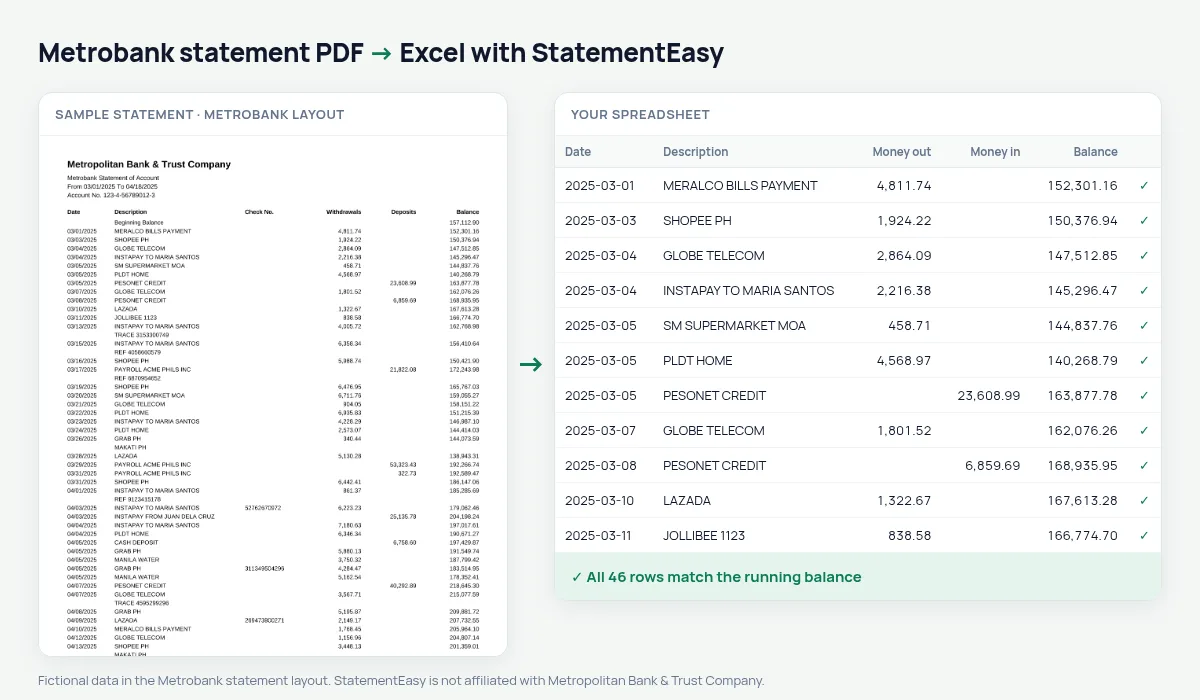
Metrobank statements list Date, Description, Check No., Withdrawals, Deposits and Balance, with dates written month first — 03/05/2025 — and a Beginning Balance line. StatementEasy reads the dates the Philippine way, keeps check numbers with their transaction and checks every balance from the beginning balance on.
Download your Metrobank statement
- Log in to Metrobank Online or the Metrobank app.
- Open the account, then Statement.
- Save the Metrobank statement as a PDF.
- Drop the Metrobank PDF into the converter above.
Metrobank columns in your sheet
| On the Metrobank statement | In your sheet |
|---|---|
| 03/05/2025 | 2025-03-05 (month first) |
| Check No. | Kept with the transaction |
| Withdrawals / Deposits | Money out / money in |
| Balance | Checked on every row |
| Beginning Balance | Opening balance, not a row |
Checking accounts and issued checks
Business owners still pay suppliers by check. Because the check number stays with each withdrawal, you can match cleared checks against your check register in the spreadsheet, or use Reconcile with an export from your books.
For BIR and your bookkeeper
Convert the months you need, export CSV or QuickBooks files, and use the Categories sheet to separate income, supplier payments and bank charges.
Metrobank peso and dollar accounts
A Metrobank dollar account statement uses the same columns as the peso statement. Convert each currency on its own so the amounts are never mixed in one total.
Last tested October 2026. StatementEasy is not affiliated with Metropolitan Bank & Trust Company.
Questions
Will 03/05/2025 be read as March 5?
Yes. Metrobank prints dates month first.
Are check numbers kept?
Yes, with the transaction they belong to.
Is my statement uploaded?
Your browser reads the PDF first. Only if it cannot is the file read on our server, and deleted after reading.
Is StatementEasy made by Metrobank?
No. StatementEasy is an independent tool and is not affiliated with Metropolitan Bank & Trust Company.
Your next statement, in a spreadsheet
Free, no limits. No sign-up.